
How to Connect a MIDI Keyboard to Reason

MIDI Keyboard Configuration
Reason needs to recognize that your MIDI keyboard is connected to your computer before you will be able to use it. Install the latest drivers for your keyboard (if needed) and follow the instructions in the owner’s manual before proceeding. Once your keyboard is set up, you can select it in Reason, and start recording MIDI.
Reason MIDI keyboard setup
You can manage MIDI connections from Reason’s MIDI Device menu. From there, you can activate or deactivate the MIDI ports or channels of your hardware. Follow the steps below to enable each of your MIDI devices.
1. Go to the Edit menu, click Preferences, then click the Control Surfaces tab.
2. Click Auto-detect surfaces, click the MIDI device to open the Control Surface Panel, then select your MIDI input by clicking the drop-down box at the bottom of the window.
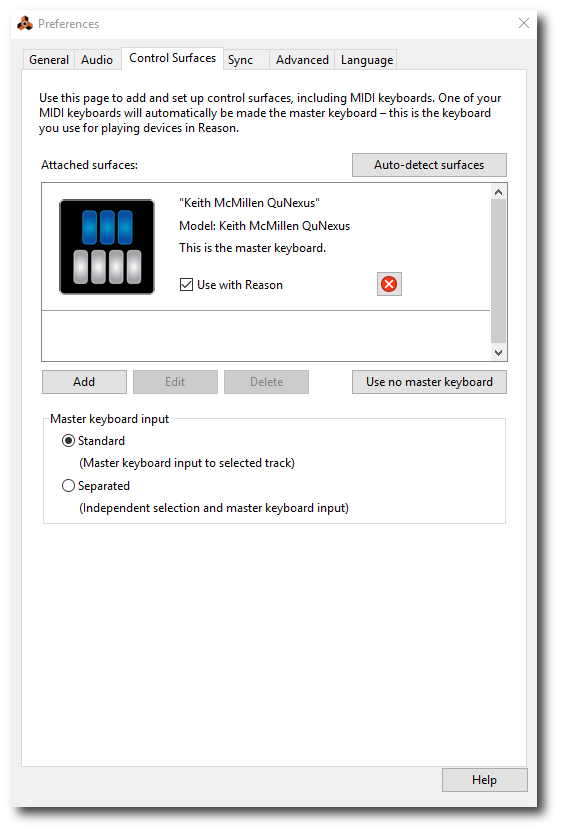
Reason’s MIDI settings window.
Related Content
Making Your First Beat
Trap Drum Basics
When you need help, Sweetwater has the answers!
Our knowledge base contains over 28,000 expertly written tech articles that will give you answers and help you get the most out of your gear. Our pro musicians and gear experts update content daily to keep you informed and on your way. Best of all, it’s totally FREE, and it’s just another reason that you get more at Sweetwater.com.

