
Video Switchers
Get More at Sweetwater
Refine Your Search
Availability
Brand
- Blackmagic Design (50)
- Roland (25)
- Rode (12)
- Marshall Electronics (4)
- Turtle AV (4)
- YoloLiv (3)
- Atomos (2)
- RGBLink (2)
- Mackie (1)
- OBSBOT (1)
- Sweetwater (1)
Price Range
- $100 to $200 (3)
- $200 to $300 (4)
- $300 to $500 (7)
- $500 to $750 (15)
- $750 to $1000 (9)
- $1000 to $1500 (16)
- $1500 to $2000 (6)
- $2000 to $3000 (12)
- $3000 to $5000 (12)
- $5000 to $8000 (8)
- $8000 and Over (13)
Financing
What is this?Type of Deal
Series
- Blackmagic Design ATEM (32)
- Roland V (14)
- Rode Rodecaster (9)
- Blackmagic Design VideoHub (8)
- RGBLink mini (2)
- YoloLiv YoloBox (2)
- Atomos Shogun (1)
- Atomos Sumo (1)
- Blackmagic Design HyperDeck (1)
- Mackie ProFXv3 (1)
- Roland VR (1)
- Roland XS (1)
- YoloLiv InStream (1)
Related Searches
Blackmagic Design ATEM Mini Pro ISO HDMI Video Production Studio with 5-stream Recording Engine
5-channel Video Production Studio with Livestream via Ethernet Hardware, Video Switcher, DVE, Audio Mixer, Individual Input Recording, 4 HDMI Inputs, 1 HDMI Output, 2 Mic Inputs, and USB Output


Blackmagic Design ATEM Television Studio 4K8 2TB 8-channel 4K Video Switcher
8-in/8-out 12G-SDI 4K Live Production Video Switcher and Control Panel with Livestream Ethernet, Talkback, MADI, Aux Out, Analog XLR, Stereo, USB-C, DVE, Audio Mixer, T-bar Fader, 2TB Storage, and LCD Screen
Blackmagic Design ATEM SDI Pro ISO Video Production Studio with 5-stream Recording Engine
6-channel Video Production Studio with Livestream via Ethernet Hardware, Video Switcher, DVE, Audio Mixer, Individual Input Recording, 4 3G-SDI Inputs, 2 3G-SDI Outputs, 2 Mic Inputs, and USB-A Output


Roland V-8HD 8-channel HD Video Switcher
8-channel (video)/18-channel (audio) Digital Switcher with Multi-viewer Display, 8 HDMI Inputs, 3 HDMI Outputs, Stereo RCA Input, 5 Composition Layers, Scaling, Automated Video Switching, Start and Stop Atomos Recording, and Remote Control Capability


Blackmagic Design ATEM Television Studio HD8 ISO 8-channel HD Video Switcher
8-in/8-out 3G-SDI Live Production Video Switcher and Control Panel with ISO Recording, Livestream Ethernet, Talkback, MADI, Aux Out, Analog XLR, Stereo, USB-C, DVE, Audio Mixer, T-bar Fader, and LCD Screen


If you want to compare another product, please remove one of your earlier choices.
How a Video Switcher Streamlines Your Production Setup
For folks working in live production and content creation, a video switcher is essential for staying in control of your feed. These hardware broadcast selectors make it fast and easy to swap camera angles, transition shots, and share high-quality footage on the fly.
If you’re new to the market, there’s an incredible range of switchers at Sweetwater to match your workflow, ranging from simple HDMI switchers for your Twitch or OBS setup to broadcast-grade video production switchers for high-demand conferences and live events.
Whether you’re a video producer, a church A/V director, or a game streamer, this guide will walk you through your top options and offer quick tips to help you choose the right video mixer without the guesswork.
What Does a Video Switcher Do?
When you’re running a live production, things need to move fast and flow seamlessly. A video switcher lets you jump between camera angles, media clips, video calls, slides, logos, and graphics without missing a beat. Factor in real-time transitions, effects, and mixing, and it’s easy to see how a switcher becomes the behind-the-scenes powerhouse for streaming events and broadcast TV.
What’s the Difference Between a Video Switcher and a Video Mixer?
Practically speaking? Not much. Both tools let you select and transition media feeds for real-time streams and productions. Software-controlled video switchers tend to be smaller and easier to learn, which is why they’ re often the preferred choice of solo streamers and mobile producers. Panel-style video mixers (sometimes called “vision switchers”) are often larger and may include tactile T-bars and audio faders, which can give them an edge for production houses, broadcast studios, and houses of worship needing greater control over more audio and video sources.
So, which is right for you? If you’re the only one running the show, a simple video switcher saves desktop space and puts all necessary feed-switching commands and effects in one spot. If you’re also recording audio or working with a crew, a more robust video mixer may offer more useful features for the money.
Pro Tip: Double-check Your Connections
Making sure your video mixer and the rest of your gear can communicate sounds like a no-brainer, but you always want to double-check to ensure all your gear can link and sync. One thing to look for is input scaling, which will allow you to connect standard-definition or mismatched-resolution sources to your HD video mixer. On that note, pay attention to the maximum resolution your video mixer can handle. You’re generally better off choosing a higher ceiling than you may need right now so as to future-proof your system for upgrades down the road.
Use Onboard Effects to Punch Up Your Set or Stream
Want to create memorable visuals? Sweetwater recommends checking out the onboard transitions and effects. You’ll probably use a few transitions beyond fades and jump cuts, but chroma key and luma key compositing can be incredibly useful at times. Likewise, picture-in-picture effects are great for both streaming and live presentations, where you may need to show two visual elements at once.
One thing that makes accessing effects and transitions particularly easy is an integrated display. Some integrated displays are touchscreens, so, in addition to providing visual feedback, they also speed up your workflow. While you’re at it, check out all the hands-on controls. These are especially important for live video mixing, where you need to access many different functions as efficiently as possible.
Find Your Next Video Switcher / Mixer at Sweetwater
We hope these tips from the video experts at Sweetwater make finding the right video mixer or switcher for your rig easy. There’s a lot to bear in mind, so if you want help figuring out the best one for your rig, please don’t hesitate to give us a call.
What are the most popular brands for Video Switchers on Sweetwater.com?
What are the most popular Video Switchers on Sweetwater.com?
-
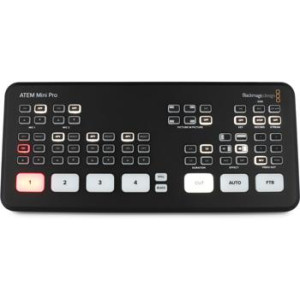
Blackmagic Design ATEM Mini Pro HDMI Video Production Studio with Livestreaming
4.5 out of 5 stars 15 reviews
$349.00 -

Blackmagic Design ATEM SDI Extreme ISO Video Production Studio with 9-stream Recording Engine
5 out of 5 stars 2 reviews
$1,715.00 -

Rode RODECaster Video A/V Production Console
4.5 out of 5 stars 2 reviews
$1,199.00 -
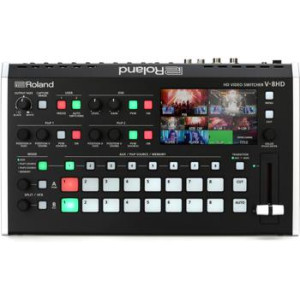
Roland V-8HD 8-channel HD Video Switcher
5 out of 5 stars 5 reviews
$1,451.77 -
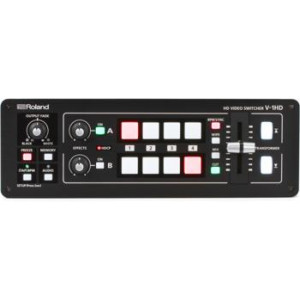
Roland V-1HD 4-channel HD Video Switcher
4.5 out of 5 stars 5 reviews
$659.99
Why shop Video Switchers at Sweetwater.com?
With a massive selection of Video Switchers, free shipping, a free 2-year warranty, 24/7 access to award-winning support - and more - Sweetwater gives you more than any other retailer! If you have any questions about Video Switchers, make sure to give your personal Sales Engineer a call at (800) 222-4700.
