
Digital Piano Setup Guide

Congratulations on buying a digital piano from Sweetwater. Here’s how to set things up and get started, and make playing more enjoyable.
- Register your purchase
- Setting up your digital piano
- How to practice and play comfortably
- Caring for your digital piano
Register your purchase
Warranty coverage
In your digital piano’s box, you’ll find information about how to go to the manufacturer’s website, set up a user account, and register the piano’s serial number. This will also activate your warranty from the manufacturer.
Everything you buy from Sweetwater comes with Sweetwater’s 2-year Total Confidence Coverage™ (TCC) warranty, but it’s important that you register with the manufacturer as well.
Download the owner’s manual
Once you register your purchase on the manufacturer’s website, on your user account page you can download the owner’s manuals. It’s good to keep a copy on your computer or device for reference.
Educational apps
Some manufacturers provide music education apps for Mac, Windows PC, iPhone, iPad, and Android; you can find information about that on the manufacturer’s website as well.
Setting up your digital piano
The range of different makes and models of digital pianos provide various features, but here are some common points to consider.
Power Supply and Batteries
Check your owner’s manual to see if your product is battery-powered, and to find out what kind of batteries you need.
If your digital piano comes with a power supply, you should use only that power supply. Other power adapters you may have in your home may not have the correct specifications to operate your instrument.
Built-in Speakers, External Audio, and Headphones
We hope you’ve heard a real live acoustic grand piano, in person. Acoustic pianos can be played very loudly and fill up a concert hall with sound.
Your digital piano, on the other hand, has built-in speakers that are only loud enough to enable the person sitting at the piano to hear themselves for practice at home.
If you want to play where other people can hear you, or play in a band, you must connect your digital piano to an external amplifier and speakers, or PA system, using cables. For this purpose, some models have a pair of jacks labeled Output. If your digital piano doesn’t have dedicated outputs, you can connect a cable from the headphone jack to your speakers or PA.
When you want to use headphones, first make sure that the digital piano’s power is turned off, or its master volume knob is turned all the way down. Then plug in the headphones. Now turn the volume up a bit, gradually. Keep the headphone volume at a comfortable level. Don’t play through headphones for a long period of time or at a high volume. Give yourself breaks where you take the headphones off. You can experience ringing in your ears and even damage your hearing if you misuse your headphones.
Auxiliary Input
Depending on the model, your digital piano may have one or more means by which you can play audio tracks from an external device, like a phone or tablet, so that you can hear the tracks through your digital piano’s built-in speakers or headphones while you play along with the music. This is called auxiliary input, or “aux in” for short.
Your digital piano may provide an Aux In jack into which you can insert an audio cable to connect to your device. Your model may also support audio over Bluetooth, which is wireless. Consult your owner’s manual.
USB Cable and MIDI
Some digital pianos provide a USB connection to your Mac or Windows PC. Depending on the model, this is used to send and receive MIDI data or digital audio to your computer over a USB cable, so that you can record performances in an app called a digital audio workstation, or DAW. With MIDI over USB, you can also use the keyboard on your digital piano to play and control other electronic instruments. Consult your owner’s manual.
The Sustain Pedal or Footpedal
A real acoustic piano has a sustain pedal, or damper pedal. This is a mechanism with a lever that you press down with your foot. The pedal raises the felt dampers off of the strings on the piano so that the notes sustain and ring out with sympathetic vibrations until you release the pedal. Learning how to use the sustain pedal is part of learning to play piano.

A piano-style sustain pedal
Depending on the make and model, your digital piano will have a jack on the back for connecting an electrical footswitch or sustain pedal, which performs a similar function. Some models provide a connection for three pedals, which replicate other effects from an acoustic piano called una corda and sostenuto.
Consult your owner’s manual regarding what kind of pedal is compatible with your instrument. There are many models of sustain pedals available.
How to practice and play comfortably
Setting up your digital piano isn’t just about hooking up the cables. New piano students, especially smaller children, often don’t think about the way they sit, and how to position the piano and the chair. If the keyboard is at the wrong height for your body, arms, and hands, you will experience fatigue, and you won’t enjoy practicing.
Spend a little time getting things positioned correctly. It’s easy.
How to sit at the digital piano
Ideally, no matter how tall you are, you want to sit with your feet flat on the floor, not dangling from a chair that’s too high. You want to sit on the forward part of the chair, with your torso and head up tall and erect.
Now the most important part: your hands and arms and how they address the keyboard. With your shoulders relaxed and your arms at your side, you want to raise your hands and reach out and forward. You want your forearms at slightly more than a 90-degree angle to your upper arms, and you want the keyboard to be just below your hand position.
Your hands and fingers need to be above the keyboard, rounded and arched, with your wrists free to flex. You don’t want the keyboard up high where your hands have to reach up, and you don’t want the keyboard too low so that you have to bend your wrists back; that creates strain.
Your piano teacher will show you how to hold your fingers and hands.
Keyboard stands and benches
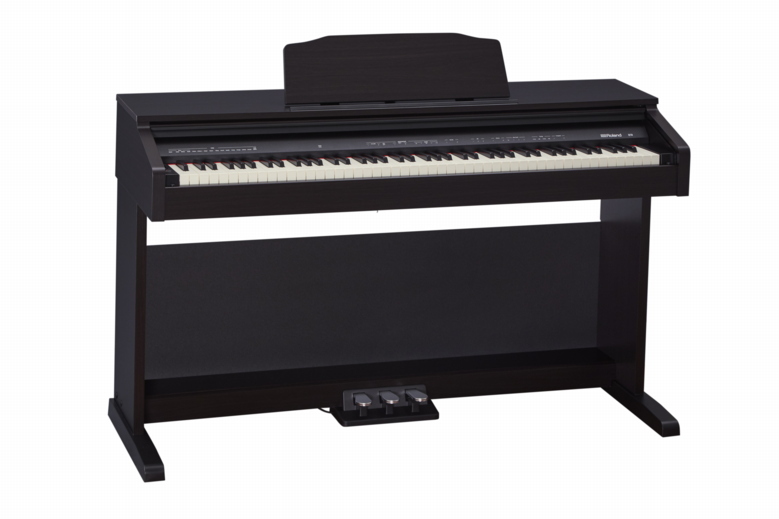
A console digital piano can’t be adjusted for keyboard height.
If your digital piano is of the console type, it is attached to a solid frame; you can’t raise or lower the keyboard. Try a different chair, or get an adjustable keyboard bench and raise or lower it.

An adjustable keyboard bench

A double-X-braced adjustable keyboard stand
If your digital piano is of the portable type, you need an adjustable X-braced keyboard stand that you can raise or lower to bring your keyboard to the right height for you. Inexpensive single-X stands are only suitable for the smallest, lightest keyboards. For a digital piano, you need a stand that won’t wobble while you are playing it, so consider a double-X design. An adjustable keyboard bench is practical here as well.
For a child, if you have a console piano, getting the arms and hands at the right height for the keyboard will require a higher seat, and that might leave the feet dangling; if that’s the case, stack some books or cushions on the floor so that your child can rest their feet on them.
Caring for your digital piano
Keep It Clean
It’s pretty simple: don’t eat or drink near your digital piano, and don’t spill liquids on it.
From time to time, you can wipe down your keyboard with a cloth or cleaning wipes, but don’t use any sprays or solvents.
Use a Keyboard Cover
A console digital piano may have a built-in sliding keyboard cover, also known as a fallboard. Keep it closed when you are not playing.
With a portable digital piano, it’s a good idea to wrap a keyboard cover over the keyboard to protect it from dust and pet dander. Dust works its way beneath the keys and prevents the key contacts from working, resulting in “stuck” keys, which requires repair work. Select a cover that is the right size for your instrument.
Transport and Store Your Keyboard in a Gig Bag or Case
If you need to transport your digital piano, buy a gig bag or soft case with carrying handles. Cases are available in many sizes and dimensions, so measure your keyboard to make sure you are buying one that will fit.
When you need help, Sweetwater has the answers!
Our knowledge base contains over 28,000 expertly written tech articles that will give you answers and help you get the most out of your gear. Our pro musicians and gear experts update content daily to keep you informed and on your way. Best of all, it’s totally FREE, and it’s just another reason that you get more at Sweetwater.com.

