How It
Works

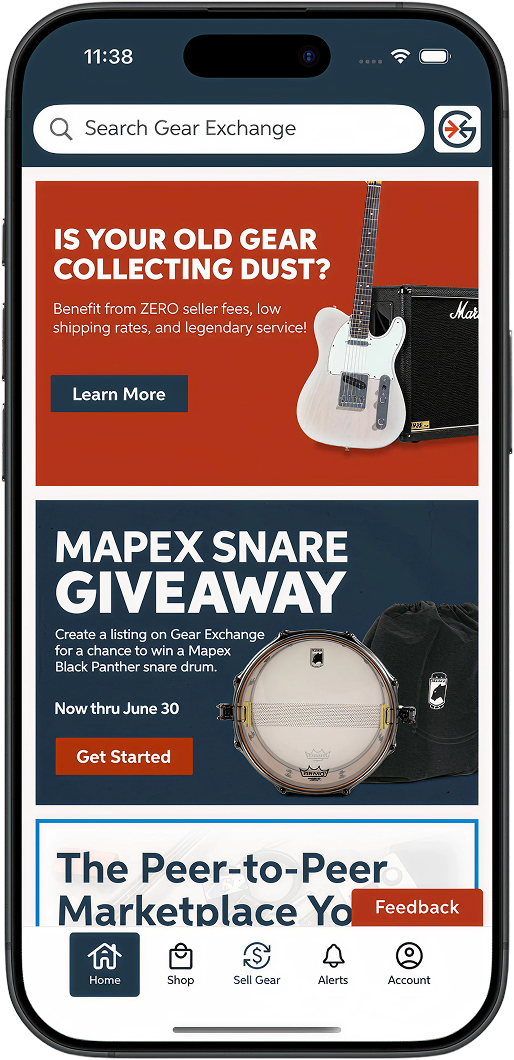
We make listing simple.
List your used gear with just a few clicks. Our handy product finder makes it super easy!

We promote your used gear.
Get your listing in front of millions of potential buyers who already happen to be Sweetwater customers.

You keep more money.
Redeem your earnings in the form of a Sweetwater Gift Card and pay ZERO fees! Cost of service for a Fee-Based Payout is 7.5%.

Shop Sweetwater.com
Turn that used gear into something shiny and new. Put your earnings toward your next Sweetwater purchase.
How to Sell Your Gear on Gear Exchange
1
Create a Listing
- Add photos of the actual item you're selling (no stock photos) and an accurate description to boost your selling success.
- Save time and use the Gear Exchange Product Finder to quickly search for your gear and auto-fill the specs in your listing.
- Create your storefront to stand out and help buyers find your gear.
- As part of our extensive buyer and seller protection, every new user's first listing is held for review before it is published. Once your first listing has been approved, following listings will be published almost instantly.
- Set a price and choose whether you would like to receive offers for your listing.

2
Make a Sale
- Communicate with potential buyers via Messages to discuss price, shipping arrangements, and other terms of the sale.
- Your buyer will complete the transaction and pay using our secure Gear Exchange checkout.
- Once the buyer has completed payment, you’ll be notified of next steps via email.

3
Ship and Get Paid
- Save time and money on shipping with a Gear Exchange shipping label!
- Ship the item via the agreed shipping method and provide tracking info, or arrange a local pickup.
- When payout funds are available, you will be notified via email.
- As part of our fraud protection, funds from your first sale are held for 1-2 days following delivery confirmation, giving the buyer time to inspect the gear.
- Once you have an established seller account with positive feedback, you may be eligible for faster payouts.
4
Shop Sweetwater.com
- When you shop new gear at Sweetwater.com, you get a dedicated Sales Engineer, free shipping, free tech support, zero interest financing options, and so much more.
- Gear Exchange sales have a 2.5% transaction fee and a 5% seller fee. Redeem your earnings in the form of a Sweetwater Gift Card to waive all fees and boost your buying power!
- From selling used to buying new to asking for expert advice, we want to support you on every step of your music gear journey.
Simple Payout Options
Frequently Asked Questions
Choose the payout option that works best for you.
- Sweetwater Gift Card - keep more of your earnings with ZERO seller fees when you select a Sweetwater Gift Card payout. Gift cards can only be redeemed at Sweetwater.com.*
- PayPal, Venmo, or Your Bank Account - transfer funds to your preferred payment app or bank account for a 5% seller fee plus a 2.5% transaction fee. Funds are transferred via Hyperwallet.
*Sweetwater gift cards cannot be used to purchase gear from other users on Sweetwater Gear Exchange.
To help protect our community of buyers and sellers, your first few sales may include an extended payout timeline (typically an additional 1-2 days after item delivery is confirmed). Once that period is complete, your funds will be released either to Hyperwallet or as a Sweetwater Gift Card, depending on the payout method you selected.
Learn more about payout timelines here >
The IRS has announced another delay in lowering the Form 1099-K reporting threshold to $600. For now, marketplaces like Gear Exchange will be required to report tax year 2024 transactions to the IRS for sellers with $20,000 or more in sales. This is part of a phase-in to implement the $600 reporting threshold enacted under the American Rescue Plan Act of 2021. (see Sec. 9674).
Once you hit the annual sales threshold, you will need to provide tax identification information for us to be able to continue processing payouts. If you hit the annual sales threshold and don’t provide the necessary information, we may temporarily suspend your payouts until the tax information has been properly submitted.
You’ll need a Hyperwallet account if you want to be paid to PayPal, Venmo, or your bank account, or if you sell over $20,000 within a year. Learn more about taxes here.
- Once your first payout is ready, you’ll receive an email with a link to set up your Hyperwallet Pay Portal.
- Log in using the same email address and password you use for Sweetwater and Sweetwater Gear Exchange**, and provide the requested information including your physical address and Social Security number.***
- Click on Transfers and set up the destination for your funds - your bank, PayPal, or Venmo.
Pro tip: You can set your Hyperwallet to auto transfer funds every time you complete a sale.
**If you choose to receive payouts to your PayPal account, your Hyperwallet notifications email must match your PayPal account email. If you are using a different address for your Gear Exchange login, you will need to change the email address within Hyperwallet. Log in to the Hyperwallet Pay Portal and click Settings, then Preferences. On the Notifications tab, enter the same email you use for your PayPal account. Please note that this doesn’t change your Sweetwater Gear Exchange login in any way.
***This is required by US law, in particular the American Rescue Plan Act of 2021.
- If you choose a Sweetwater Gift Card payout, you will receive an email with your e-gift card as soon as the buyer’s item is in transit (when shipment is first scanned). Please note: there will be a 1-2 day hold on funds for first time sellers that begins when the item is marked “delivered”.
- Your funds will be released either to Hyperwallet or as a Sweetwater Gift Card, depending on the payout method you selected. Fee-Based Payouts (Hyperwallet) can then be transferred to your PayPal, Venmo, or a bank account. To help protect our community of buyers and sellers, your first few sales may include an extended payout timeline (typically an additional 1-2 days after item delivery is confirmed).