

Shure’s 600 MHz Wireless Tool
Overview
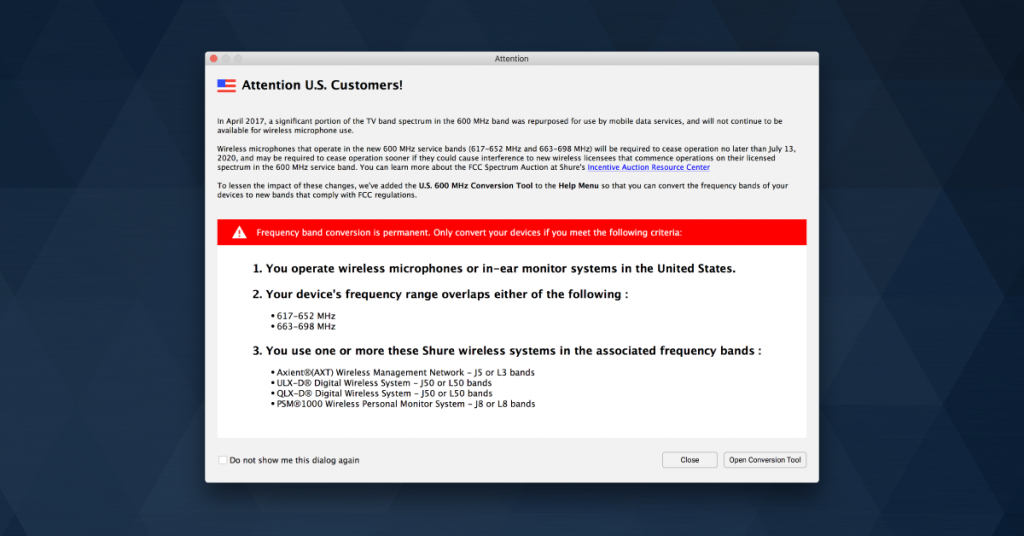
In this article, we will show you how to convert the frequency range of eligible Shure wireless systems in order to accommodate the FCC Wireless Spectrum Auction. This will make your eligible Shure wireless system no longer use the 616–653MHz and 663–698MHz frequencies and cannot be undone. If you’re not sure what the auction is or if your gear is affected, first read The FCC’s Wireless Spectrum Auction: Why You Should Care.
What is Frequency Conversion?
Wireless systems are designed to work with preformatted frequencies. Because of the auction, some default channels on your wireless system will no longer be available for use. Long story short, if your eligible Shure wireless system uses any frequencies within 616–653MHz or 663–698MHz, it should be updated so that it no longer uses them. This will not only make your device legal for use, but prevent dropouts and interference as each of those frequency bands become unavailable in your area.
View the eligible Shure wireless systems and their respective frequency bands (before and after conversion) below. If your system’s frequency bands can be converted, check when your area will be affected and perform the conversion before that date. If your system is not eligible for conversion and uses the discontinued 600MHz frequencies, you should plan on using a system with different frequency bands. While this may mean purchasing a new system, Shure has offered trade-in/rebate accommodations to alleviate the issue. Learn more on Shure’s wireless trade-In & rebate page.
Axient
J5 (before): 578-608 MHz, 614-638 MHz
J5A (after): 578-608 MHz
ULX-D & QLX-D
J50 (before): 572-608 MHz, 614-636 MHz
J50A (after): 572-608 MHz, 614-616 MHz
L50 (before): 632-696 MHz
L50A (after): 653-663 MHz
PSM 1000
J8 (before): 554-608 MHz, 614-626 MHz
J8A (after): 554-608 MHz, 614-616 MHz
L8 (before): 626-698 MHz
L8A (after): 653-663 MHz
600 MHz Transition Schedule
When the 600 MHz transition takes effect depends on your location. Learn more about when your area will be affected.
Convert Shure Wireless Systems
Converting your wireless systems’ frequency bands requires the Wireless Workbench 6 app. Within this app is the U.S. 600 MHz Conversion Tool, which is what you will use to perform the update. These changes are permanent! If you are using the system outside of the United States, keep this in mind as the changes cannot be undone. Follow the steps and Shure’s video below to convert your Shure wireless system’s frequency bands.
Install Shure’s U.S. 600 MHz Conversion Tool
1. Download Shure’s Wireless Workbench app.
2. Open your downloads folder, uncompress the .zip file, and then run the installer.
3. Launch the Wireless Workbench 6 app.
4. Click the Help menu and select U.S. 600 MHz Conversion Tool…. Follow the onscreen instructions or video below to convert your wireless systems.
Shure’s Frequency Finder
Visit Shure’s Frequency Finder page to see what frequencies are available and preferred for your area.
When you need help, Sweetwater has the answers!
Our knowledge base contains over 28,000 expertly written tech articles that will give you answers and help you get the most out of your gear. Our pro musicians and gear experts update content daily to keep you informed and on your way. Best of all, it’s totally FREE, and it’s just another reason that you get more at Sweetwater.com.

