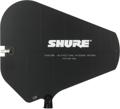
Over the last 10 years, changes in the laws regarding the UHF spectrum (officially defined as 300MHz to 1GHz) have made using wireless microphones more challenging. As we attempt to operate more wireless microphones in less spectrum (our legal range now falls between 470MHz and 600Mhz), proper application of antennas becomes very important. If you’re finding that your wireless microphones are suffering dropouts and noise bursts, optimizing your antenna usage and placement is the key to improving performance.
Line of Sight
The very first thing you can do to improve RF (radio frequency) transmission is ensure that you have line of sight between the microphone and the receiver antennas. Though many antennas default to mounting in the back of a rack, almost all systems have a way to front mount those antennas, and you should take advantage of this benefit. For example, front-mount kits such as the Sennheiser AM2 work for almost all Sennheiser pieces, and the Shure UA600 will work with most Shure equipment. If your wireless came with options to front mount the antennas, then by all means use them! Important: Almost all wireless that operates in the 2.4GHz range either does not allow the antennas to be remotely mounted or requires specialized cabling to do so.
When you’re setting up antennas, resist the urge to hang them at the end of a length of BNC cable in order to achieve line of sight. Wireless mic antennas are ground-plane antennas, which means they need to be attached to a ground source that is the same length as the antenna in order to work properly.
Remote Antennas and Distribution
While it may seem as if RF acts like a spotlight or a fire hose, the reality is not so tidy. Handheld and bodypack transmitters are also ground-plane antennas, and while we call these omnidirectional, that is not quite true. Their coverage patterns are basically doughnut shaped, with the hole in the doughnut aligned with the direction of the antenna. For example: if a handheld microphone is held vertically —straight up and down — the ceiling and floor won’t get much RF, but everywhere else in the room will.
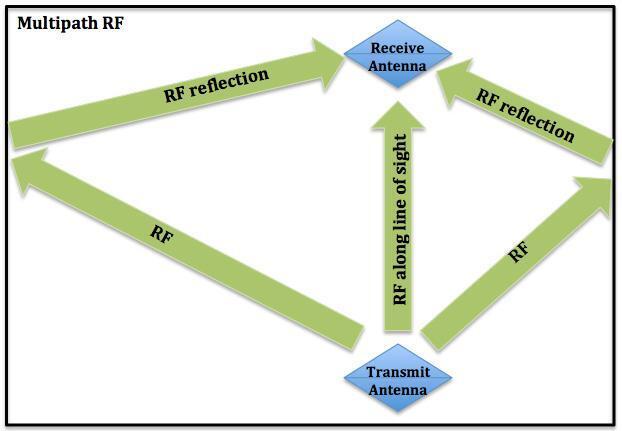
To further complicate the issue, RF bounces off surfaces like a billiard ball and keeps going. Because of this, you can have the RF signal hitting the receiving antenna from multiple directions, with slightly different timings. This can cause cancellations or distortions of the carrier signal, which impacts the receiver’s ability to lock on. This phenomenon is called multipath and is illustrated in the diagram below.
When you have a dead RF spot onstage, multipath is usually the issue. Moving your receive antennas will often help. Unfortunately, if you have several pieces of wireless and they are racked up, moving them may not be practical. This is when an antenna distribution unit, such as the Shure UA844 or Audio-Technica ATW-DA49, comes in handy. You can use units like these to allow you to share a better antenna, such as the Sennheiser A1031 or Shure PA805SWB, across more than one wireless. For the most part, antennas and distro units work across manufacturers for RF. But if the distro unit also supplies power for the receivers, it generally won’t be compatible across different manufacturers’ products.
With both a distribution unit and external antennas, you have a much easier time moving the antennas to address multipath cancellation issues. Rules of thumb for placement are pretty basic:
• Maintain at least 5 feet of distance between antennas.
• Closer to the transmitter is better.
• If you’re going to run cables longer than 25 feet to the antennas, you may need to make additional provisions (antenna boosters).
• Avoid placing antennas near transmitters for IEM (in-ear monitor) units or noisy RF products, such as LED lights, computer routers, or TV distribution devices.
What Kind of Remote Antennas?
Like directional microphones, antennas offer different pickup patterns. Broadly speaking, there are only two kinds of external antenna patterns: omni (again, think doughnut shaped) and directional. Generally, omni antennas are preferred indoors, because the RF reflections can actually help pickup quality. Directional antennas (this includes more extreme versions, such as helical and circumpolar) are a better choice outside, or in rooms that are so large, like an arena, that reflections cease to be much of an issue. In these situations, use an omni antenna onstage and directional antennas at the front of house.
Directional antennas can be a good choice if you have interference issues that you must work around. But the key is knowing what you are working around! If you’re doing a show somewhere you’ve never been before, a great resource is Sennheiser’s Frequency Finder page. Just enter the local zip code, and the page will pull the data from the FCC database to see what interference you might be facing. Here’s an example based on a show in Indianapolis:
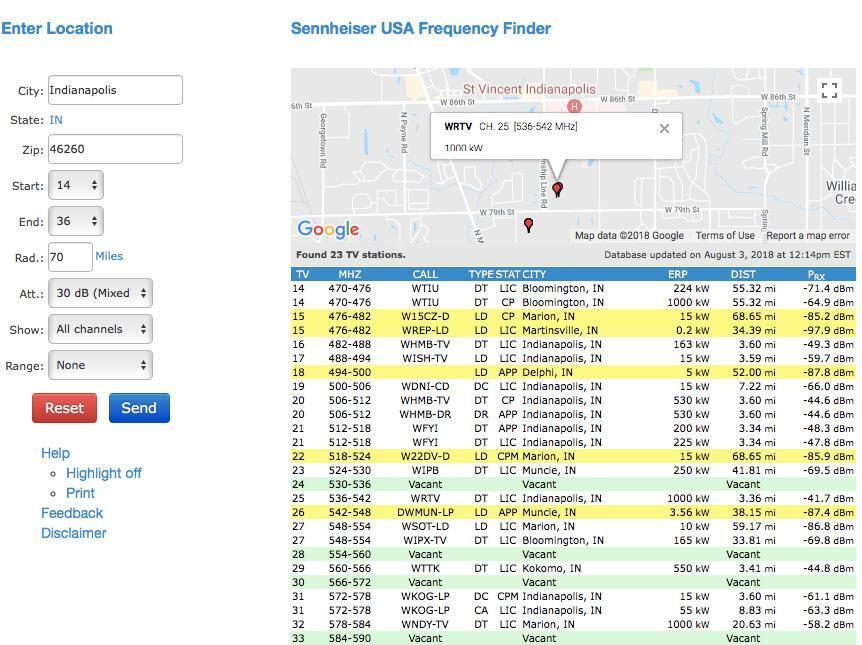
The first thing to notice here is a megawatt TV channel (WRTV) just slightly to the south. You have two choices: panic and run away, or improve the situation by using a directional antenna. Directional antennas have the most sensitivity at the front and back (similar to a hypercardioid microphone) and are less sensitive to the sides, as you can see in this diagram:

If the stage is set up so the interference from the TV station (or any other source) is coming in from the side of the antenna, then it will do a better job of rejecting that noise. Important note: Directional antenna orientation is not visually intuitive. The performer should be looking at the edge of the antenna from the stage. If you are on the stage and can read the logo on both directional antennas, they are probably aimed 90 degrees from where they should be. The antenna below is aimed to the left, not at you!
Active or Passive?
 Properly speaking, there is no such thing as an “active” antenna. An antenna such as the Shure UA874 is a passive antenna with an amplifier circuit on the output to raise the RF level. This approach isn’t intended to boost your signal for better reception but to overcome the loss incurred by running long cable lengths. In fact, this could actually cause problems if you were connecting it to a distribution unit with a short cable run, because RF signals can distort just as audio signals can. And as you’d expect, clipping is almost always bad.
Active antennas (or passive antennas with boosters, such as the Sennheiser AB3) are almost always filtered to a certain frequency range. This is to avoid boosting RF noise along with desired signal. Unfortunately, if you’re feeding several different wireless units in different frequency ranges with this system, you would be making the units that fall outside of the filter range work poorly or not at all.
Additionally, passive antennas can work in either direction. You can hook them up to a wireless mic system to receive or use them to transmit an IEM signal. But an active antenna can only work as a receiving antenna. Generally, you should not be using an active antenna unless you are trying to address a specific issue, such as a long RF cable run.
Cable or Air?
Even considering the amount of signal loss in a longer cable run, getting your antennas closer to the transmitters will generally improve performance. While some wireless systems give you the ability to turn up their transmission power, this can increase the amount of inter-modulation distortion and end up hurting more than helping. This becomes much more of an issue as you run more channels of wireless. Bottom line, if you’re running one wireless outside and need more distance, turning up the power could help. Otherwise, it is more likely to make things worse.
Getting the antennas closer to the source is “free” gain that doesn’t cause problems, until you get to less than 15 feet away. If you are having dropouts with your wireless at 15 feet, you have other issues. Conflicting frequencies or operating within an occupied TV channel is more likely the cause.
Even 100 feet of marginal cable has less loss than 100 feet of air, and good RF cable, such as RG8X (used in Shure’s UA825 and UA850 extension cables) has about a tenth of the loss of air, so while you might be spending a little extra money, that security may be absolutely worth it.
Summing It All Up
There are obviously a lot of aspects to wireless and antennas to consider, and consulting with an expert, such as your Sweetwater Sales Engineer, is always a wise decision. But these are the main points to keep in mind:
- Being able to see the receive antennas from the stage will always make things better. Raising them up will improve things, as you are not trying to shoot RF through people. The human body is a wonderful RF absorber!
- External antennas will improve response if you take the time to place them correctly, and you might as well get a distro unit so you can share antennas with all of your wireless.
- Unless there is a really good reason, use passive antennas and get them close to the source — but not too close. Inside of 15 feet, wireless systems will actually start acting worse rather than better.
If you have any questions about wireless antennas, don’t hesitate to reach out to your Sweetwater Sales Engineer at (800) 222-4700.