
Pro Tools | Carbon Registration Guide
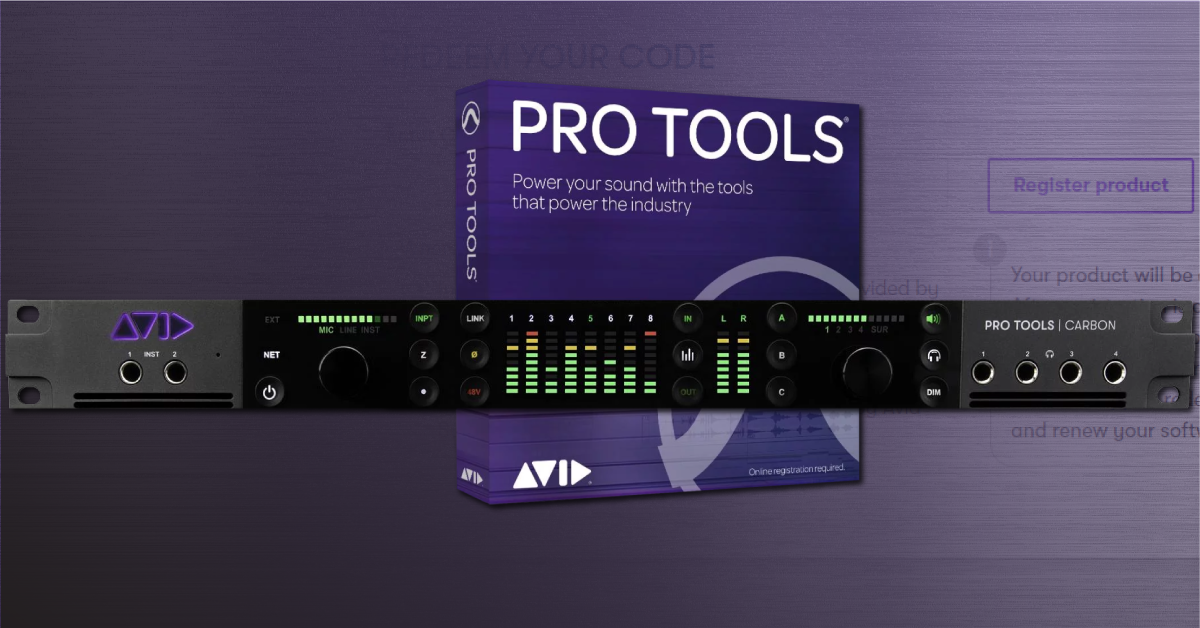
How to register the Pro Tools | Carbon with Avid
In this guide, we’ll show you how to register your new Pro Tools | Carbon with Avid. Before you get everything set up and connected, you’ll first need to register the Carbon. After it’s registered, you’ll receive a 1-year Pro Tools subscription license with a Perpetual Parachute, the Avid Complete Plugin Bundle, which includes AIR effects and instruments, UVI Falcon 2, Melodyne 5, and standard Avid support.
During the registration process, you’ll need to create an Avid account, iLok account and choose whether you have a current Pro Tools license or not. After you’ve registered the hardware, Avid will then provide you with activation codes and instructions for your bonus third party software. Follow these steps to register your Pro Tools | Carbon.
Before you register your Pro Tools | Carbon interface:
There are a few essential things you need to know before registering your Pro Tools |Carbon with Avid.
- The Pro Tools license includes what’s called a Perpetual Parachute. This means the current version of Pro Tools in your account will never expire.
- If you choose not to renew your Pro Tools license after the one year subscription period, the license will automatically change to a perpetual license.
- This means you’ll only be able to use the version of Pro Tools you currently have activated (i.e., Pro Tools 2020.11).
- Pro Tools Ultimate users aren’t eligible for the Perpetual Parachute.
- If you wish to continue receiving access to Pro Tools updates and any of the third-party software bundles, you’ll need to purchase a 1-year subscription.
- You can switch to a subscription license at any time during the Perpetual Parachute, but you’ll have to purchase the 1-year subscription plan.
- For more information, refer to the chart below and also check out Avid’s Carbon FAQ page.
How a Pro Tools | Carbon subscription works
As mentioned above, you receive a Pro Tools license which includes a Perpetual Parachute. Here is how it works:
- If you’re a new Pro Tools user, you receive a 1-year Pro Tools subscription with a Perpetual Parachute.
- If you currently have an active Pro Tools subscription, you can either receive a new 1-year subscription or a 1-year subscription extension.
- If you currently have an expired subscription, you will receive a new 1-year subscription with a Perpetual Parachute. The expired perpetual license will remain in your account.
- Once the Pro Tools subscription expires, the license will remain active but you’ll lose access to third-party plugin bundles.
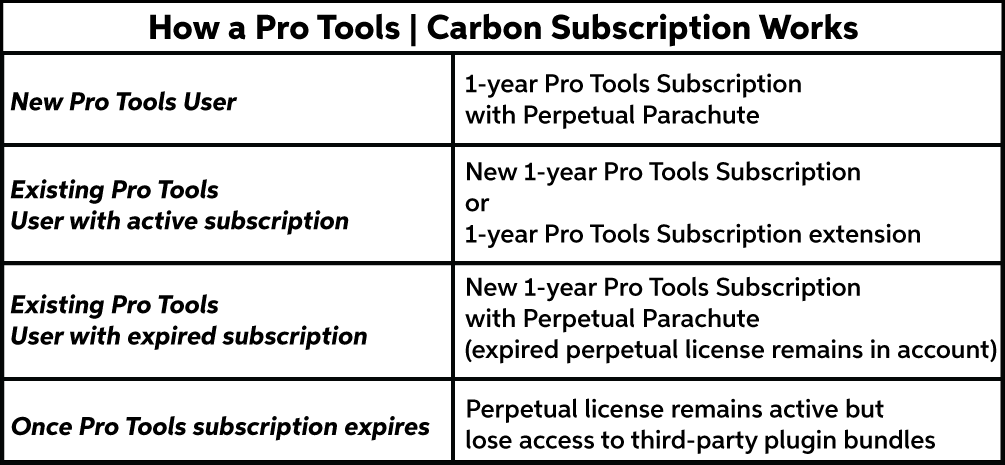
How a Pro Tools | Carbon subscription works. Click to enlarge.
- Log into your Avid Master Account. If you don’t have an account yet, keep this tab open and learn how to create an Avid account.
- Go to the Avid registration page and enter the Pro Tools software activation code located on the registration card. It can be found on the side of the box, as well. Alternatively, scan the QR code using your mobile device.
- Your Carbon interface will automatically be registered at that time.
- Enter your iLok account credentials. If you don’t have an iLok account, keep this tab open and check out our iLok setup guide for instructions on how to create one.
- Activate Pro Tools if you’re a new Avid customer or have an expired license.
- If you already have an existing or existing license, select whether or not you’d like to either activate a new subscription or extend the current license.
- Purchase or redeem a three-year hardware contract extension for your Carbon.
- You have 90 days from the day you activated your Carbon to purchase or redeem the contract extension.
- Activate, download, and install all of the third-party software. You can follow Avid’s activation instructions, or feel free to check out our software activation instructions for each piece of software:
What’s Avid’s three-year hardware contract extension?
IMPORTANT: You must contact Avid directly for any hardware RMA’s. Any type of warranty repair will be free of charge only if the damage is caused by faulty hardware; NOT from user abuse.
Your Carbon interface automatically comes with a one-year warranty. You can purchase a three-year hardware extension for your Pro Tools | Carbon. If you need to send your Carbon to Avid for repair during that time, Avid (not the reseller) will guarantee an overnight advanced replacement.
When you need help, Sweetwater has the answers!
Our knowledge base contains over 28,000 expertly written tech articles that will give you answers and help you get the most out of your gear. Our pro musicians and gear experts update content daily to keep you informed and on your way. Best of all, it’s totally FREE, and it’s just another reason that you get more at Sweetwater.com.

