
Korg Volca Mix Setup Guide
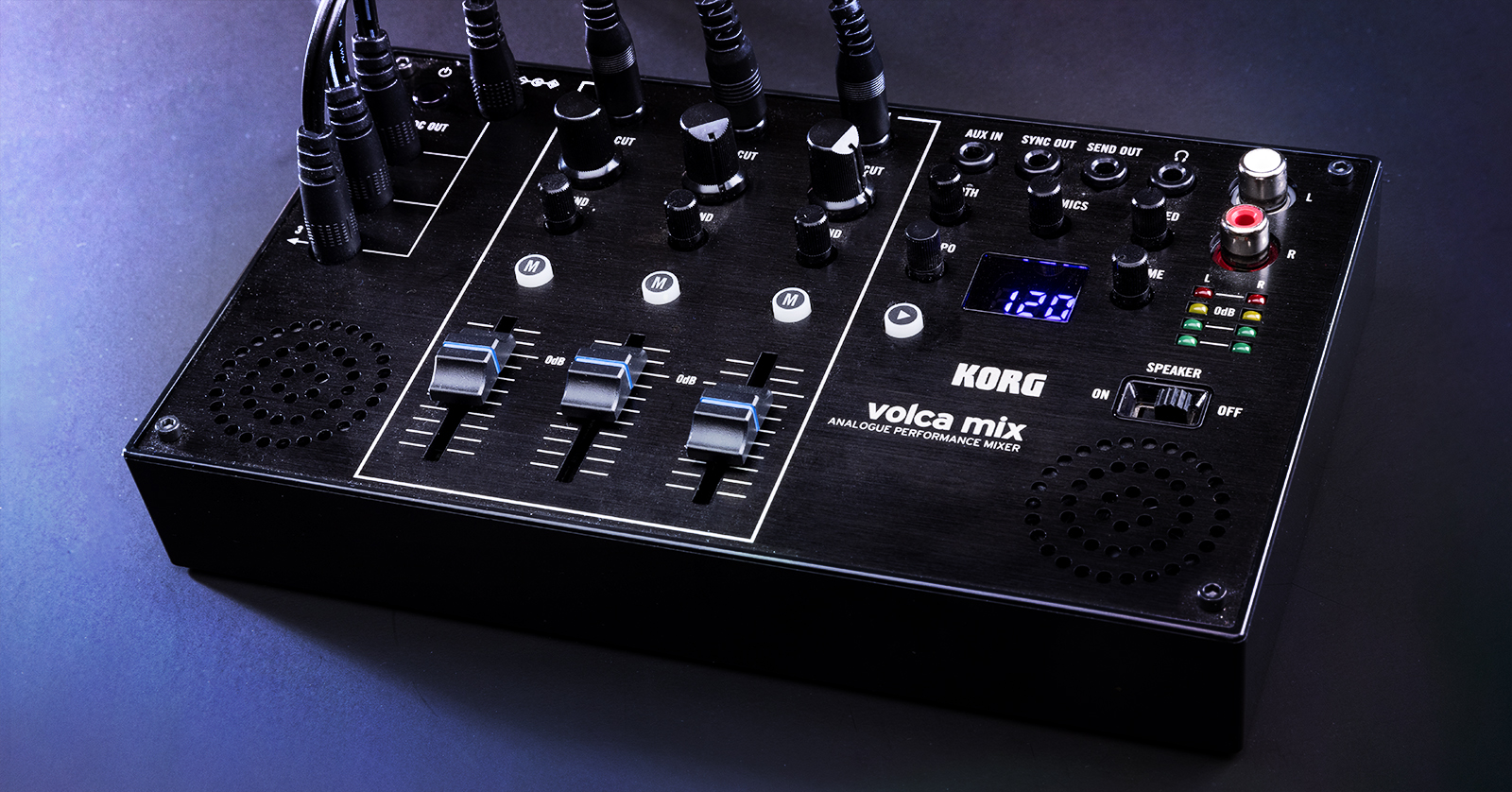
In this guide, we will show you how to get up and running with the Korg Volca Mix. With instructions covering everything from syncing to mixing, you’ll learn how to use it to its full potential in no time! Follow the sections below to get started.
Parts of the Korg Volca Mix
The Korg Volca Mix is the central hub for all your Korg Volca products, and it couldn’t be easier to navigate. There are three primary sections of the Volca Mix: Power, Mixer, and Master Chain and I/O.
Power
One great feature of the Korg Volca Mix is its ability to power all your Volcas. This means you no longer need to rely on batteries, which gives you peace of mind, as you don’t need to worry about them dying in the middle of a set!
Just connect the included power cables from the Volca Mix to your Volca products, and you’re all set.
Mixer
The Mixer of the Volca Mixer is straightforward. Connect your external Volca’s audio output to the Volca Mix using the included 1/8-inch TRS cable. Please note that input 3/4 is stereo.
- Volca FM, Volca Sample, and Volca Sample OK GO Edition are all stereo units.
- Use the Send knobs to control each channel’s audio level sent to the Send OUT.
- The audio sent to the Send OUT will be summed to a mono signal before output.
Master Chain and I/O
The Master Chain and I/O section of your Volca Mix is where you make all your sync, input, and output connections and add stereo width, compression, and the compressor’s envelope speed. You can connect external effects processors or synths via the Aux and Send jacks.
Setup and Connections
Now that you know how the Korg Volca Mix works, let’s show you how to get set up and connected.
- Connect your Volca modules to the Volca Mix using the included power cables.
- Connect the Volca module Audio OUT to the inputs on the Volca Mix.
- Don’t forget that input 3/4 is a stereo connection!
- Connect a 1/8-inch TRS cable from the Volca Mix Sync OUT to another Volca module’s Sync IN to sync devices. Check out our guide on syncing Korg Volca modules to learn more!
- If you want to send the audio from the Volca Mix to an external effects processor, connect it via the Send OUT jack.
- You can control the amount of audio signal that will pass through the Send OUT jack by using each channel’s Send knob.
- If you want to send an external processor’s signal back to the Volca Mix, use the Aux IN. The external device’s signal will be mixed after the Master Chain.
- Use the Aux IN to send an external processor’s signal back to the Volca Mix. The external device’s signal will be mixed after the Master Chain.
- You can record the audio by connecting the Volca to an audio interface using an RCA-1/4-inch cable.
Updating parameter settings
A few global parameters can be changed on the Korg Volca Mix. Press and hold the PLAY button to access them while powering the device.
To switch between parameters, use the TEMPO knob, and to change the parameter setting, press the PLAY button. Once changed, change it to SaV, then press the PLAY button to save your changes. Check out the diagram below to see what parameters can be changed.
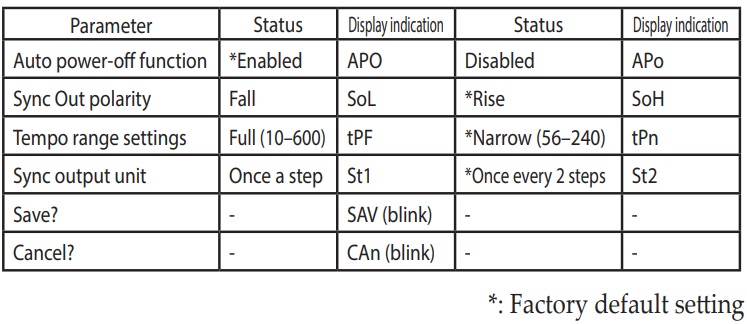
Parameter settings on a Korg Volca Mix
When you need help, Sweetwater has the answers!
Our knowledge base contains over 28,000 expertly written tech articles that will give you answers and help you get the most out of your gear. Our pro musicians and gear experts update content daily to keep you informed and on your way. Best of all, it’s totally FREE, and it’s just another reason that you get more at Sweetwater.com.

