
Serato Software Activation Instructions
The article below was generously provided by our friends at Serato and can be found here.
Activate Serato DJ or an Expansion Pack with a license number or voucher code
If you have purchased a boxed copy of Serato DJ or have received a voucher code for a Serato DJ license this article explains how to activate your Serato DJ software using a boxed license number or voucher code.
IMPORTANT: Your computer must be connected to the internet to complete the steps explained in this article.
1 Download and install Serato DJ
If you haven’t already done so, download and install Serato DJ.
2 Open the Serato DJ Online window
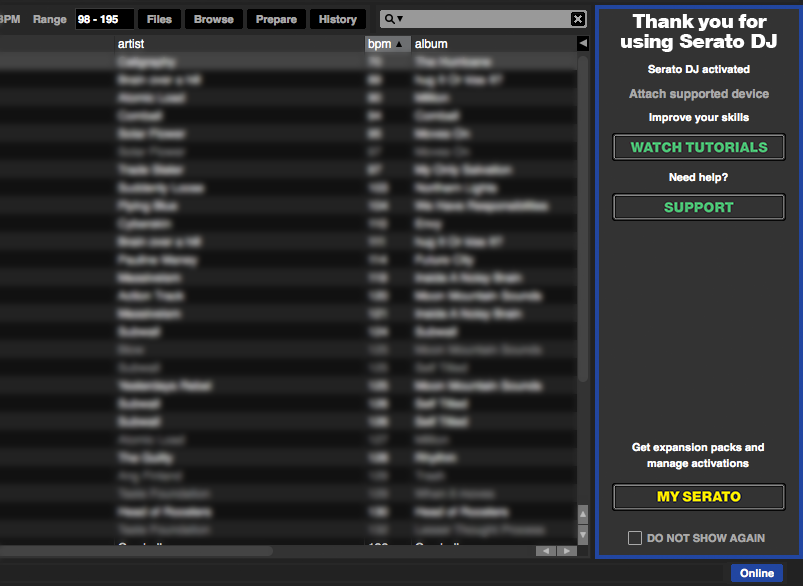
Start the Serato DJ application. Open the Serato DJ Online window by clicking the My Serato button. This button is located in the license panel, found in the right hand side of the Serato DJ application window.
3 Log in to Serato DJ Online
If you have an existing serato.com or whitelabel.net user account, enter the email address you use to access this account. Otherwise, create a new user account by entering your current email address. Click the Continue button.

If you are logging in using an existing serato.com or whitelabel.net user account, enter your password. If you are creating a new user account, enter a password and confirm it.
4 Select “Enter Voucher Code” from the top‑right of the window
Upon logging in to Serato DJ Online you will be presented with options to enter your license number or voucher code.

5 Enter your license number or voucher code
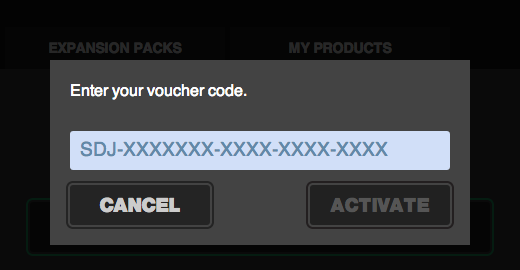
Enter your license number or voucher code, taking care to accurately enter the characters. Click the Activate button.
6 Specify your controller (Serato DJ license only)
Select the controller that you use with Serato DJ
Note: If you currently have a supported Serato DJ hardware device connected you will not be presented with this step.

7 Serato DJ is now activated
If you entered a valid license number or voucher code your product will now be activated on your computer.
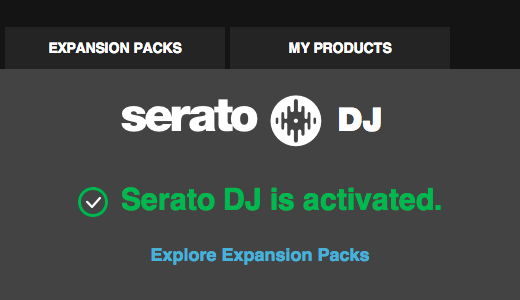
Congratulations! You can now explore Expansion Packs or close the Serato DJ Online window and enjoy your new software.
When you need help, Sweetwater has the answers!
Our knowledge base contains over 28,000 expertly written tech articles that will give you answers and help you get the most out of your gear. Our pro musicians and gear experts update content daily to keep you informed and on your way. Best of all, it’s totally FREE, and it’s just another reason that you get more at Sweetwater.com.

