
Korg Volca Mod Quickstart Guide
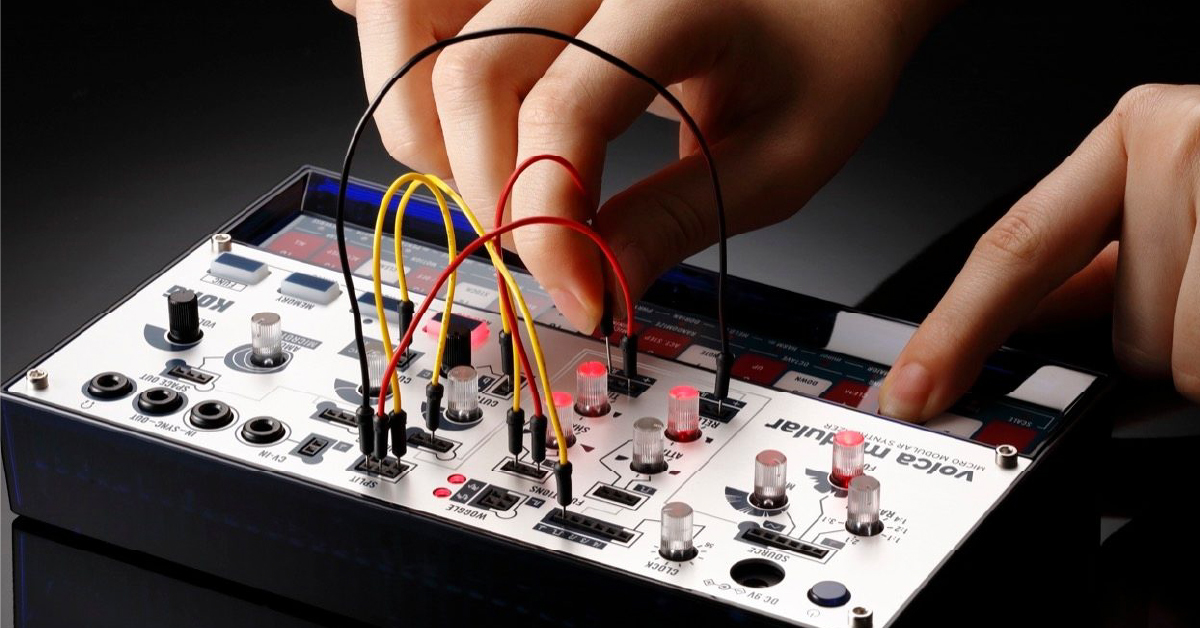
In this guide, we will teach you how to use the Korg Volca Modular. We’ll explain the different sections of the synth, how to get sound out, and then record a sequence. Follow the sections below to get started.
Navigating the Volca Modular
The Volca Modular is a modular analog synthesizer that allows you to change the sound using patch cables and record sequences. The initial setup is easy. Put the batteries in, turn it on, then start playing. You can also use a 9V power supply.
- If you want to use a power supply with a Volca, you must use the Korg Volca power supply. Using a generic power supply may result in damage to the unit.
- Volca modules come with six nickel-hybrid AA’s. If you switch to alkaline batteries, you will need to change the battery mode. To do this, press and hold the FUNC button and power the unit on. Next, press the M2 key to switch to alkaline (bt.AL).
Sections of the synth
The Volca Modular has four primary sections; Power and Tempo, Synth Modulation, Input & Output, and Step Sequencer. You can also access different functions by holding down the FUNC button then pressing a button. Refer to the User Guide for the complete list of functions.
Power and tempo
The power and tempo section is where you turn the synth on and off, connect a 9V power supply, and adjust a sequence’s tempo.
Synth Modulation
This is where you change different characteristics of the synth using the control knobs and patch cables.
Input & Output
The Input & Output section is where you connect external hardware to control or sync with the Volca Mod.
Step Sequencer
The Step Sequencer section is where you will record and save patterns. Each button also functions as the keyboard.
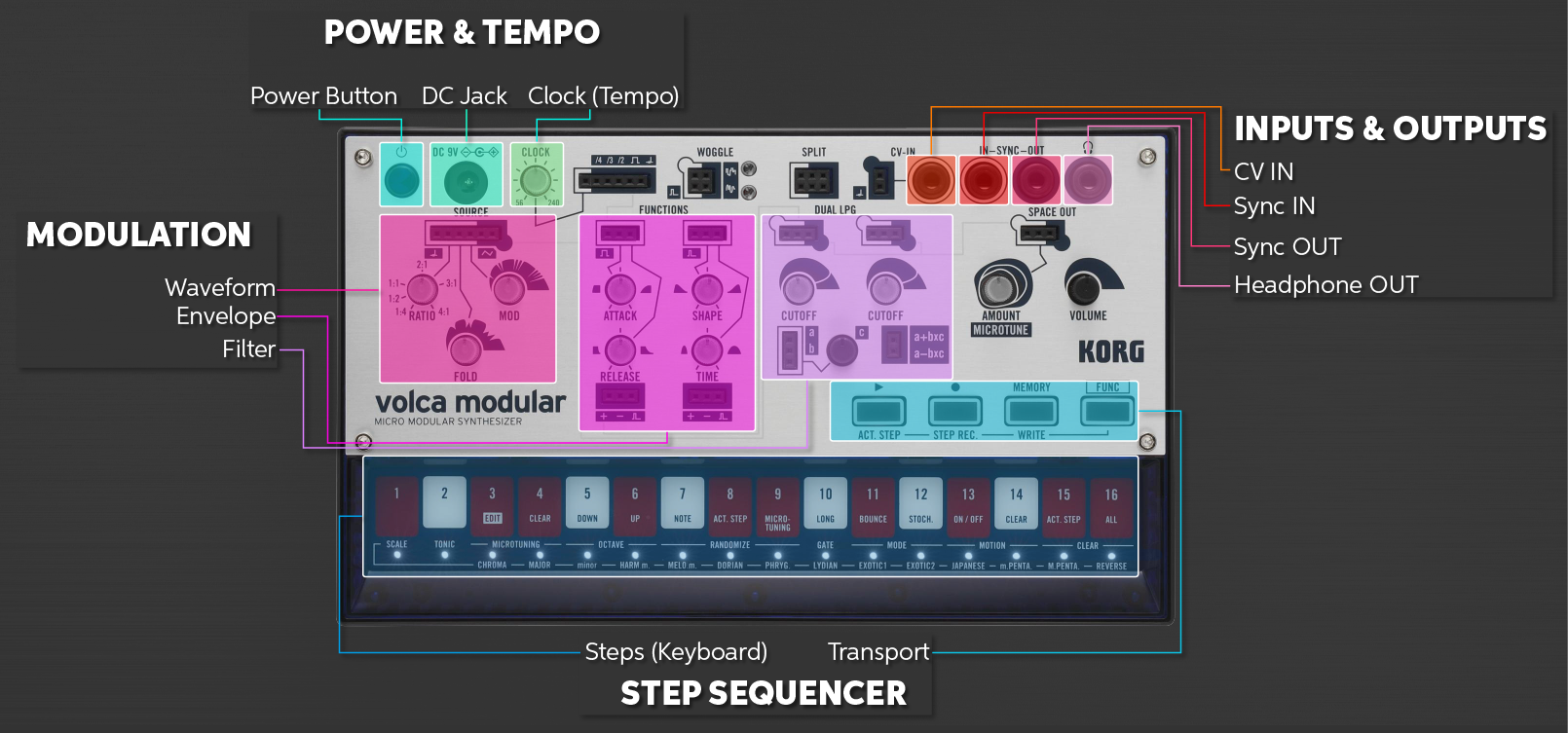
Sections of the Volca Mod. Click to enlarge.
Getting sound out
As soon as you turn the Volca Modular on, you can play a Triangle Wave. You will need to use the knobs and patch cables in the Synth Modulation section to alter the tone.
Basic sound
Getting a basic sound out of the Volca Modular is easy. Just turn the unit on, press the keys in the Step Sequencer section, and adjust the knobs in the Synth Modulation section. Follow these steps to get the sound out.
- Press a key and turn the left Cutoff knob up until you hear a tone.
- Turn the Fold knob to adjust the wave folder (more commonly known as wave shape) to change the overall tone. Turn the Mod knob to change the harmonics of the sound.
- Adjust the Attack, Shape, Release, and Release Time to change each stage of the note.
- Adjust the AMOUNT knob to change the level of the reverb.
Does it sound out of tune?
The Volca Modular uses analog circuitry, so the tuning can change depending on conditions such as heat. To adjust the tuning, hold the FUNC button while rotating the RATIO knob.
Patching a sound
Patching allows you to send the source signal to control different sound modulations. Use the patch cables to connect the SOURCE input or output to a function’s input or output. The input sections are outlined, and the outputs are solid. Let’s use an example and use patch cables to create a basic LFO Modulator.
- In the SOURCE section, connect a patch cable from the MOD input to the + output in the TIME section.
- Connect a patch cable from the last output (gate output) in the TIME section to the first input (gate input) in the SHAPE section.
- Adjust the TIME knob to change the pulse’s speed.
Be careful!
Be careful when inserting and unplugging the patch cables. They are fragile and may bend if moved or taken out too forcefully.
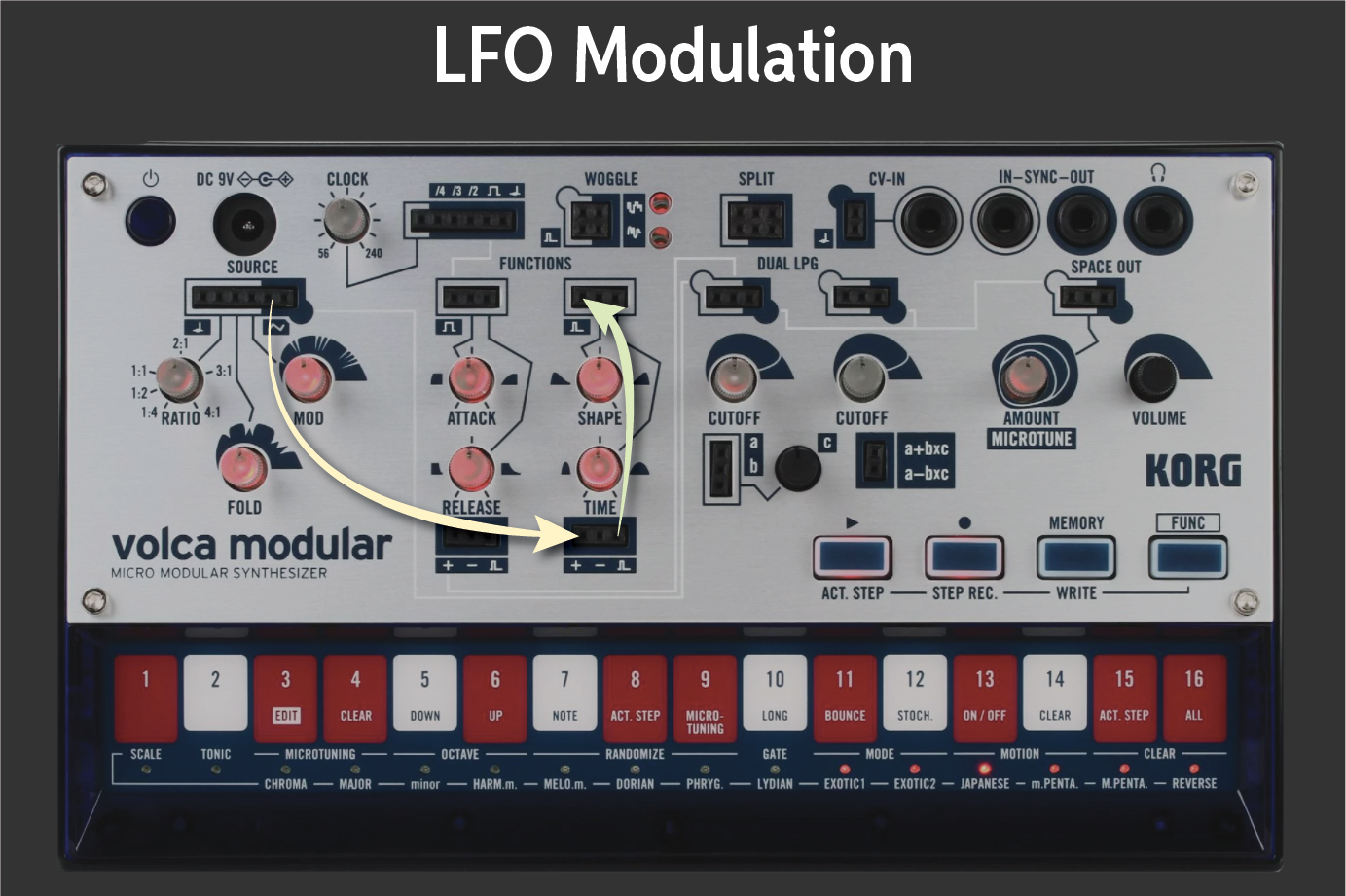
Patching to create an LFO Modulator. Click to enlarge.
Using the step sequencer
The Volca Modular has a built-in step sequencer that allows you to record notes and play them back. You can store and load up to 16 sequences.
Recording a sequence
You can record sequences in two different ways; standard and step. When you record in standard mode, it will record the steps in real-time. In step mode, you can record one note (step) at a time without worrying about timing. Follow these steps to record in both modes.
Standard recording
- Press the Record button to prepare to record, then press the Play button to begin.
- Press the Record button once you’re finished.
Step recording
- Hold the FUNC and press the Record button to enter STEP REC mode.
- Press one of the keys to trigger a step. Let go, then press another note to trigger the next step. The LED beneath the step keys indicates which step it’s currently on.
Need to change what’s being triggered?
If you want to turn a specific step on or off, hold the FUNC button, press the Play button, then press the step key you would like to turn on or off.
Sequencer and Tuning Overview
Saving and loading sequences
Saving and loading sequences are easy. You can save up to 16 sequences and also specify which sequences you wish to playback. Follow these steps to save and load sequences.
Saving sequences
- Hold the FUNC button and pressing the MEMORY button to enter save mode.
- Press one of the step buttons to save the current sequence to one of the 16 locations.
Loading sequences
Press and hold the MEMORY button then press the step button where the sequence is saved to.
Loading multiple sequences
If you want to load then chain multiple sequences, press and hold the MEMORY button then press the step buttons where the sequences you want to load were saved.
Related Articles
When you need help, Sweetwater has the answers!
Our knowledge base contains over 28,000 expertly written tech articles that will give you answers and help you get the most out of your gear. Our pro musicians and gear experts update content daily to keep you informed and on your way. Best of all, it’s totally FREE, and it’s just another reason that you get more at Sweetwater.com.

