

I receive a 1706 error or 1603 error when installing pace or iLok drivers in Windows
Before you try reinstalling, you will first need to remove all previous Pace or iLok software from the computer.
1. Click on Start> Control Panel and click on either Programs and Features, or Uninstall a Program.
2. In the top right corner of the Window, type Pace, then uninstall any software that has PACE Anti-Piracy as the publisher name including the C++ Redistributables. Remove all of the items before rebooting the computer.
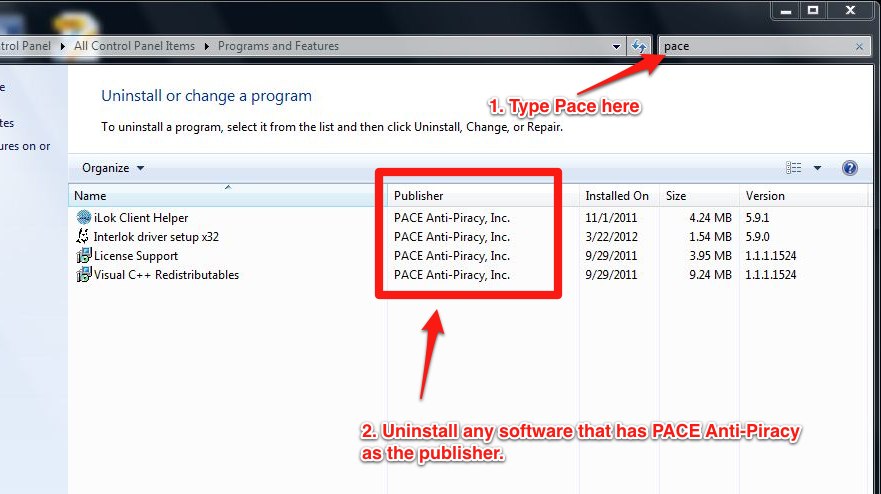
3. When the computer has rebooted, try reinstalling your software again
Helpful Links
Why is iLok License Manager telling me I need to update Windows 7 or Windows 10?
How do I redeem my iLok activation code using the iLok License Manager?
PC Optimization Guide for Windows 10
Windows 10 Compatibility Information
Slate Media Technology Raven MTi2: Raven iLok Registration
When you need help, Sweetwater has the answers!
Our knowledge base contains over 28,000 expertly written tech articles that will give you answers and help you get the most out of your gear. Our pro musicians and gear experts update content daily to keep you informed and on your way. Best of all, it’s totally FREE, and it’s just another reason that you get more at Sweetwater.com.

