
Two notes Torpedo Captor X+ Reactive Load Box Quickstart Guide
NOTE: This guide covers the Two notes Torpedo Captor X+ models released in 2026. We have a guide for the original Torpedo Captor X here.
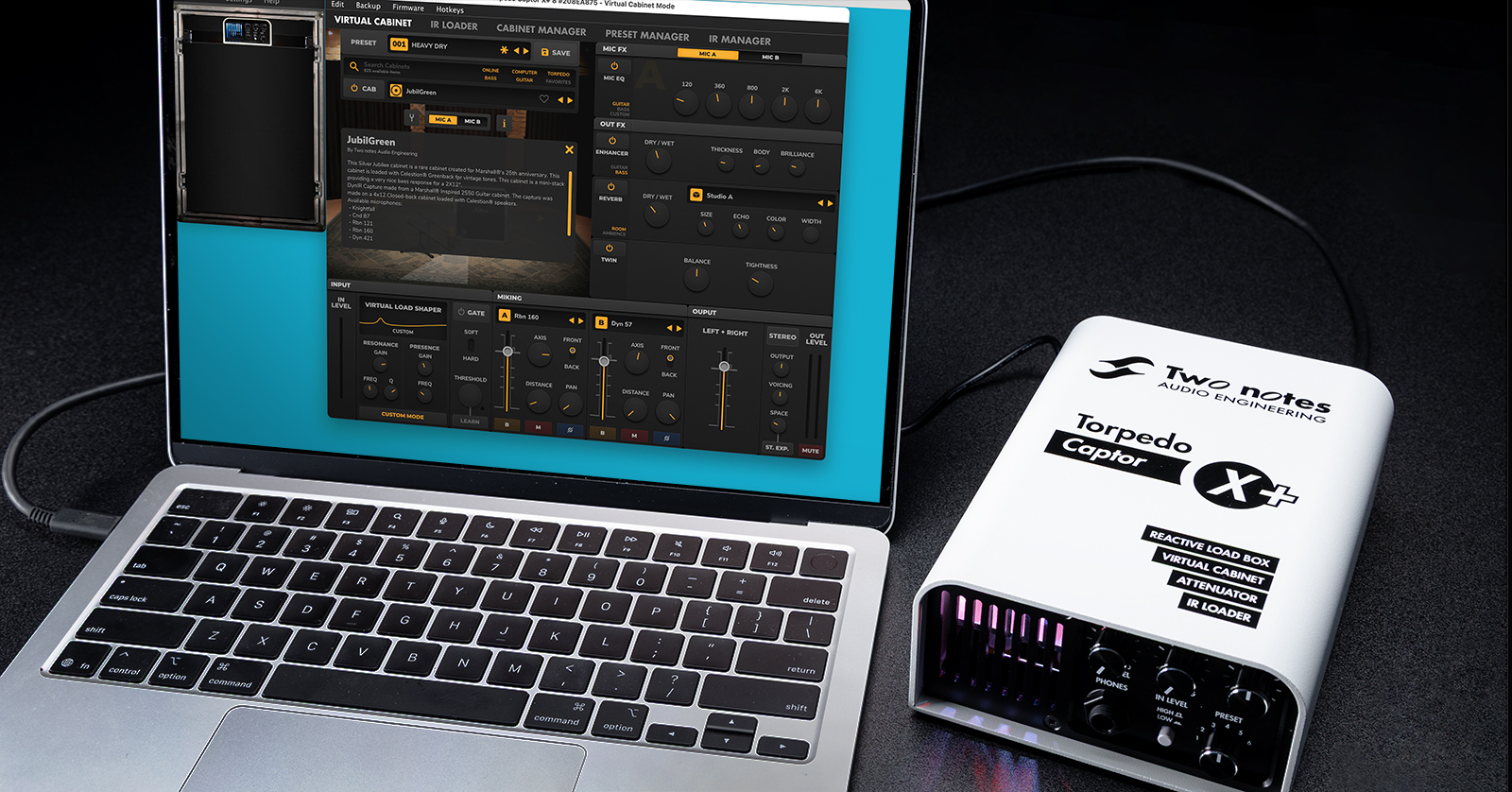
The Two notes Torpedo Captor X+, in 8-ohm or 16-ohm, is a reactive load box, amp attenuator, stereo miked-cabinet simulator, and IR loader with reverb, doubling, and effects. Use it with your tube guitar amplifier for silent stage performance, practice, and recording, or for managing stage volume with your speaker cabinet while driving your amp in its sweet spot.
Here’s how to hook it up to your tube amp and how to use the Torpedo Remote app on your computer, phone, or tablet to program parameters for full-stereo DynIR virtual speaker cabinet models, microphones, rooms, and effects, and to load additional IRs.
- Overview of the Torpedo Captor X+
- Download the Software & Register Your Purchase with Two notes
- Using Torpedo Captor X+ with Your Tube Amp
- Torpedo Captor X+ Inputs & Outputs
- Working with Torpedo Remote
- Two notes Torpedo Captor X+ Video Overview
Overview of the Torpedo Captor X+
IMPORTANT! Because you will be using this product with a vacuum-tube guitar amplifier, you need to take care to connect it correctly. Otherwise, you risk damaging your tube amplifier and the Torpedo Captor X+. This SweetCare guide will help you get started, but it is not a substitute for reading the Two notes Torpedo Captor X+ User’s Manual, found online at this link.
You use the Torpedo Captor X+ by connecting it between your amp and speaker cabinet.
When used as an attenuator, the Captor X+ lowers the amp’s output while preserving optimal tone and passes the signal through to your speaker.
When used as a reactive load box, it enables you to play through your amp silently with no physical speaker connected. It then digitally models speaker cabinets, microphones, and effects in stereo and sends the signal through the XLR outputs.
You can monitor everything through headphones and send the XLR outputs to an audio interface for recording or to your PA system for live performance.
To select different Two notes DynIR speaker cab simulations and to program the tone-shaping effects, you use the Torpedo Remote app with either your computer or your mobile device.
On your Mac or Windows computer, you connect the Captor X+ via USB. The USB connection is for using the Torpedo Remote app to program the parameters of the Captor X+’s digital processing. The USB connection does not transmit digital audio. To record the output of your amp through the Captor X+, connect the XLR analog audio outputs to an audio interface.
You can also run the app on your iPhone, iPad, or Android device connected to the Captor X+ wirelessly over Bluetooth, which is more convenient for use onstage.
Let’s get set up.
Download the Software & Register Your Purchase with Two notes
Register the Captor X+ and set it up using the apps on your computer and mobile device before you connect the unit to your tube amp and start cranking out those great guitar tones.
On the Two notes website, click “Login/Register.” Log in to your existing account or create a new one. Write down your username and password as you will need them to log in to the Torpedo Remote app in the next step.
Set Up the Torpedo Remote App on Your Computer
On your computer, download and install the Torpedo Remote app for macOS or Windows.
Connect the power supply to the Torpedo Captor X+. Attach the included USB-C data cable and connect it to your computer. You may need an adapter to make the connection.
Launch the Torpedo Remote app and log in with your username and password.
You will be prompted with a “Declaration of Ownership” to register your unit to your account. Click “Register.”
When you register, you will receive:
- Your license for three (3) additional DynIR cabinet emulations and 30 exclusive presets
- Your license for the Genome plugin
- Firmware updates
- An account in the Two notes store, where you can purchase additional virtual cabinets
NOTE: Don’t use the “Guest” option. If you proceed as a guest, then you can use some of the functions of the app with your unit, but you won’t be registered for the benefits listed above.
Update the Firmware
The app will inform you if there’s a firmware update. Follow the instructions to download and install the update.
Set Up the App on Your iPhone, iPad, or Android Device
Now that you’ve used the app on your computer to register everything and update the firmware, let’s get set up with your mobile device.
- On your iPhone or iPad, install the Two notes Torpedo Wireless Remote app from the Apple App Store.
- On your Android device, install the Two notes Torpedo Wireless Remote app from the Google Play Store.
To connect to your Torpedo Captor X+ over Bluetooth:
- On your device, make sure Bluetooth is enabled.
- Launch the Torpedo Wireless Remote app.
- Within the app, accept the requested authorizations.
- In the Bluetooth connection window, follow the on-screen instructions.
- Input the PIN code to pair the Torpedo Captor X+ and your mobile device. The PIN code is a six-digit number beginning with “000” and ending with the last three digits of the serial number on your unit.
For more information, consult the Torpedo Captor X+ User’s Manual > Configuring & Using Torpedo Captor X+ > Torpedo Remote.
Download Two notes Genome
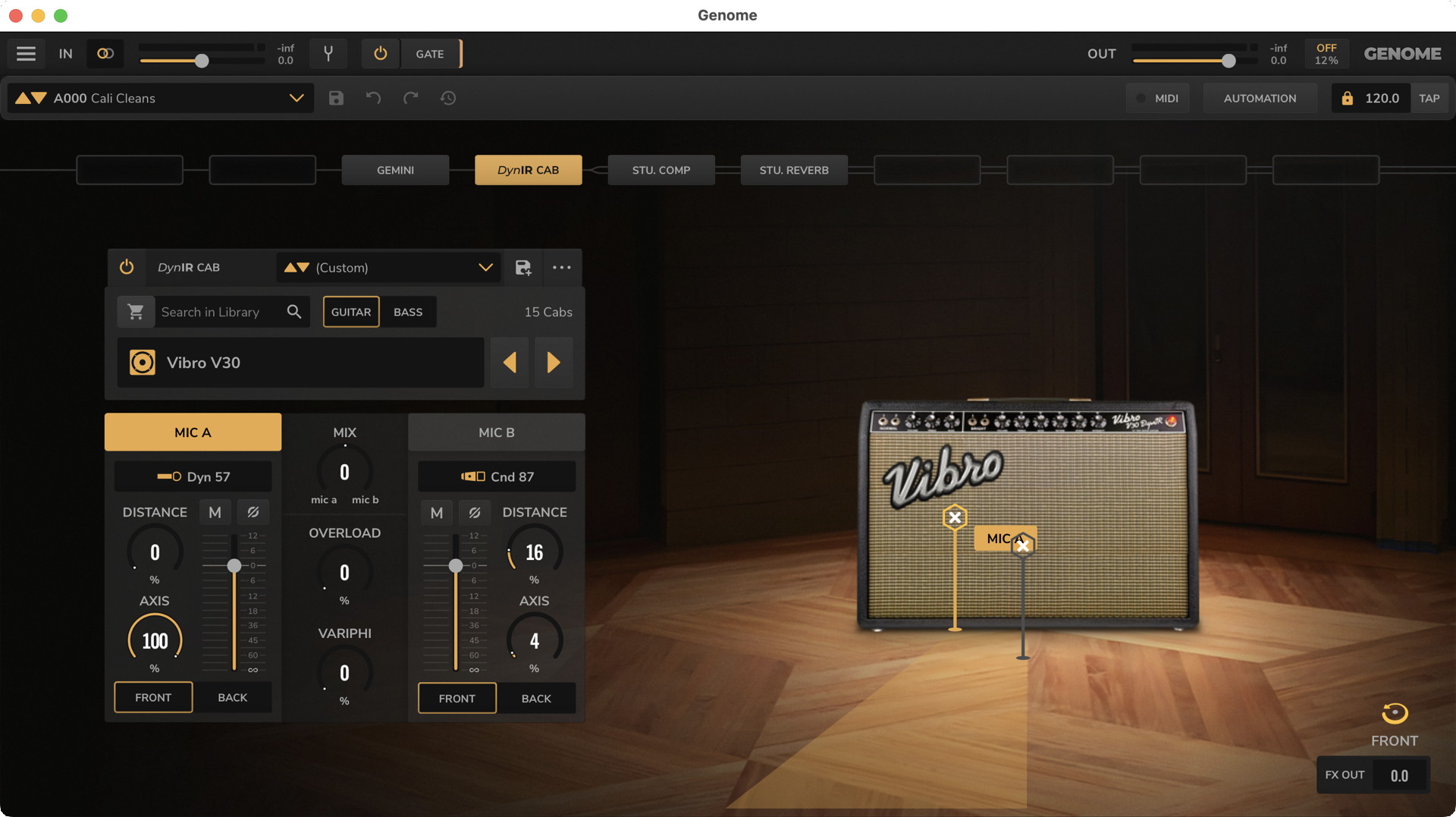
Two notes Genome.
Included with your purchase is a license for Genome, Two notes’ app and plugin for recording your guitar through digital amp modeling, cabinets, and effects entirely within your computer and your DAW — no Torpedo Captor X+ needed. When you register, you can download and activate your copy of Genome from your account page.
Learn more in the Two notes Genome User’s Manual.
Using Torpedo Captor X+ with Your Tube Amp
IMPORTANT! Before you proceed, make sure you have a tube amplifier of 100 watts or less and a suitable speaker cabinet. You need an amp with either 16-ohm or 8-ohm output.
Make sure that you have the correct version of the Torpedo Captor X+, 16-ohm or 8-ohm, to match the load from your amp.
You need speaker cables to connect the output of the amp to the Speaker In on the Torpedo Captor X+ and to connect the Speaker Out jack from the Captor X+ to your speaker cabinet. Do not use regular guitar instrument cables. The wrong cables will cause equipment to overheat and may lead to damage.
IMPORTANT! Before you turn on the power to your amp, always make sure it is properly connected either to a speaker cabinet or to the Torpedo Captor X+, which will provide the proper load. Your amp may suffer damage otherwise.
Read Two notes’ Recommendations for the Correct use of a Load Box with a Tube Amplifier. Use this to find the “sweet spot” to get the ideal sound without putting too much strain on your amp and wearing out your tubes too fast.
Captor X+ Use Cases
Inside the box, you’ll find two folding cards, one in English and one in French. These show how to set up your Captor X+ with your amp based on four use cases:
- Your Tone, Choose Your Volume. Use the Captor X+ as an attenuator between your amp and your speaker cabinet.
- Your Tube Amp, In Stereo. Connect your amp to the Captor X+ without a speaker and send the cab sim output to an audio interface for recording.
- One Tube Amp, Two Signals. Using Dual Mono routing in the Torpedo Remote app, you can send different signals to your front-of-house mixer and to your monitors.
- Record Now, Mic Later. Connect your amp to the Captor X+ and the direct outs to your audio interface. Record the processed and dry signals separately and use the Genome plugin to add cab sims and effects after the fact.
These diagrams are also found in the Torpedo Captor X+ User Manual > Use Cases & Connecting the Torpedo Captor X+.
Torpedo Captor X+ Inputs & Outputs
Back-panel Connections
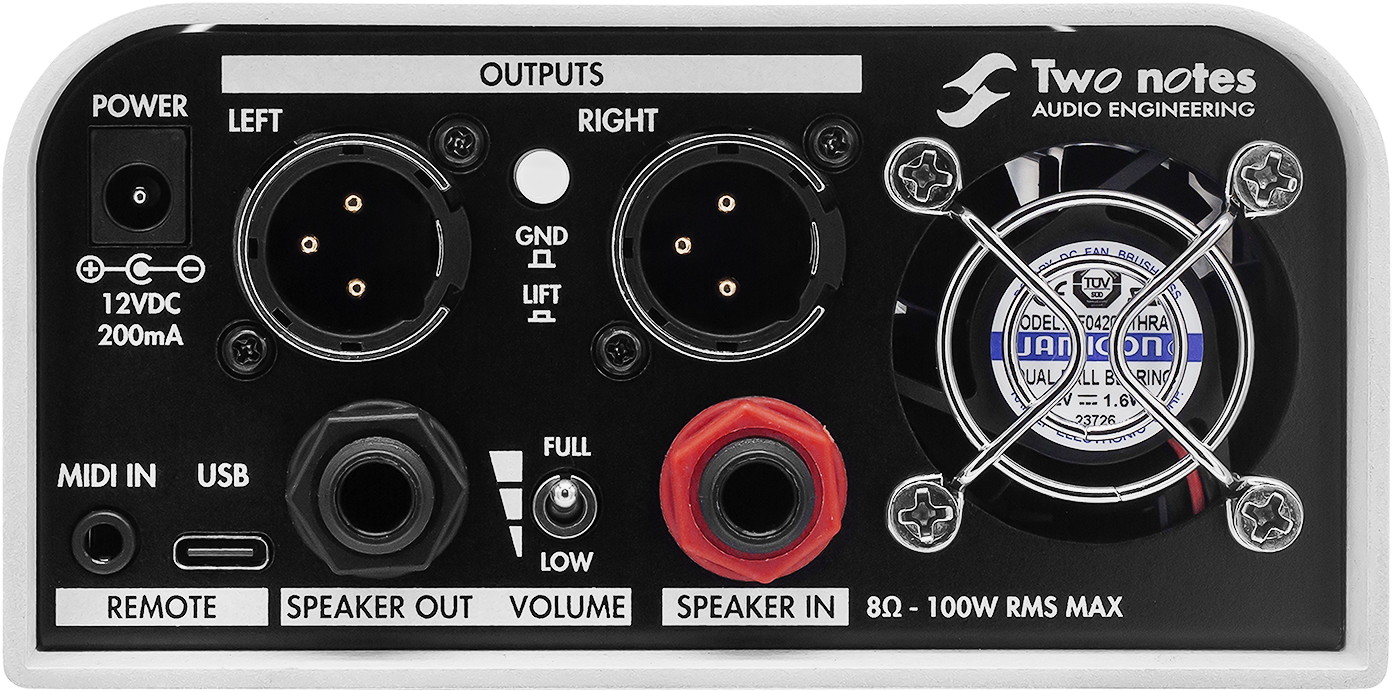
Two notes Torpedo Captor X+ back-panel connections.
Power
Use only the included 12V 200mA power adapter.
Speaker In
Connect a 1/4-inch TS speaker cable from your amp’s speaker output to this connection. Do not use an instrument cable, which has a different impedance.
Speaker Out
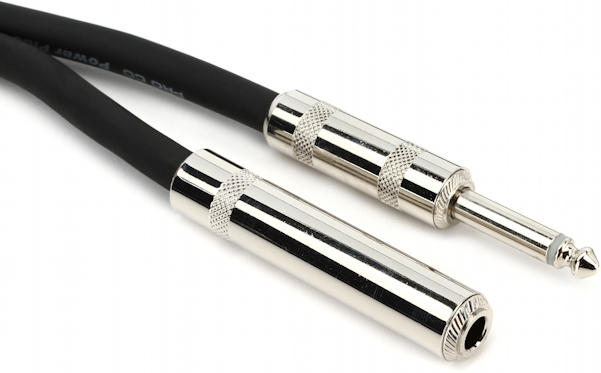
A speaker cable adapter with a female jack to connect to the speaker plug in a combo amp.
Connect a 1/4-inch TS speaker cable to the input on your speaker cabinet. If you are using a combo amp, then you will need a speaker cable with a female jack to connect to the plug wired to your speaker.
Volume
When you have a speaker connected, choose the full strength of the amp’s output or two levels of attenuation.
Ground Lift
Use this switch to eliminate hum from a ground loop.
Outputs
Use balanced XLR connections for an audio interface or a mixer. These can be configured in the Torpedo Remote app as Stereo, Dual Mono, or Dry and Wet.
USB-C
Use a USB-C data cable to connect your computer to use the Torpedo Remote app.
MIDI In
This 1/8-inch TRS jack accepts the included MIDI cable adapter to connect a MIDI device for changing presets.
Fan Exhaust
Keep the space around this clear to allow the fan to pass air through the unit for cooling.
Front-panel Connections
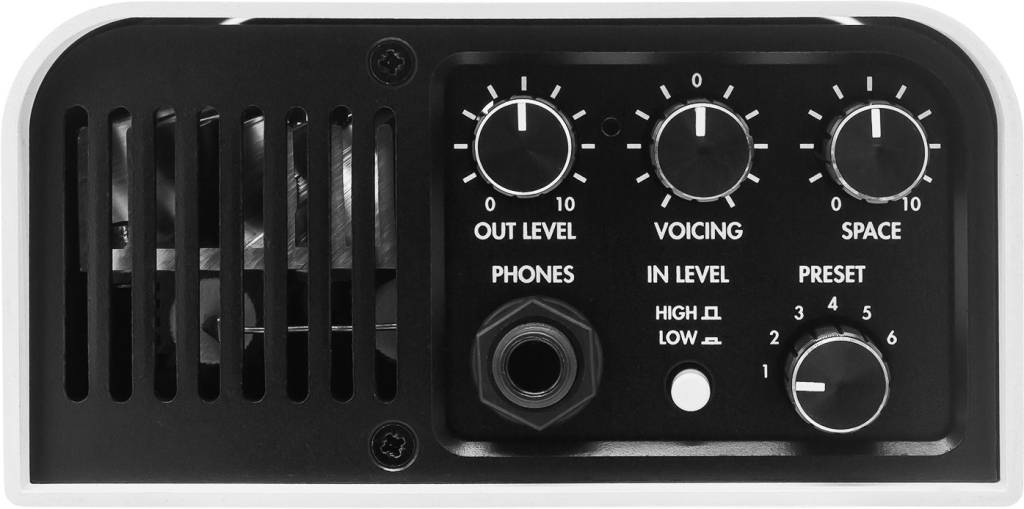
Two notes Torpedo Captor X+ front panel.
In Level
This two-position switch lets you attenuate the input to avoid clipping.
Out Level
Turn this all the way down before you connect headphones or XLR outputs. Turn it up gradually to control the volume.
Voicing
This is a master control for the tone produced by the unit that’s useful for adjusting onstage.
Space
When using stereo output, use this knob to widen the stereo field.
Phones
Connect headphones to this 1/4-inch TRS jack.
Preset
Switch between six presets. Using the Torpedo Remote app, you can load custom presets utilizing additional cabinet and microphone models and effects.
Vent Grille
Make sure this is not obstructed so the fan can draw air through the unit to cool it.
Working with Torpedo Remote
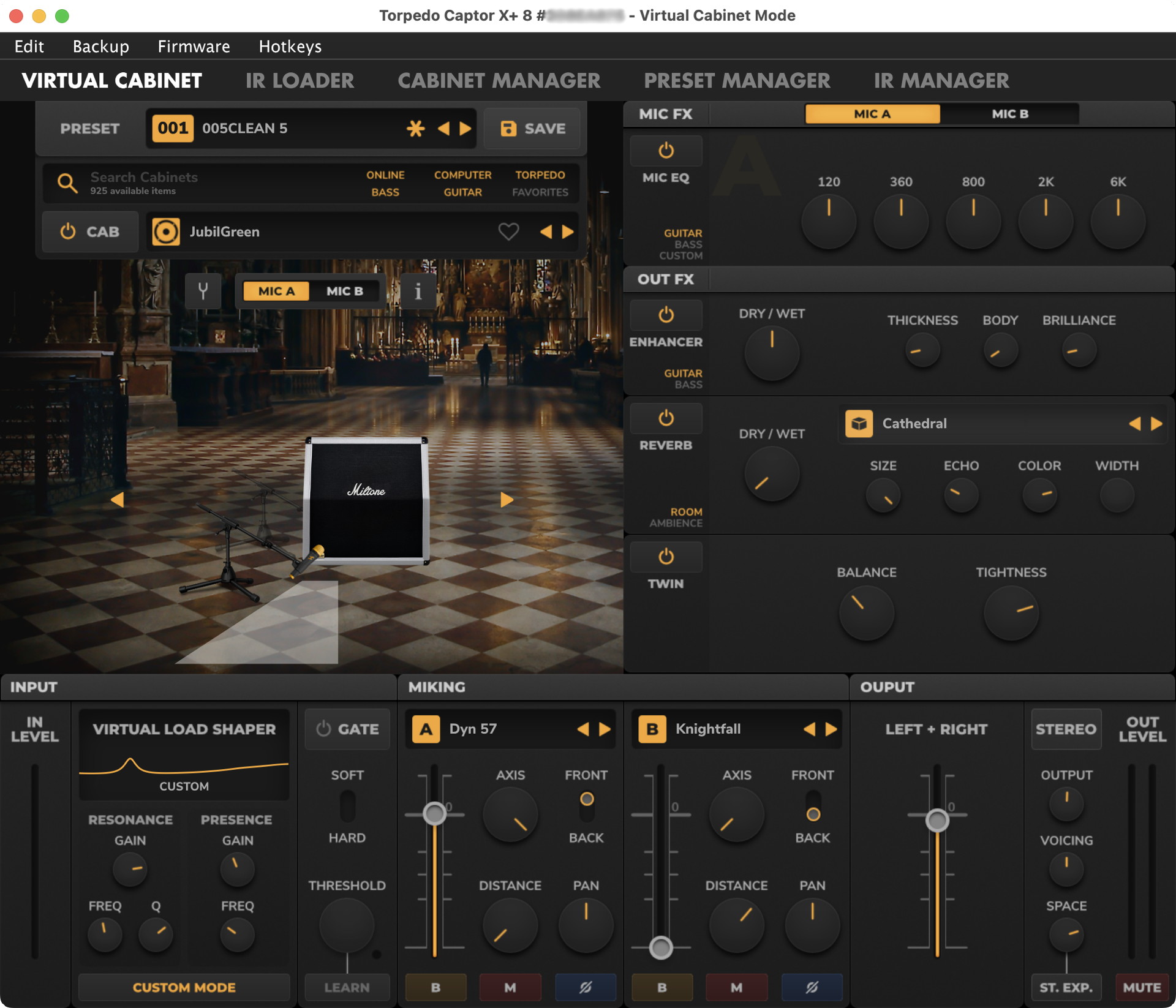
Programming the Captor X+ with Torpedo Remote on macOS.
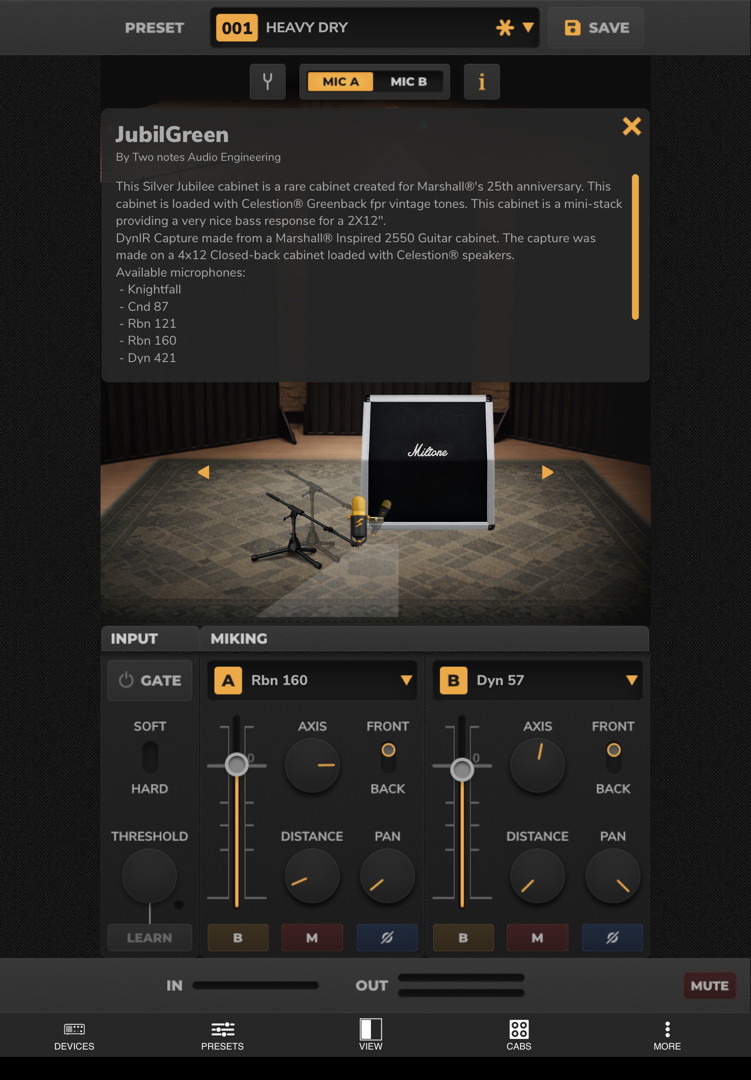
Torpedo Wireless Remote on iPad.
The full capabilities of the Torpedo Captor X+ are unlocked in the Torpedo Remote app for your computer or the Torpedo Wireless Remote app for your mobile device.
The Torpedo Captor X+ holds six cab models in its memory. With Torpedo Remote, you can load and choose from hundreds more that you can download from the Two notes website. These DynIR virtual cabinets give you a great deal of parameter control.
Elements of the signal chain have multiple parameters you can customize. Elements include:
- A virtual cabinet and speaker combination
- The virtual room in which it’s placed
- A selection of one or two virtual microphones and their precise placement
- Effects including the new Virtual Load Shaper, EQ, Enhancer, Reverb, Stereo simulation, and the Twin Tracker double-tracking effect
In addition to a fully stereo signal chain, you can also set up a preset for dual mono so that you can create different mono mixes for front-of-house and for stage monitoring using the two outputs.
You can also use the app to download your own IR files from outside sources and install them on the unit.
Don’t forget to read the Two notes Torpedo Captor X+ User’s Manual to learn the full array of features available for you to dial in the tones that inspire you.
Two notes Torpedo Captor X+ Video Overview
TwoNotesTV: Captor X + Feature Run Down with Guillaume Pille
Related Articles
When you need help, Sweetwater has the answers!
Our knowledge base contains over 28,000 expertly written tech articles that will give you answers and help you get the most out of your gear. Our pro musicians and gear experts update content daily to keep you informed and on your way. Best of all, it’s totally FREE, and it’s just another reason that you get more at Sweetwater.com.

