
Resolving Missing DLL Errors on Windows
In this article, we will give you step-by-step instructions to solve the problem in just a few minutes.
Suppose you are getting an error message stating that a program cannot run because of a missing .DLL file. In that case, downloading some specific updates for your Windows operating system can usually fix that problem.
NOTE: The Microsoft downloads mentioned in this article will cover problems with software created between 2015 and the present day. If the software giving you the missing DLL file error is from before 2015, you may need to download and install the Visual Studio 2013, 2012, or 2010 updates from the official Microsoft download page to resolve the issue.
Understanding the problem
In a nutshell, a .DLL file is an operating system file that contains critical information needed to run different computer software. Many different applications can share .DLL files, so if one is missing, it can cause problems or error messages with more than one application. You might be missing the file because it has become corrupted, or you might be missing the file because your computer is missing specific Windows updates.
This problem will usually show up as an error message on your screen, either while installing new software for the first time or after the software is installed and you’re trying to run the program for the first time.
You may get several different error messages, but they will all have something in common: the error message will say you are missing a file with a .dll extension. Here are some examples
- The program can’t start because VCRUNTIME140_1.dll is missing from your computer. Try reinstalling the program to fix this problem.
- The program can’t start because MSVCP110.dll is missing from your computer. Try reinstalling the program to fix this problem.
- The code execution cannot proceed because mkl_intel_thread.dll was not found. Reinstalling this program may fix the problem.
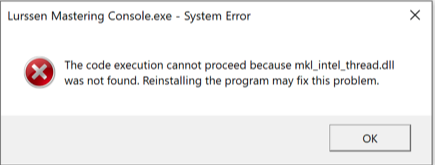
Example of a .DLL error
How to reinstall the .DLL files
The files you are missing are a part of the Windows operating system. Microsoft has created a single page with all the downloads you will need to solve an error message or problem due to a missing .DLL file.
DOWNLOAD THE FILES FROM MICROSOFT ONLY! Do not attempt to download a .DLL file from any other website except the official Microsoft website. If you download a .DLL file from third-party websites, it will not solve this problem and may have viruses or other malware attached.
- Go to the official Microsoft download page.
- Scroll down to Visual Studio 2015, 2017, and 2019 and download both vc_redist.x86.exe and vc_redist.x64.exe using the links provided.
- Locate the files in your Downloads folder and double-click them to install the updates.
- Reboot your computer.
- Run the installer again for the original program giving you the missing DLL file error message. You should be able to complete the installation with no problems or error messages.
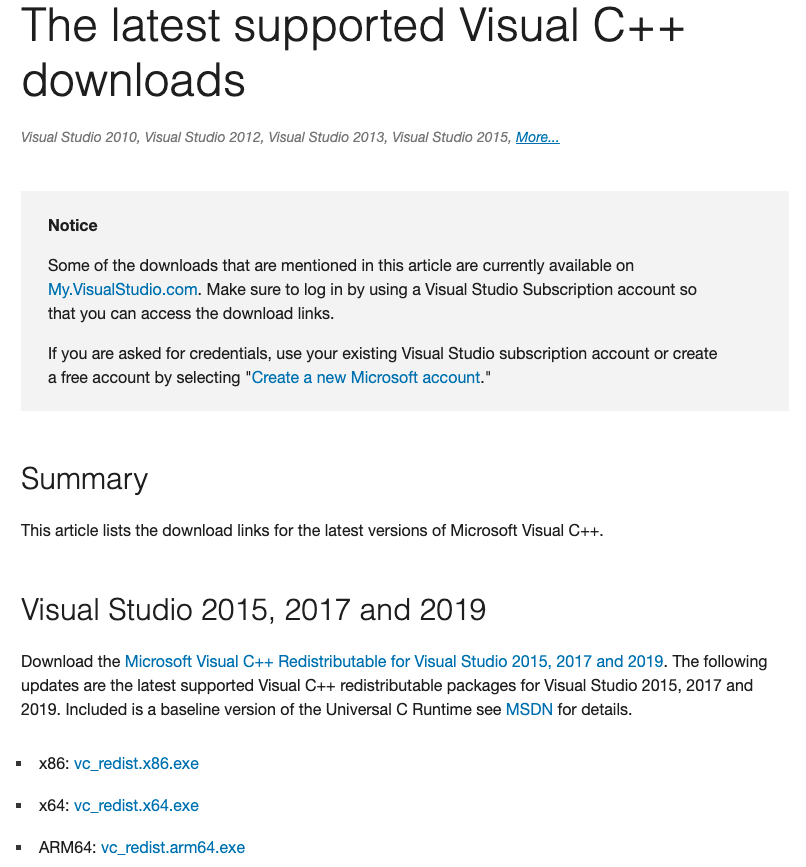
Click the image to download
Related content
Learn more about how and when to back up Windows 10!
Learn More
Learn more about resolving audio interface issues on Windows!
Learn More
Learn more about how to properly update drivers on PC!
How Do I Update Drivers on My PC?Learn more about the different ways you can back up Windows 10!
How to Back Up Windows 10When you need help, Sweetwater has the answers!
Our knowledge base contains over 28,000 expertly written tech articles that will give you answers and help you get the most out of your gear. Our pro musicians and gear experts update content daily to keep you informed and on your way. Best of all, it’s totally FREE, and it’s just another reason that you get more at Sweetwater.com.

