

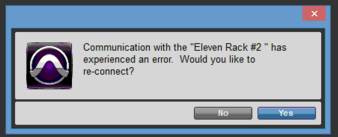
I’m getting a message in Pro Tools that says, “Communication with the “Eleven Rack #2″ has experienced an error.”
- Article #1723655
- Updated on Feb 11, 2016 at 3:50 PM
This happens when there is a duplicate Eleven Rack listed in the Pro Tools MIDI devices. Removing the second Eleven Rack from the MIDI inputs devices menu will fix this error.
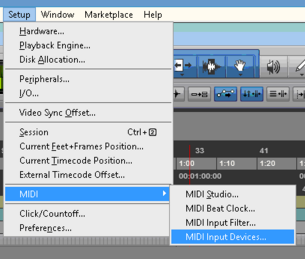
1. Click on the Setup Menu and choose MIDI > Input Devices
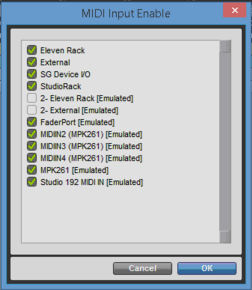
2. Uncheck Eleven Rack #2
When you need help, Sweetwater has the answers!
Our knowledge base contains over 28,000 expertly written tech articles that will give you answers and help you get the most out of your gear. Our pro musicians and gear experts update content daily to keep you informed and on your way. Best of all, it’s totally FREE, and it’s just another reason that you get more at Sweetwater.com.
 Knowledge Base

Customers Also Viewed
- Yamaha CC1 Quickstart Guide
- macOS Tahoe 26 Compatibility Guide
- Suzuki Omnichord OM-108 Quickstart Guide
- Behringer Synth Setup Guide
- Avid Perpetual Upgrade Software Activation Instructions
- How to Set Up a DAW Controller in Bitwig Studio
- How to Set Up a DAW Controller in Studio One
- How to Set Up a DAW Controller in Cubase