



¡Obtenga asesoría en español!  Llámenos hoy a (800) 222-4701
(800) 222-4700 Talk to an expert!
Loading Cart
Your Cart Is Empty

See what's new at Sweetwater.

My Cart this.cartQty

How do I access the Softube plugins that were included with my Focusrite device?

Focusrite and Softube have teamed up to offer the Time and Tone plugin bundle to customers who purchase a new Scarlett, Saffire, or Clarrett series device, free of charge. To receive these free plugins, you will need to register the serial number on your Focusrite device in your Focusrite account. This will generate a registration code for your Softube Time and Tone bundle and a lot more. The instructions below will walk you through the process of using that registration code to get your Softube Time and Tone bundle up and running.

iLok:

Before we get started, it’s best to ensure that you have an iLok account created. While this bundle does not require a physical iLok, you will need an iLok account (create a free account here) and the iLok License manager to activate your Time and Tone bundle.

Download

After you have registered the serial number on your Focusrite device, a list software activation codes will appear in the “Downloads and Activations” section of your Focusrite account. Next to Softube Time and Tone bundle you will see a code and a blue link that says “Click Here”. Copy the code and then click the link to view the Softube registration page.

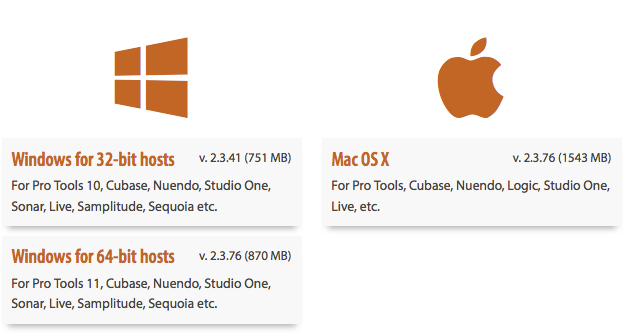
At their registration page, you will find download links, step-by-step instructions, and a video that details this entire process. Click the installer that corresponds to your host and operating system to begin downloading the Time and Tone bundle.

screen-shot-2016-09-27-at-11-58-31-am

 Register:

To register your Softube Time and Tone bundle, enter the Softube code that appeared in your Focusrite account as well as your iLok User ID  and email address. Take care to enter the iLok User ID exactly as you would when you log into your iLok account; even a small typo at this stage can be time-consuming to correct. Once you have entered all your information correctly, click the OK button. Softube will now send a license to your iLok account.

screen-shot-2016-09-27-at-12-05-01-pm

Activate:

After registering your bundle code, the Time and Tone bundle license will appear in the “Available” section of your iLok account. To activate your plugins, launch the iLok License manager, log into your account, and then drag and drop the license onto the icon for your computer as shown here. You will only need to do this once.

Install:

To install your Softube bundle, simply double click the installers that you downloaded and follow the onscreen instructions. When the installer has finished, the Softube Plug-ins Control will open. Select the Time and Tone bundle and click OK to make your plugins visible to your host software.

You are now ready to use your Softube Time and Tone bundle!

Note: If your bundle doesn’t appear in your host, try relaunching it.


When you need help, Sweetwater has the answers!

Our knowledge base contains over 28,000 expertly written tech articles that will give you answers and help you get the most out of your gear. Our pro musicians and gear experts update content daily to keep you informed and on your way. Best of all, it’s totally FREE, and it’s just another reason that you get more at Sweetwater.com.

Click here for 28,000 answers to your tech questions Knowledge Base

Hundreds of Deals in the DealZone

Offer applies only to single-receipt qualifying purchases. Select manufacturers may require that only the manufacturer’s products qualify towards the minimum purchase amount needed to be eligible for promotional financing. Otherwise, an invoice that meets the minimum purchase amount and contains at least one qualifying manufacturer product is eligible for promotional financing. No interest will be charged on promo purchase balance, and equal monthly payments are required on promo purchase until it is paid in full. The payments equal the amount financed divided by the number of months in the promo period, rounded up to the next whole dollar. These payments may be higher than the payments that would be required if this purchase was a non-promo purchase. During the last month(s) of the promo period the required monthly payment may be reduced due to the prior months’ rounding. Regular account terms apply to non-promo purchases. New Accounts as of 07/31/2025: Purchase APR is 34.99%. Penalty APR is 39.99%. Min Interest Charge is $2. Existing cardholders: See your credit card agreement terms. Subject to credit approval.

Offer applies only to single-receipt qualifying purchases. No interest will be charged on the promo balance if you pay it off, in full, within the promo period. If you do not, interest will be charged on the promo balance from the purchase date. The required minimum monthly payments may or may not pay off the promo balance before the end of the promo period, depending on purchase amount, promo length and payment allocation. Regular account terms apply to non-promo purchases and, after promo period ends, to the promo balance. New Accounts as of 07/31/2025: Purchase APR is 34.99%. Penalty APR is 39.99%. Min Interest Charge is $2. Existing cardholders: See your credit card agreement terms. Subject to credit approval.

The estimated required monthly payment shown which excludes taxes and delivery equals the amount financed divided by the number of months in the promo period, rounded up to the next cent. During the last month(s) of the promo period the required monthly payment may be reduced due to this rounding. These payments apply only with the financing offer shown. If you make these payments by the due date each month, you should pay off this amount financed within the promo period, if it is the only balance you are paying off. If you have other balances on your account, this payment will be added to any other minimum monthly payments.

Applies only to select items from this manufacturer. Ask your Sweetwater Sales Engineer for more details.