

How do I adjust the recording level on my Zoom Q2n?
Use the dial on the right side of the unit to increase and decrease the levels.
If the Peak indicator at the bottom right of the screen turns red, your levels are too high.
- Turning the dial clockwise will increase the level.
- Turning the dial counter-clockwise will decrease the level.
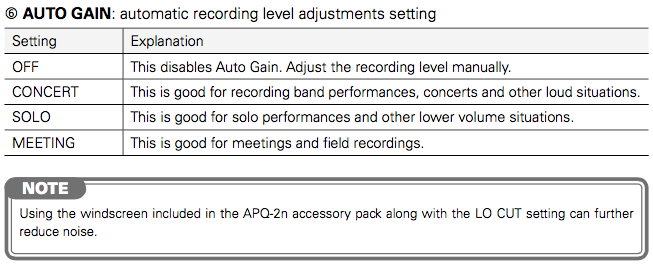
Auto Gain:
The Auto Gain settings allow you to choose a preset amount of gain that corresponds to common recording situations.
The four Auto Gain settings and the situations they are optimized for are described on page 13 of the manual and listed below.
When you need help, Sweetwater has the answers!
Our knowledge base contains over 28,000 expertly written tech articles that will give you answers and help you get the most out of your gear. Our pro musicians and gear experts update content daily to keep you informed and on your way. Best of all, it’s totally FREE, and it’s just another reason that you get more at Sweetwater.com.

