There’s quite a bit of mystique (and possibly a bit of confusion) surrounding the tools and techniques related to equalization, so, in an effort to clear some of that up, here’s a basic EQ primer — what EQ is, where it came from, how it works, and the differences among different types of EQs.
What Is an Equalizer?
At the most basic level, an equalizer is a filter that connects to a volume knob. Audio equalizers are made up of multiple filters that isolate specific ranges — or bands — centered around specific frequencies. The loudness (or softness) of each of these bands can be controlled with its own volume knob by turning it up (louder) or down (softer). Each EQ band has four basic characteristics: slope, frequency, Q, and gain.
Filter Types
Shelving filters
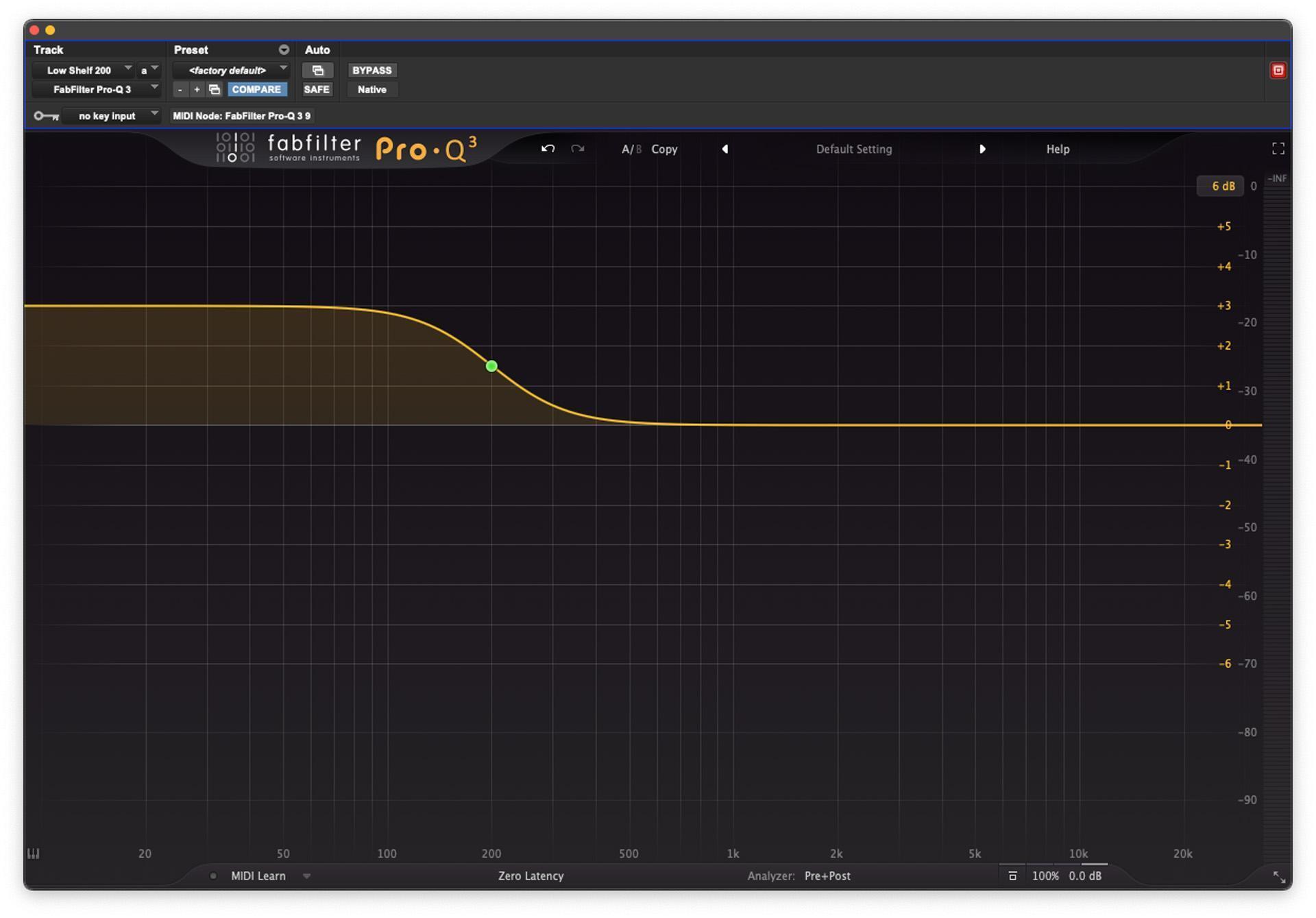
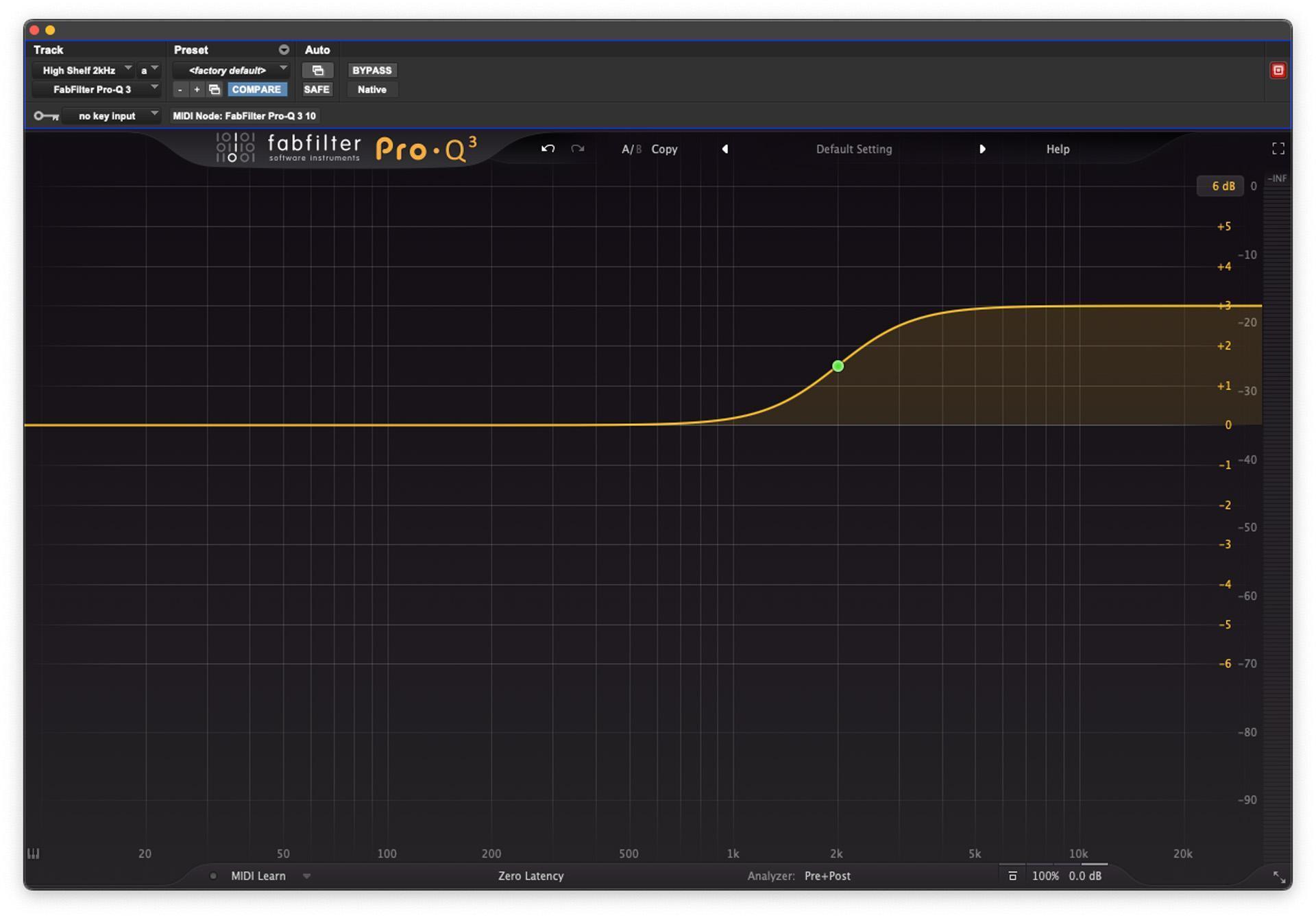
Shelving filters, like those used in consumer-grade stereo systems, work with a corner frequency (the “corner frequency” is the frequency where the signal level is altered by 3dB [decibels] whether boosting or cutting); a low shelf only affects the audio below the corner frequency (see fig. 1 below), while a high shelf affects the audio above the corner frequency (see fig. 2 below). With a shelving EQ, those frequencies above or below the corner frequency can be made louder (by boosting) or softer (by cutting). The shelving frequencies are chosen to affect mainly the frequency extremes while leaving the midrange largely unchanged. For this reason, general high- or low-frequency tonal shaping tends to be done by using a shelving filter. Shelving filters are designed to apply an equal gain change to all frequencies beyond the corner frequency. If a shelving filter needs to be adjustable, then it will require not only a control for selecting the shelving frequency but also one for selecting the amount of cut or boost applied.
Highpass and lowpass filters
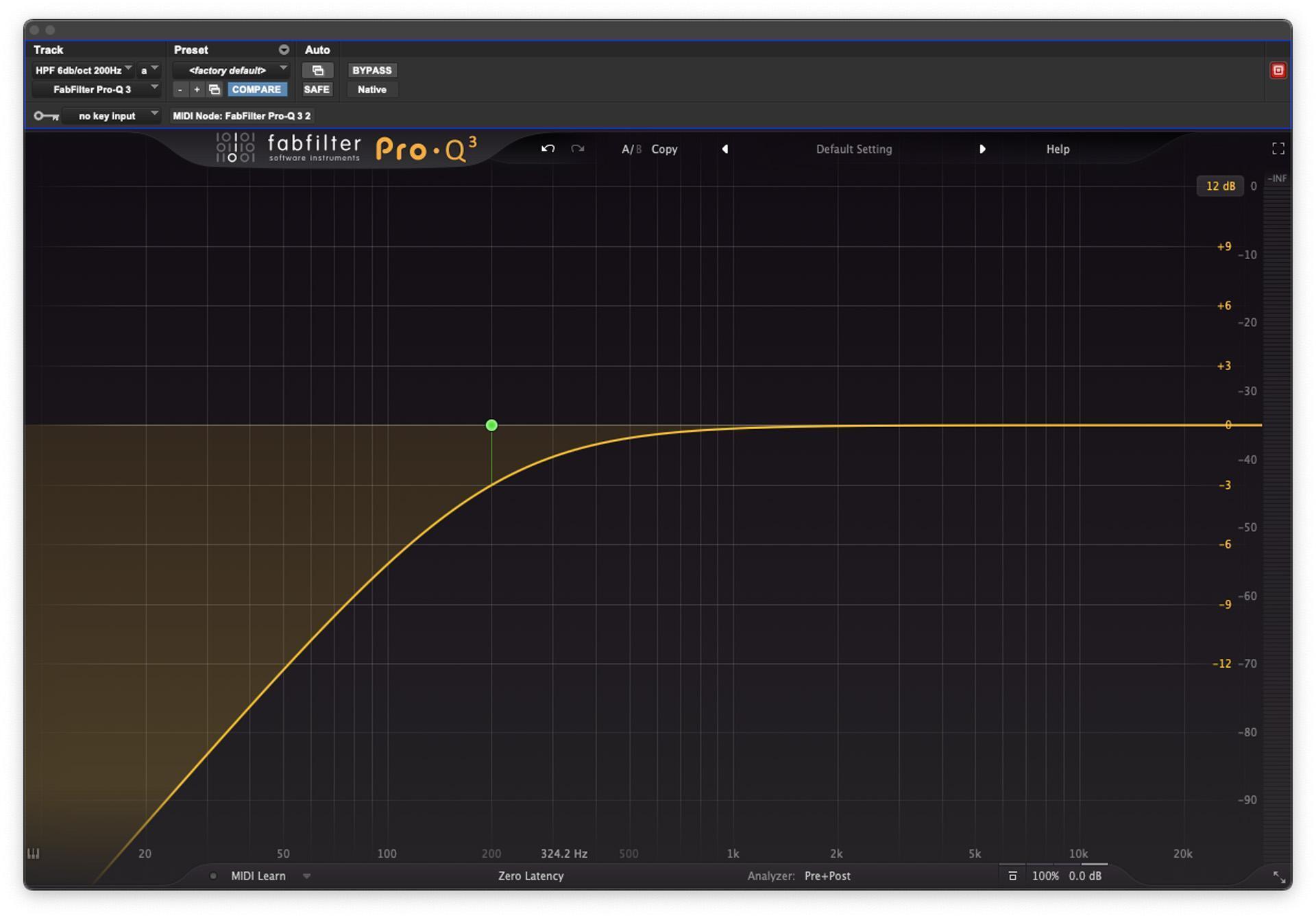
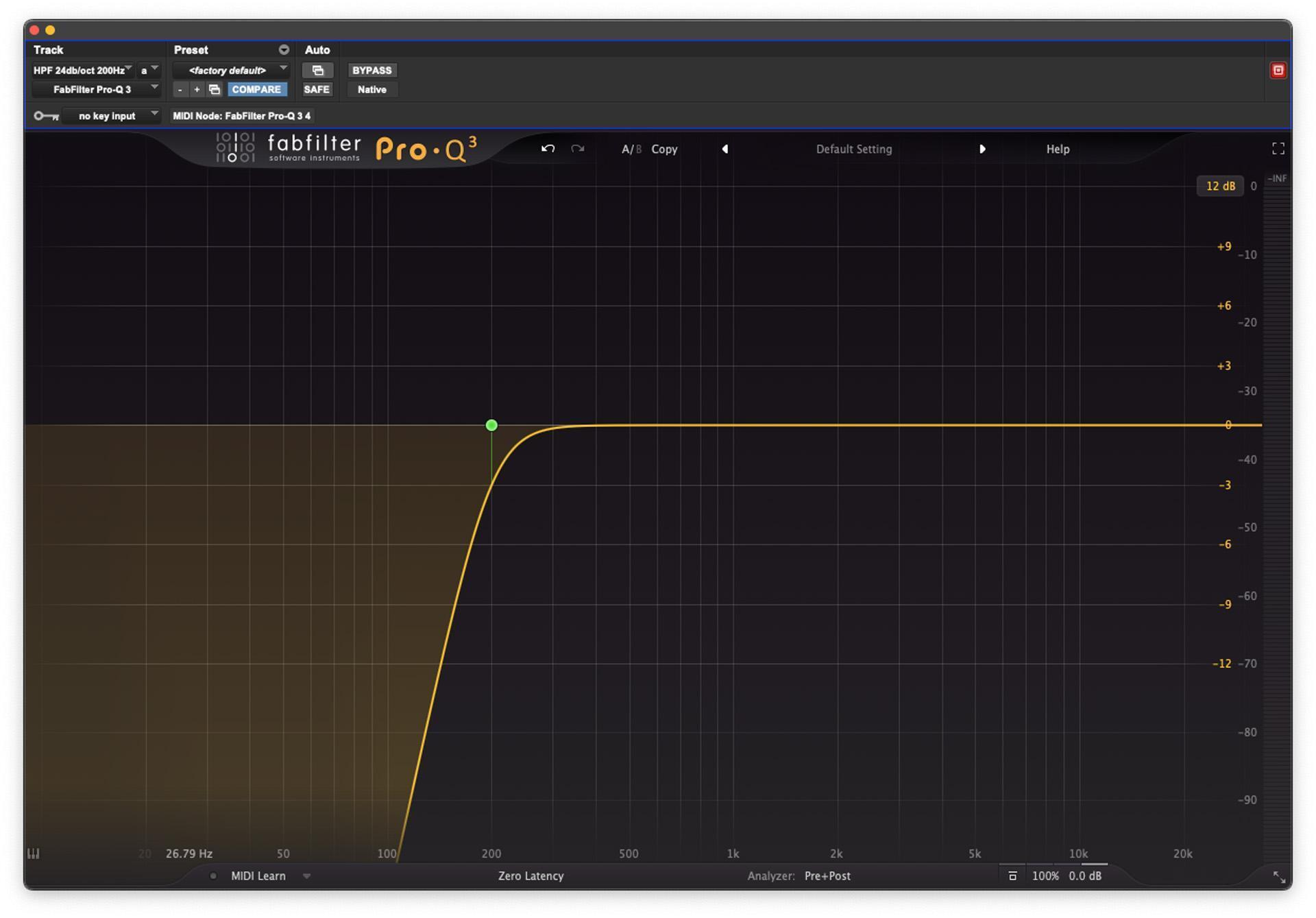
The simplest filter circuits commonly used in EQs are highpass and lowpass filters, which are named for the frequencies that they leave unaffected. A highpass filter (sometimes called a low-cut filter) progressively reduces the level of any audio frequencies below a user-specified cutoff frequency (“cutoff” is another name for the corner frequency) while leaving the level of those above this point comparatively unchanged (see fig. 3 below).
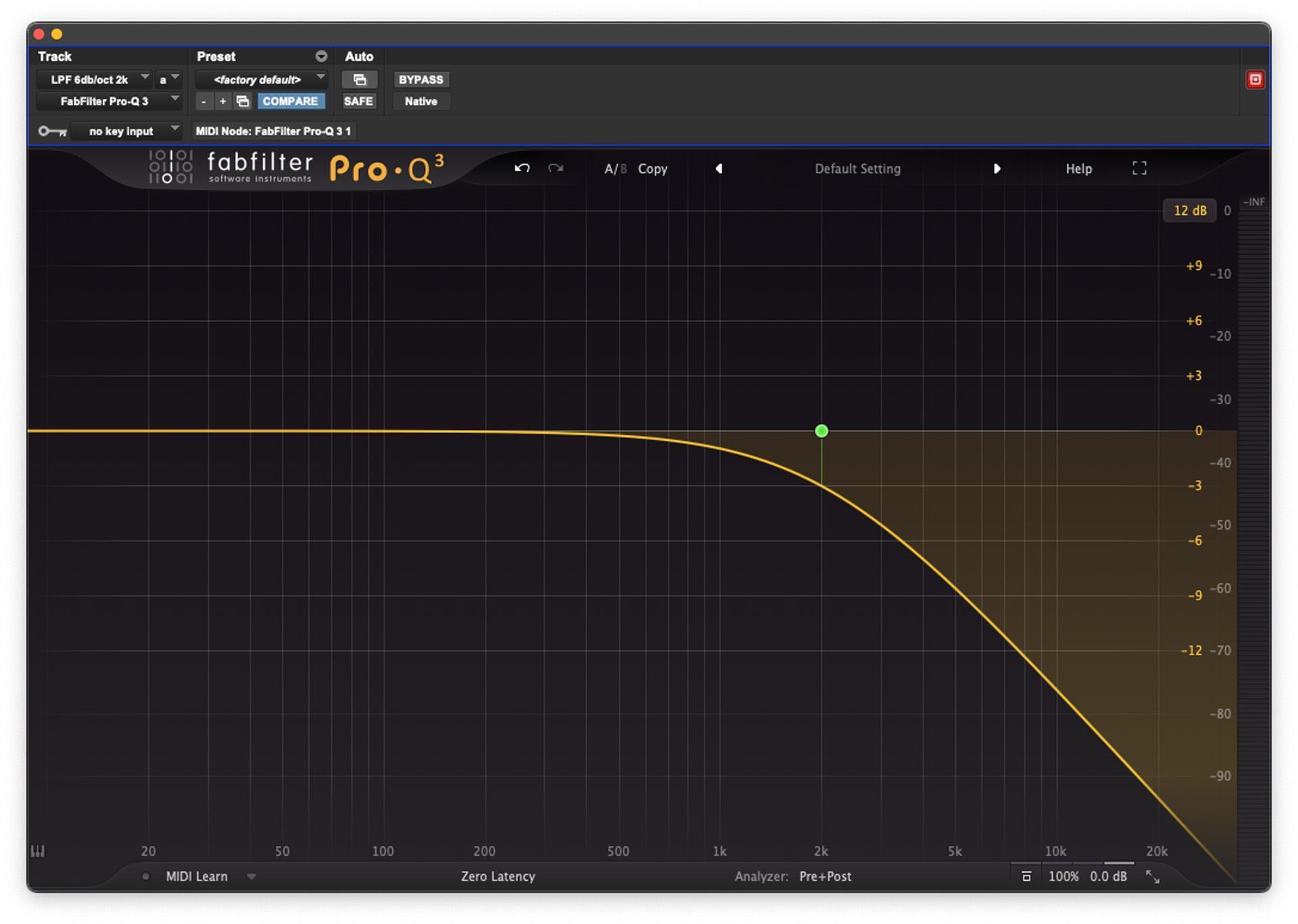
On the other hand, the lowpass filter (sometimes called a high-cut filter) reduces the level of frequencies above the cutoff frequency, leaving those below comparatively unchanged (see fig. 4 below).
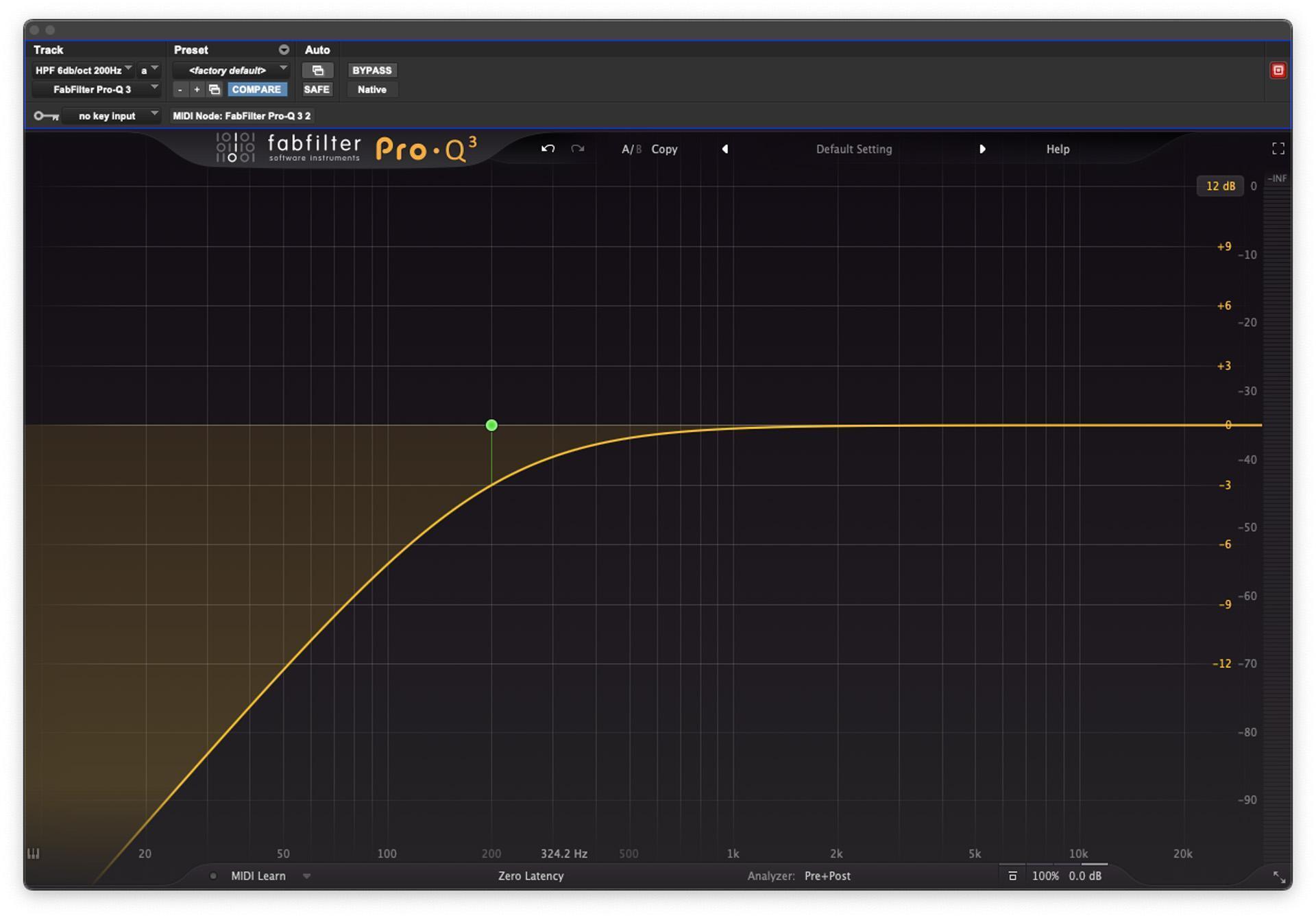
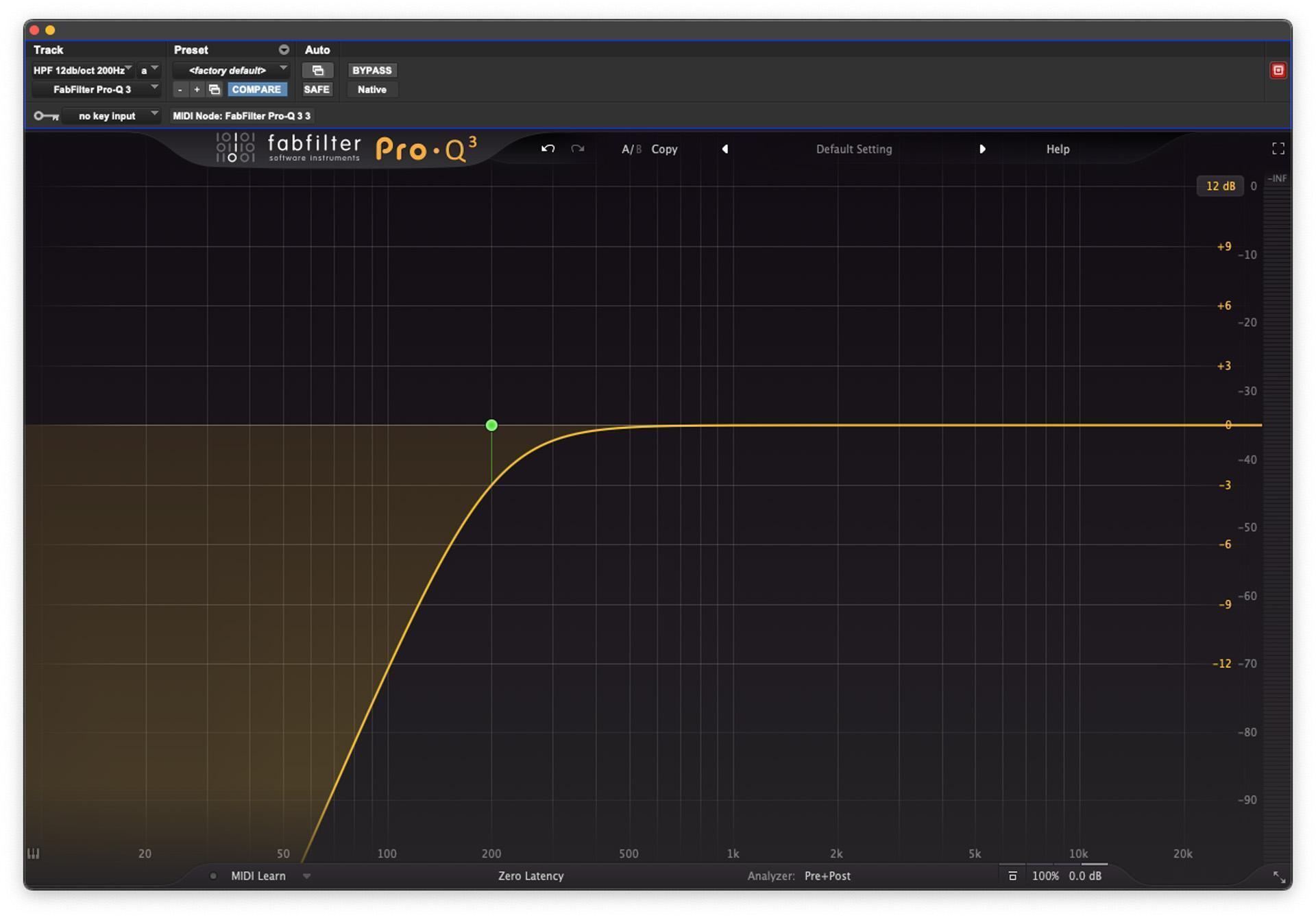
A first-order lowpass or highpass filter has a standard response curve that reduces the unwanted frequencies well above or below the cutoff frequency with a slope of 6dB per octave. A second-order filter will reduce those frequencies with a slope of 12dB per octave, though filters can be designed to have steeper slopes, such as 18dB, 24dB, and even 48dB per octave (see figs. 5A, 5B, and 5C below).
Bandpass filter
To affect a frequency band that isn’t at either extreme of the frequency spectrum, a bandpass, or peaking, filter (also called a bell filter) is required. This type of filter allows you to selectively boost or cut a limited band of the audio spectrum. These filters are typically sweepable, which allows to you to choose the center frequency of the band as well as the amount of boost or cut. Fully parametric EQs are ones that allow you to choose the width of the band, which translates to choosing how much of the audio spectrum that band will affect.
Notch filter
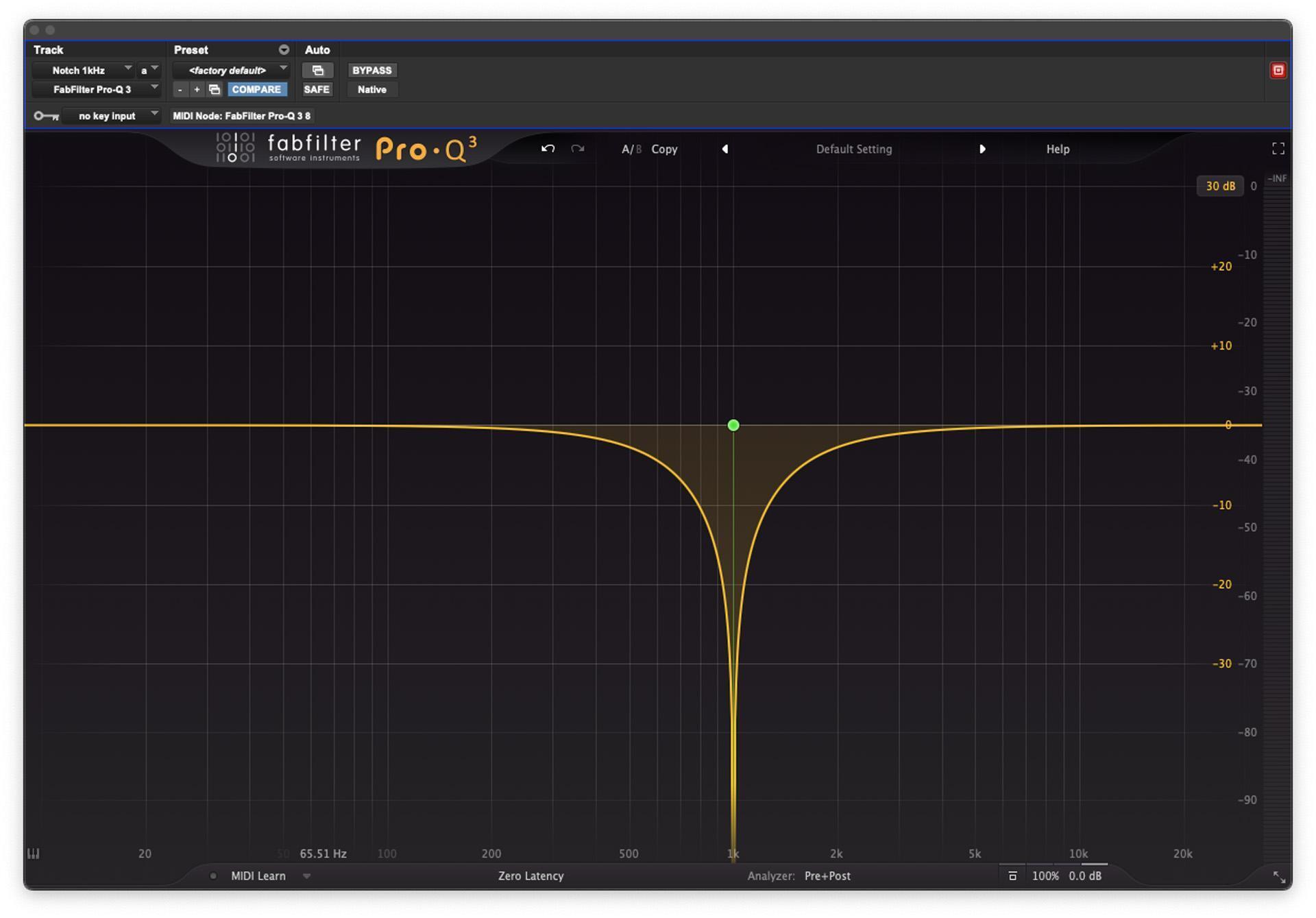
A notch filter is essentially a bandpass filter that is used to cut a certain frequency range usually with a very narrow bandwidth (see fig. 6 below). These are commonly used to tune out resonant frequencies in an installed speaker system (such as a PA).
Filter Characteristics
Slope
The slope of a filter refers to how aggressively the sound beyond its corner frequency is attenuated. Filter slope is usually associated with highpass and lowpass filters, though some EQs allow you to change the slope of bell or shelving bands, as well. Slope is measured in dB/octave. The higher the number, the steeper the drop-off around the corner frequency of the filter. Slopes from 6dB/octave to 24dB/octave are common.
Frequency
The frequency is the center of your EQ band’s operation. This control, along with the Q, determines the range where boosts or cuts will occur.
Q
You can think of “Q” as the bandwidth of an EQ band. Q stands for “quotient of change.” Q values less than one result in broader EQ curves (see fig. 7 below), while values greater than one create tighter, more selective boosts or cuts (see figs. 8 and 9 below).
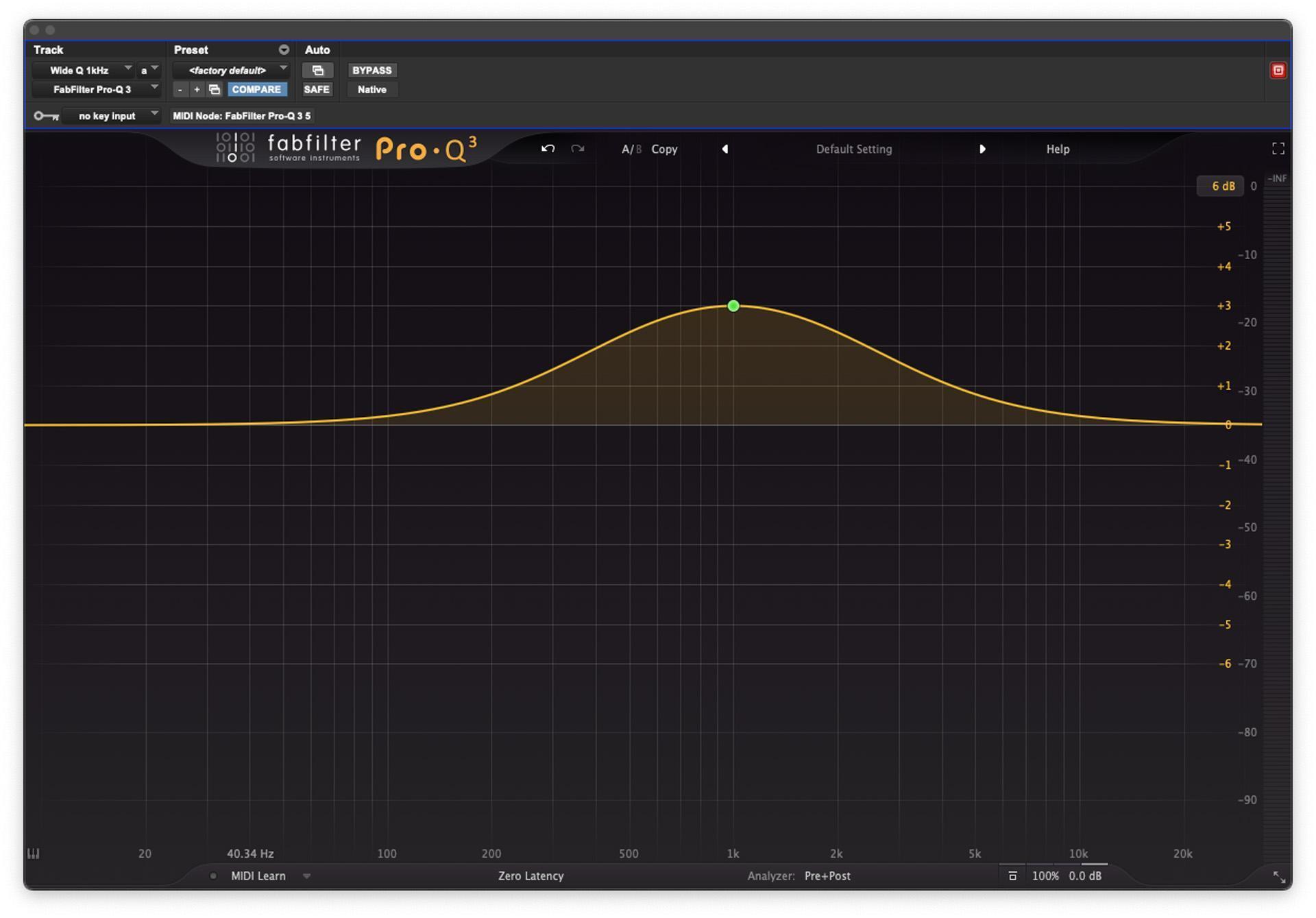
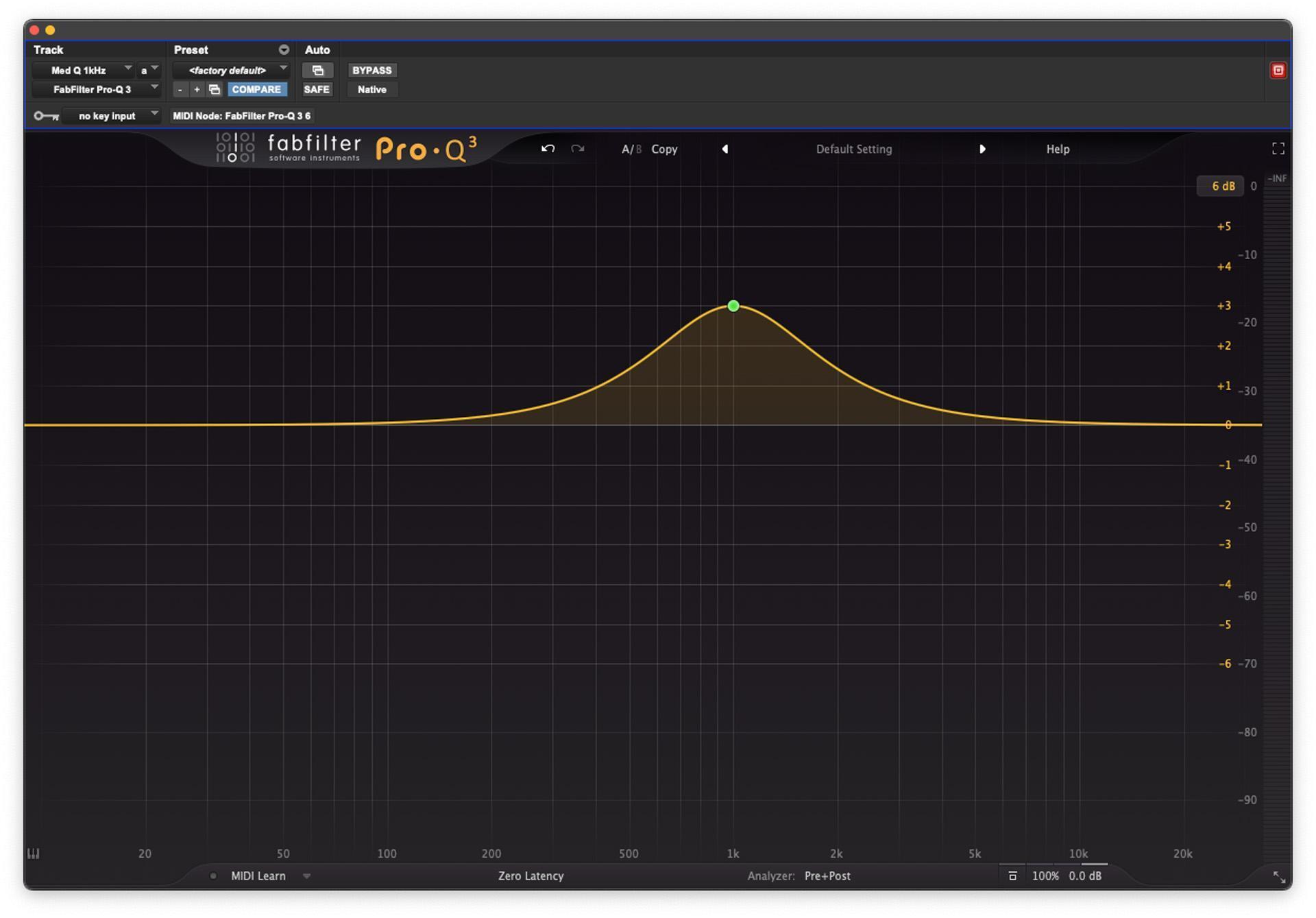
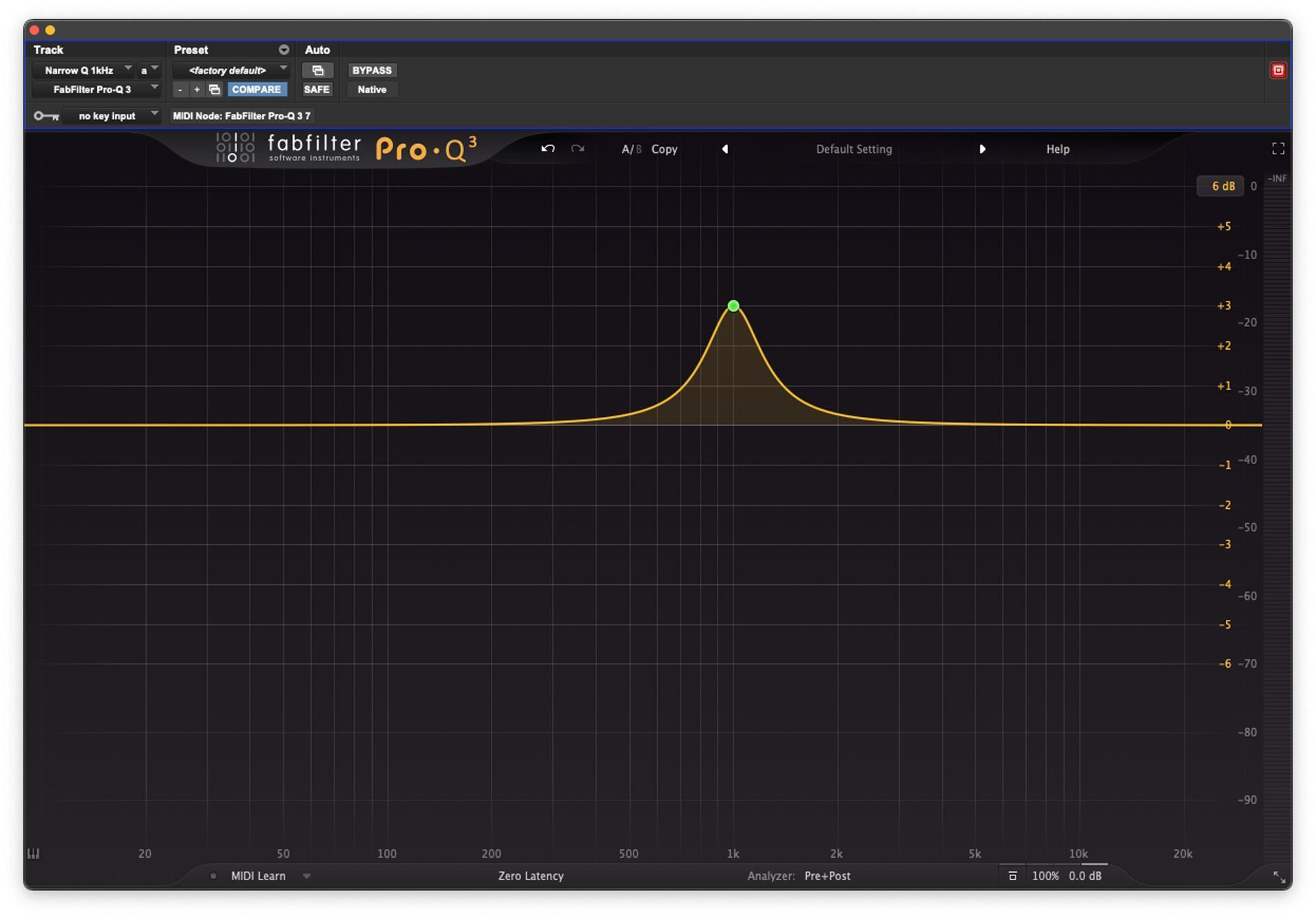
Figure 9: A higher-value bell curve will affect an even narrower range of frequencies. This curve, centered at 1kHz, represents a Q of 3.
Gain
Gain determines the amount of boost or cut you apply with your EQ. It’s measured in decibels (dB). Positive gain values indicate a boost, while negative ones make a cut.
History
The concept of equalization was first applied to correct the frequency response of telephone lines using passive networks. Initially, it was used to compensate for the uneven frequency response of an electric system by applying a filter having the opposite response, thus restoring the fidelity of the transmission.
Equalizers as an audio product were originally developed for physical venues such as movie theaters, places that weren’t designed with acoustics in mind, to “equalize” all of the sound frequencies. Early equalizers included basic bass and treble controls featuring fixed frequency centers as well as fixed levels of cut or boost. These filters worked over broad frequency ranges. Variable equalization in audio reproduction was first used by RCA in the 1920s and was used to equalize a motion-picture theater sound-playback system.
Types of Equalizers
Graphic equalizer
Graphic EQs are banks of filters that, together, cover the audio spectrum in greater or lesser resolution, depending on the number of filters. With a 10-band graphic EQ, each of the 10 filter bands controls the gain of approximately an octave of the audio spectrum, while the bands of a 31-band EQ control the gain of approximately a third of an octave. When you look at the position of each slider, the basic shape of the tone adjustment is obvious.
The Langevin Model EQ-251A was the first equalizer to use slide controls. It featured two passive equalization sections, a bass shelving filter, and a bandpass filter. Each filter had switchable frequencies and used a 15-position slide switch to adjust cut or boost. The first true graphic equalizer was the type 7080 developed by Art Davis’s Cinema Engineering. It featured six bands with a boost or cut range of 8dB.
Sweepable equalizer
A sweepable EQ is actually a simplified version of a parametric EQ. There are two basic controls for each band of a sweepable EQ: a gain control to turn frequencies up or down and another control to choose the center frequency of those which are affected. You simply “sweep” through the frequency spectrum, select the frequency you are looking for, and then boost or cut that. Most sweepable equalizers (also called semi-parametric) allow you to control the amount of gain and the center frequency but not the Q, the width of the audio spectrum being affected by that band.
Parametric equalizer
A parametric equalizer has one or more sections, each of which implements a second-order filter function. A parametric EQ will have one or more bands, and each band will have three adjustments: one knob chooses the center frequency for that band; another controls the Q, which determines the range that band will affect; and a gain control determines how much the affected frequencies will be boosted or cut relative to frequencies above or below the selected center frequency.
Pultec EQP-1A
One iconic equalizer that doesn’t fit neatly into any of the above equalizer types is Pultec’s EQP-1A, a 3-band passive EQ that requires an amplification stage to restore the signal level to unity gain — so the signal level coming out is the same as what’s being fed into the unit. This amplification stage makes it easy to compare EQed and non-EQed signals; but, as important, the tube amplification stage and transformers add their own euphonic sound whether or not the EQ is engaged.
The EQP-1A’s low-frequency section is really two different 6dB-per-octave shelving filters. One is a shelving EQ that provides four selectable frequency bands (from 20Hz to 100Hz) and can be boosted up to 13.5dB with one knob. A second low-frequency shelving EQ can cut to 17.5dB. The high-frequency section is actually two separate bands, as well, though this is a bit clearer (if only because you can boost different frequencies than those that you cut). A peaking (bell-shaped) curve with a choice of seven frequencies (3kHz–16kHz) can be boosted up to 18dB and has a variable Q that ranges from “sharp” to “broad.” Finally, a high-frequency shelf allows you variable cut at three frequencies (5kHz, 10kHz, and 20kHz) with up to 16dB of attenuation.
Though the manual provided with the original Pultec units recommended against boosting and cutting frequencies simultaneously (in theory, boosting and cutting at the same time would cancel out any changes), engineers found that doing so yielded useful and musical results. Because the boost control offers a bit more gain change than the cut control and because the frequencies affected by boosting and cutting are slightly different, the resulting curves overlap, yielding a more complex tonal change. For example, what has become known as the “low-end trick” comes from applying both a boost and a cut at 20Hz–30Hz; the result is a slight boost around 80Hz but a cut around 200Hz, which gives low-frequency instruments like kick drum or bass a bit more weight without getting muddy. Do the same at 60Hz or 100Hz on a guitar or piano track, and the result can be added depth without boxiness. Using the high-frequency bands, a bit of air can be added to a vocal without emphasizing sibilance; simply choose a frequency above the sibilance.
Even if the bulk of your work is accomplished on a workstation, high-quality digital emulations of these types of equalizers are available as plug-ins; and, knowing how the originals — even the Pultec EQP-1A — work, you’ll have a better grasp of which EQ to use on a given source and why those emulations work the way that they do.
If you need help selecting the right equalizer for your studio, stage, or instrument application, then give your Sweetwater Sales Engineer a call at (800) 222-4700.