
Pro Tools is bouncing my files at the wrong sample rate.
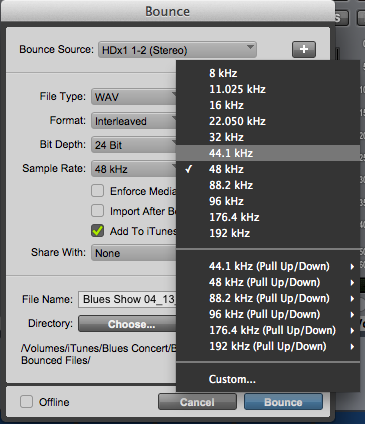
Pro Tools Bounce to Disk remembers the last bounce that it performs and applies those settings to the next bounce, unless you tell it to change the settings. For instance, if the last session you bounced was in 48kHz, but your current session is in 44.1kHz, you might find that your Bounce to Disk settings are changing the sampling rate to 48kHz.
To fix this, simply change the Sample Rate in the Bounce to Disk dialog to the desired setting and you should be good to go!
When you need help, Sweetwater has the answers!
Our knowledge base contains over 28,000 expertly written tech articles that will give you answers and help you get the most out of your gear. Our pro musicians and gear experts update content daily to keep you informed and on your way. Best of all, it’s totally FREE, and it’s just another reason that you get more at Sweetwater.com.

