

My Akai APC40 mkII isn’t working in Ableton Live.
Support for the APC40 mkII was added to Ableton Live as of version 9.1.3. Make sure you are at least running that version in order to use your APC40 mkII to it’s fullest extent in Live. The APC40 mkII will also work with Ableton Live 9 Lite.
Once you are running Live 9.1.3 or later, you can set up the APC40 mkII according to the following instructions:
- Launch Ableton Live
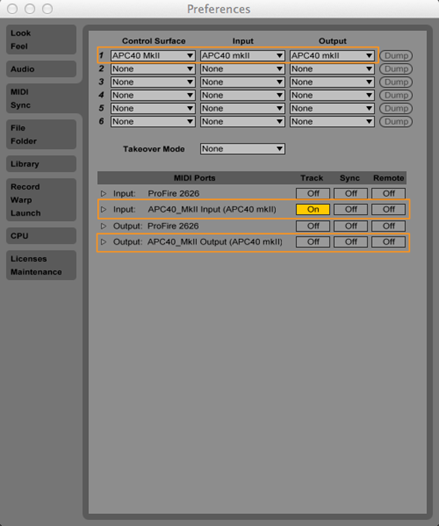
- Open Preferences > MIDI Sync
- Adjust the settings according to the picture below
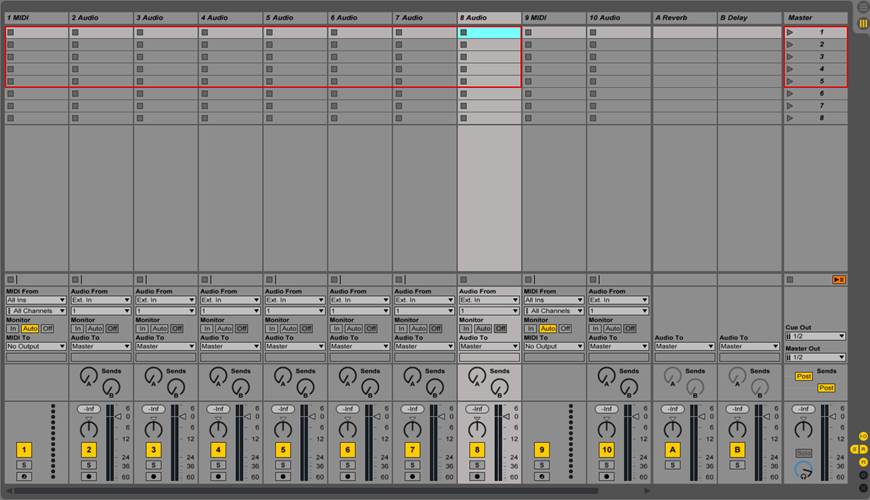
- When the APC40 mkII is set up properly, Live’s session view will have a red box around the active tracks.
- That’s it!
When you need help, Sweetwater has the answers!
Our knowledge base contains over 28,000 expertly written tech articles that will give you answers and help you get the most out of your gear. Our pro musicians and gear experts update content daily to keep you informed and on your way. Best of all, it’s totally FREE, and it’s just another reason that you get more at Sweetwater.com.

