
Line 6 POD Express Edit App Guide

If you’ve got a Line 6 POD Express Guitar, POD Express Bass, or POD Express Black, you will want to use it with the free Line 6 POD Express Edit app for macOS, Windows, iPhone, iPad, and Android. This Line 6 editor/librarian app enables you to customize POD Express’s sounds, accessing many additional parameters that you can’t reach from the POD Express hardware alone. Here’s how to get started.
- What You Can Do with the Line 6 POD Express Edit App
- Update the Firmware for Compatibility with the POD Express Edit App
- POD Express Edit App for Mac and Windows
- POD Express Edit App for iPhone, iPad, and Android
- Using the POD Express Edit App
What You Can Do with the Line 6 POD Express Edit App

Line 6 POD Express Edit on macOS
You can use the POD Express Edit app to dial in sounds with amp and cab models, program the effects, and save the results. You can easily reassign footswitch functions, configure external footswitches (sold separately), and more.
Here are some examples:
With the amp models, you can adjust more than a dozen parameters, depending on the model.
With the cab models, you can adjust low cut, high cut, and level.
Effects editing on the POD Express Edit app provides a tremendous expansion of each effect’s features, such as the ability to select specific note values (e.g., 1/4, 1/4 Triplet, 1/8 Dotted) on Modulation and Delay effects. Depending on the effect selected, you can fine-tune the degree of stereo spread, adjust low- and high-cut filters, and more.
Other features, such as assigning functions to footswitches and to an expression pedal, are much easier to configure using the app.
With the app, you can also save and export presets for sharing with other POD Express users and make backups of all the settings at once.
Update the Firmware for Compatibility with the POD Express Edit App
TIP: The firmware on your Line 6 POD Express must be version 2.0 or higher in order for any version of the POD Express Edit app to recognize your unit.
Update the firmware by connecting your POD Express to your Mac or your Windows PC using a USB-C data cable (with an adapter, if necessary) and running the Line 6 Central app.
Follow the instructions in our SweetCare guide Line 6 POD Express Firmware Update.
Afterwards, return here to learn how to install and use the POD Express Edit app.
POD Express Edit App for Mac and Windows
How do I download Line 6 POD Express Edit for macOS or Windows?
- On your Mac or your Windows PC, go to the Line 6 Downloads page. Pull down the Choose Hardware menu and select your model of POD Express. Under Choose Software, select POD Express Edit. Under Choose OS, select either Mac OS X, Windows 10, or Windows 11. Click Go.
- The download information for POD Express Edit will appear. Click Get Download.
- If you have not already logged in to your Line 6 account, you will be prompted to log in with your username and password before the download can proceed.
- On the End User License Agreement page, click Accept and Download.
- Once you have downloaded the installer, go to your downloads folder. Run the installer and follow the on-screen prompts.
Connect your POD Express to your computer
You must power your POD Express using either the power-adapter connection or batteries. You can’t power the POD Express over the USB-C connection.
If you are on Windows, first you need to install the Line 6 ASIO driver, as we explained in the firmware update article above.
Connect your POD Express to your Mac or your Windows PC using a USB-C data cable, using an adapter as necessary.
Launch the POD Express Edit app, and it will recognize your unit.
POD Express Edit App for iPhone, iPad, and Android
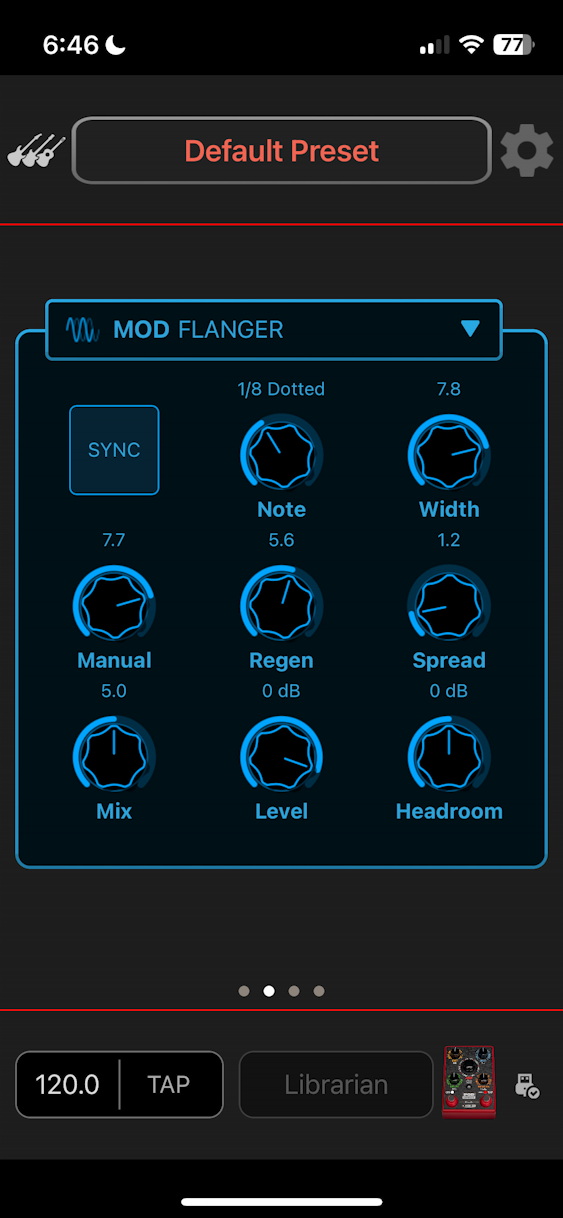
POD Express Edit on iPhone, showing flanger parameters
How do I connect my POD Express to my iPhone, my iPad, or my Android device?
TIP: As we explained above, the app for iOS, iPadOS, and Android will not recognize your POD Express unless it is running firmware 2.0 or higher. Before you use the iOS, iPadOS, or Android app, you must connect your POD Express to your Mac or your Windows PC and run the Line 6 Central app to update the firmware.
Using the POD Express Edit app on iPhone, iPad, or Android requires connecting your POD Express unit to your phone or device using a USB-C data cable. The POD Express does not use Bluetooth or Wi-Fi.
If you have an older iPhone or iPad with an Apple Lightning connector, you will need a suitable adapter to connect the POD Express’s USB-C connection to your device’s Lightning port.
How do I download Line 6 POD Express Edit for iPhone, iPad, or Android?
You can’t find a link to the iPhone, iPad, or Android apps on the Line 6 website. You download those on your device by going to the appropriate app store.
On iPhone or iPad, download Line 6 POD Express Edit from the Apple App Store.
On Android, download Line 6 POD Express Edit from Google Play.
Using your POD Express with iPhone, iPad, or Android
You must power your POD Express using either the power-adapter connection or batteries. You can’t power the POD Express over the USB-C connection.
Connect the USB-C cable to your device, then launch the app.
If the app doesn’t recognize your POD Express, this is probably because you did not update the firmware on the POD Express, as we mentioned above. Follow the instructions in our SweetCare guide Line 6 POD Express Firmware Update.
Using the POD Express Edit App
Here is Line 6’s overview of how to use the POD Express Edit app.
Related Articles
When you need help, Sweetwater has the answers!
Our knowledge base contains over 28,000 expertly written tech articles that will give you answers and help you get the most out of your gear. Our pro musicians and gear experts update content daily to keep you informed and on your way. Best of all, it’s totally FREE, and it’s just another reason that you get more at Sweetwater.com.

