

How do I upgrade from Melodyne version 3 or earlier?
Our friends at Celemony made some cool changes to the look of MyCelemony accounts for users of Melodyne 4 and later. Due to these cosmetic changes, the process for upgrading from Melodyne version 3 and earlier is slightly different than upgrading from version 4 or later.
The three steps below will walk you through registering your upgrade.
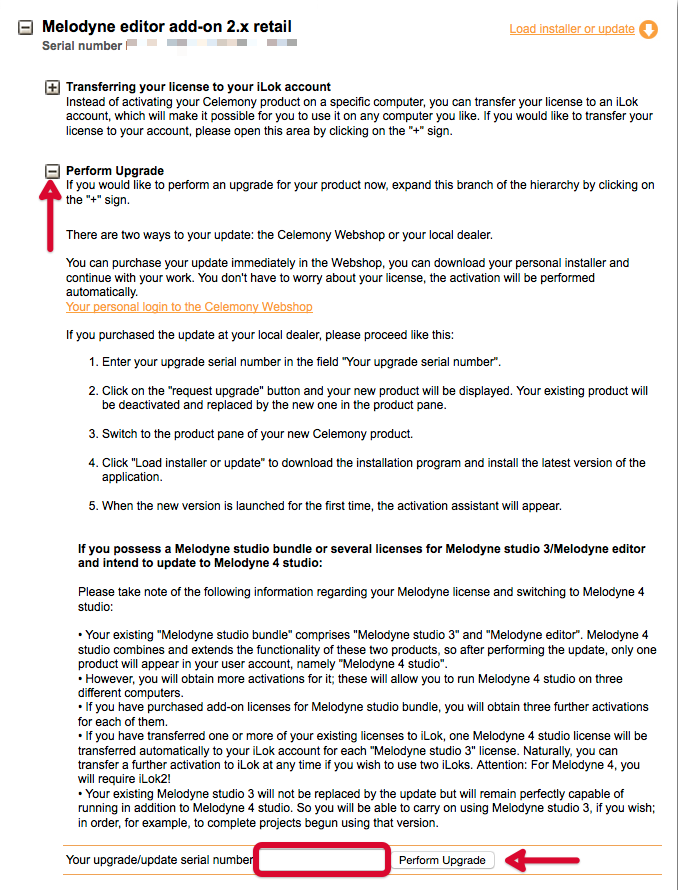
1. Sign into your MyCelemony account and click the “+” next to Perform Upgrade for the product you wish to upgrade.
2. Copy the Serial Number that you received in an email from your Sweetwater Sales engineer and paste it into the box next to “Your upgrade/update serial number” as shown in the picture below.
Hint: The subject line of that email will be “Sweetwater Software Activation Instructions”.
3. Click the “Perform Upgrade” button to complete the registration.
When you need help, Sweetwater has the answers!
Our knowledge base contains over 28,000 expertly written tech articles that will give you answers and help you get the most out of your gear. Our pro musicians and gear experts update content daily to keep you informed and on your way. Best of all, it’s totally FREE, and it’s just another reason that you get more at Sweetwater.com.

