

How do I Update Drivers on my Mac?
A device driver is a piece of software code that enables a computer’s operating system to communicate with peripherals connected to the computer; for example, a graphics card, printer, or third-party keyboard or mouse. On the Apple Mac, years ago, it was necessary for a user to install drivers provided by the manufacturers of these peripherals, especially printers.
However, as of this writing, in 2024, those days are long gone. Manufacturers engineer their products to be “class-compliant” with macOS (and iPhone, iPad, and other devices in the Apple ecosystem), meaning no third-party device drivers are needed, and there is nothing that you need to update.
The exception, however, is important to audio engineers, musicians and content creators: some manufacturers of audio interfaces and MIDI devices, with a USB or Thunderbolt connection, make certain models that still require a custom device driver. If you have one of those devices, here’s what you need to know.
- What is a Class-Compliant Audio Interface or MIDI device?
- Installing Device Drivers for Audio Interfaces and MIDI Devices
- Device Drivers for Thunderbolt Audio Interfaces on Mac
- Product Manager Installer Apps
- Audio Interface and MIDI Device Control Apps
- macOS Privacy & Security Settings
What is a Class-Compliant Audio Interface or MIDI device?
If the manufacturer of your audio interface or MIDI device states that it’s “class-compliant,” that means that this device is already designed to work with macOS without needing to have a driver installed. Just plug it in.
Note, however, that the manufacturer may also provide one or more apps that you need to use with the device. Consult the product page on the manufacturer’s website to find out what you need to download and how to install and activate the apps.
Installing Device Drivers for Audio Interfaces and MIDI Devices on Mac
For various technical reasons, some audio and MIDI devices are not class-compliant, and do require a custom driver.
The driver may be provided in an installer that you need to download. Check the owner’s manual and the product page on the website, and follow the instructions.
Refer to our SweetCare guide Where Can I Download the Drivers for My Audio or MIDI Interface? which provides a chart with links for dozens of manufacturers.
Device Drivers for Thunderbolt Audio Interfaces on Mac
Most Thunderbolt audio interfaces, with their higher throughput and lower latency, require a kernel extension. That’s a certain class of device driver that require the user to grant special security permissions to allow the driver to run. If you have such a device, check the manufacturer’s instructions about installing and updating it.
Here’s what you need to know about kernel extensions.
Product Manager Installer Apps
While you can usually download the driver for your specific device directly from the manufacturers’ website, certain manufacturers provide one app where you can register and download many products from that company. Examples include:
- Arturia Software Center
- IK Multimedia Product Manager
- Native Instruments Native Access
- Steinberg Download Assistant
- Universal Audio UA Connect
These apps may provide a means to check for updates to your registered products, and to install an update to the latest driver. Check the website and the owner’s manual.
Audio Interface and MIDI Device Control Apps
Some manufacturers of audio interfaces or MIDI devices provide a “control app.” Examples include:
- Focusrite Control
- Fender Universal Control (previously known as PreSonus Universal Control)
- Universal Audio UAD Console
The control app is required to configure and use your device.
When you install the control app, it will automatically install the driver needed for your device. The control app will alert you when there is a newer version of the app available, and prompt you to download and install it. In doing so, the app will update the driver. The app may also alert you when there is a firmware update for your device, and prompt you to install it. However, each manufacturer’s app has different features, so follow the instructions within the app and in its owner’s manual.
macOS Privacy & Security Settings
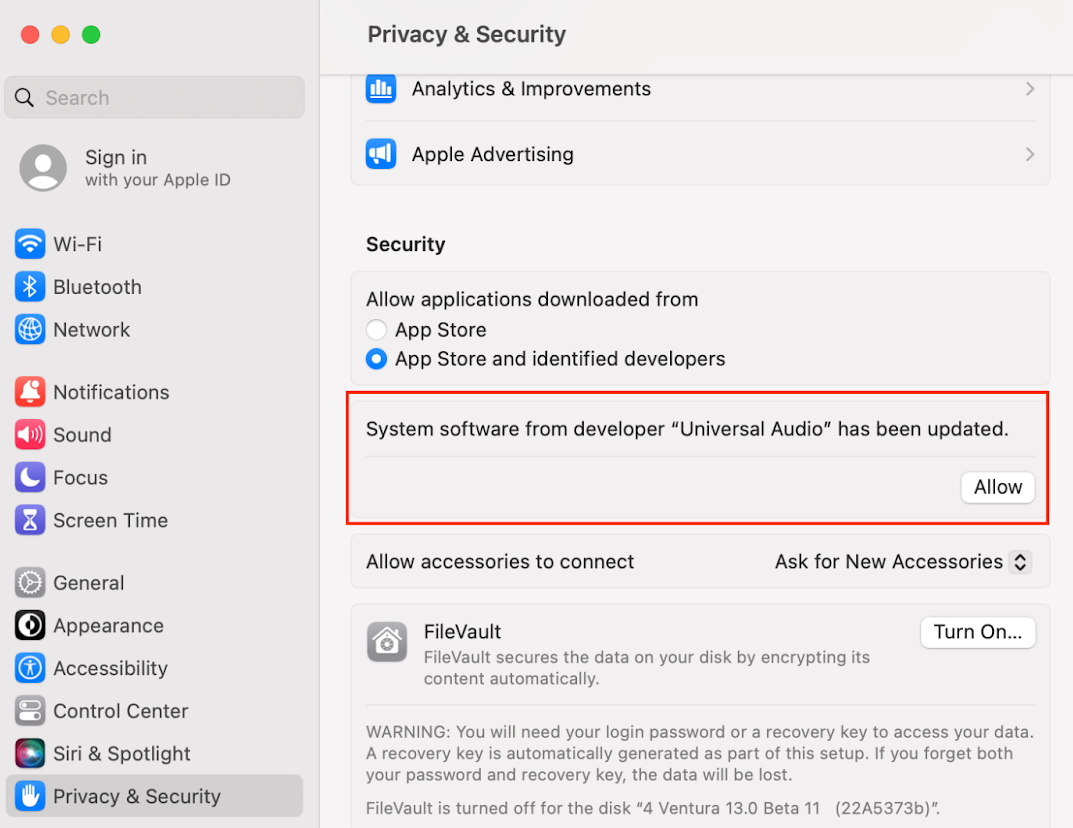
Privacy & Security in System Settings in macOS Sonoma
Sometimes when you run the installer for a driver, macOS will put up warning messages saying that an app, driver or extension cannot be installed because it is not from an identified developer. Certain drivers may be blocked from loading for other reasons. This is a safety feature to protect your system from potential malware.
As long as you are certain that you are working with software downloaded from the manufacturer of your device, there’s no need to worry. The manufacturer of your device will provide instructions that explain what to do when these messages appear. There are procedures for you to grant permission for the software to be installed and to run.
If the manufacturer provides such instructions, when you see a message that an installer was blocked, go to System Settings > Privacy & Security and scroll down to the Security section. You’ll see a message explaining what was blocked. Click the Allow button. You will be asked to authenticate by entering the username and password of an administrator account on your Mac.
Consult the instructions from the manufacturer for additional steps you need to set up your device and its software.
Related Articles
When you need help, Sweetwater has the answers!
Our knowledge base contains over 28,000 expertly written tech articles that will give you answers and help you get the most out of your gear. Our pro musicians and gear experts update content daily to keep you informed and on your way. Best of all, it’s totally FREE, and it’s just another reason that you get more at Sweetwater.com.


Offer applies only to single-receipt qualifying purchases. Select manufacturers may require that only the manufacturer’s products qualify towards the minimum purchase amount needed to be eligible for promotional financing. Otherwise, an invoice that meets the minimum purchase amount and contains at least one qualifying manufacturer product is eligible for promotional financing. No interest will be charged on promo purchase balance, and equal monthly payments are required on promo purchase until it is paid in full. The payments equal the amount financed divided by the number of months in the promo period, rounded up to the next whole dollar. These payments may be higher than the payments that would be required if this purchase was a non-promo purchase. During the last month(s) of the promo period the required monthly payment may be reduced due to the prior months’ rounding. Regular account terms apply to non-promo purchases. New Accounts as of 07/31/2025: Purchase APR is 34.99%. Penalty APR is 39.99%. Min Interest Charge is $2. Existing cardholders: See your credit card agreement terms. Subject to credit approval.
Offer applies only to single-receipt qualifying purchases. No interest will be charged on the promo balance if you pay it off, in full, within the promo period. If you do not, interest will be charged on the promo balance from the purchase date. The required minimum monthly payments may or may not pay off the promo balance before the end of the promo period, depending on purchase amount, promo length and payment allocation. Regular account terms apply to non-promo purchases and, after promo period ends, to the promo balance. New Accounts as of 07/31/2025: Purchase APR is 34.99%. Penalty APR is 39.99%. Min Interest Charge is $2. Existing cardholders: See your credit card agreement terms. Subject to credit approval.
The estimated required monthly payment shown which excludes taxes and delivery equals the amount financed divided by the number of months in the promo period, rounded up to the next cent. During the last month(s) of the promo period the required monthly payment may be reduced due to this rounding. These payments apply only with the financing offer shown. If you make these payments by the due date each month, you should pay off this amount financed within the promo period, if it is the only balance you are paying off. If you have other balances on your account, this payment will be added to any other minimum monthly payments.
Applies only to select items from this manufacturer. Ask your Sweetwater Sales Engineer for more details.