
Reason Software Activation Instructions

IMPORTANT!
If you are activating or upgrading to Reason 11, visit our software activation instructions here.
In this guide, we will show you how to activate, download, and install your new Reason software. Follow the sections below to get started.
- Register the license number and registration code
- Download and install the software
- Authorize the software
Register the license number and registration code
The first step in the activation process is to redeem the license number and registration code you received from your Sweetwater Sales Engineer. In order to redeem your product, you first need to create an account with Propellerhead.
- Log in to your Propellerhead account. If you don’t have one yet, you can create one here.
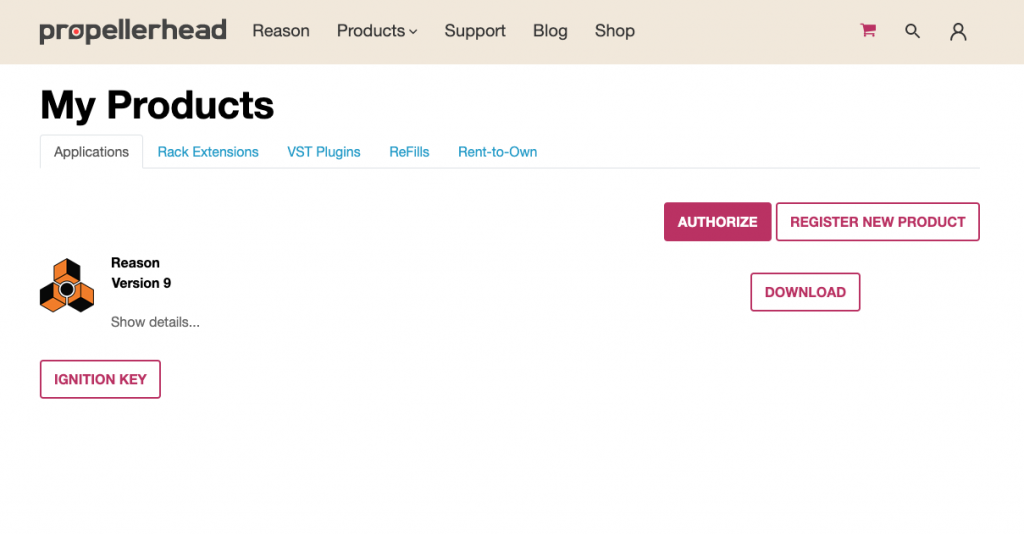
- Click Register New Product, and then select the version of Reason you purchased.
- Enter the License Number and Registration Code located in the software activation instructions e-mail from your Sweetwater Sales Engineer.
Download and install the software
The next step in the activation process is to download and install your software. You also must download the Codemeter software, which will activate your computer if it’s offline. Follow these steps to download and install the software.
- Navigate to the My Products section on your account page, and click Download.
- Once complete navigate to your Downloads folder, run the installer, and follow the on-screen instructions.
- PC: Right-click the .zip file, select Extract all…, and then click Extract. Double-click the .exe file and follow the on-screen instructions.
- Mac: Double-click the installer file, and then drag the Reason 10 folder to your Applications folder.
- Download and then install Codemeter.
Where are the soundbanks located?
If you purchased the full version of Reason 10, you will be prompted to set the location of the soundbanks during the installation process. By default, the soundbank folder location is:
- PC: C:\ProgramData\Propellerhead Software\Soundbanks
- Mac: Library/Application Support/Propellerhead Software/Soundbanks
Authorize the software
The final step in the process is to authorize Reason. You will need to log in to your Reason account upon launching the software to complete the authorization process.
- Launch the Reason software, and then enter your account credentials when prompted.
- Click the Authorize Computers and Keys link in the window that appears, and then click the Authorize button next to your preferred license location.
- The next time you launch Reason, it will run in Authorized mode and you will not need to log in to your account each time you launch.
Activating multi-seat licenses
Multi-licenses allow you to run Reason on multiple computers that are all connected over a LAN (Local Area Network). Multi-license users can follow the instructions above to register, download, and install Reason. However, you will need to follow the instructions outlined in the Reason 10 Multi-License manual to authorize every license to an Ignition Key before enabling the network server feature so that each computer running Reason can access the licenses on that Ignition Key.
Additional resources
When you need help, Sweetwater has the answers!
Our knowledge base contains over 28,000 expertly written tech articles that will give you answers and help you get the most out of your gear. Our pro musicians and gear experts update content daily to keep you informed and on your way. Best of all, it’s totally FREE, and it’s just another reason that you get more at Sweetwater.com.

