It’s always great if you can get exactly the snare sound you’re looking for when recording,
but what if it doesn’t quite work in the finished track with all the overdubbed guitars and extra keyboard passes? That’s where equalization (EQ) and compression come to the rescue. Here are some pointers about how to get the necessary impact or snap in your snare.
Equalization
EQing a snare drum is easy. Right? Need more thump? Reach for 200Hz–300Hz. Need more bite? It’s always there by boosting at 2kHz–5kHz. Trying to bring out the snares? Reach up to 6kHz–8kHz. If it sounds tubby, then pull down 400Hz and sweep the frequency-select knob up and down until you eliminate the offending frequency.
Most any software or hardware EQ will do the trick when it comes to EQing the snare, but some EQs are really special. The Pultec EQP-1A3 is one such unit. With its broad curves and delightful transformers, you can really crank the high-frequency boost knob, as much as 10dB or more, without the top end getting harsh. And for the low end, boost all you want and then try selecting 20Hz, 30Hz, 60Hz, or 100Hz, and see which one sounds best. Next try pulling out some of the low end by turning up the ATTEN (attenuate) knob, which offers the same frequencies as the BOOST knob but with different curves, so instead of canceling each other out, they make some really cool-sounding curves.

Other great EQs that are classics when it comes to fine-tuning your snare sound are the API 550A or 550b, or the BAE B15.
Pro Tip: Boosts are easier to hear than cuts, so if you’re looking for a specific offending frequency, try a narrow peak boost and then sweep the frequency up and down until you find the range that’s hurting your ear. Just pull out that frequency until it solves the problem.
For software EQ, there are classics such as the Softube A-Range EQ . I’ve worked on Trident A-Range consoles hundreds of times, and they sound sweeter to my ear than just about any console I’ve ever worked on. For flexibility, I will frequently reach for the 6-band Waves Renaissance EQ, or for some broad massaging there’s the less flexible but very sweet RS-127 in the Softube Abbey Road Studios Brilliance Pack.
Pro Tip: The best suggestion that I can give you for EQing a snare sound is “Don’t do it with the snare track soloed.” Some engineers spend lots of time making a snare sound just perfect in isolation only to put it back in the track and find that it doesn’t sound good. For live drum recordings these days, there are frequently between 4 and 24 mics and sometimes as many tracks. You simply cannot change one sound without affecting the others, because the drums are one large instrument. Changing the EQ on the hi-hat can alter how the snare sounds. Brightening up the kick may make the snare sound dull. So EQ the snare in the perspective of the whole kit, and you’ll find it much easier to get it right.
Compression
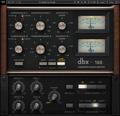
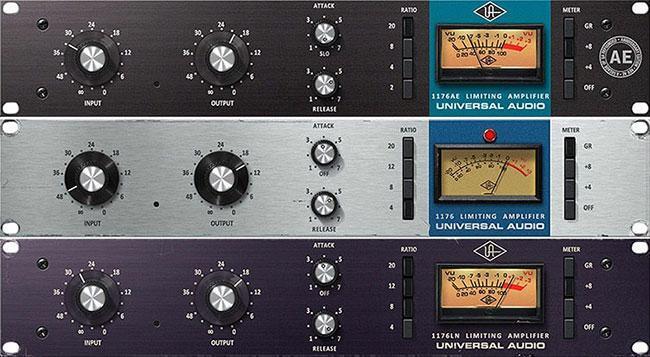
Compression was originally used to contain or restrict volume. But today compression is where you can get creative. Modifying the length of the attack and release to get different sonic results is my favorite trick. You can make a snare drum really pop in the track by compressing it substantially (5dB–10dB) but leaving the attack long enough that the initial transient still comes through. This chokes the snare and really makes it bite in the track. I initially discovered this outcome using the compressor on the British Calrec console, but it works almost as well on an SSL. I’ve had good luck with several plug-in compressors that work great for this, like the Universal Audio 1176 Classic Limiter Collection, which has variable Attack and Release, or the Pro Tools DigiRack comp set for 25:1 ratio, 8.7ms attack, and 92ms release. I’ve also used the software version of the classic dbx 160 that I frequently used to provide the snap on my snare drums in the studio.
On hardware compressors, you can also push the signal into mild distortion to add some crunch on the snare. This is not recommended for plug-ins, because they don’t distort gracefully. You can also mult the snare signal by routing it to two channels (one clean and one processed) and heavily compressing and EQing the processed channel and then adding that processed signal back in with your natural snare sound to give it more “stuff.” If you do this, be careful that the two signals are aligned in time (no processing delay/latency), or else you’ll end up with frequency cancellations due to the latency of the plug-ins — the resultant comb filtering can really decimate the sound of an instrument.
Let’s Listen
Here are some samples to show you how you can craft a great snare sound from your snare source, whether it’s a sample or live. This snare sound was recorded with a
DW Collector’s Series Exotic Snare Drum miked with a Shure SM57 into the Chandler TG2-500 preamp.
Straight snare sound
Here’s the same snare sound with a smooth but extreme top boost (+10) using the Abbey Road RS127 EQ from the Softube Abbey Road Brilliance Pack. Listen to the way it brings out the snares. You can see the settings on the image below.
Abbey Road RS127 EQ

Here’s another EQ approach with the Trident A-Range plug-in from Softube, a sweet classic EQ with 4-bands and selectable frequencies. You can see the settings on the face plate above. Listen to how the low boosts at 150Hz and 250Hz really bring out the meat of the drum. You can see the settings on the image below.
Trident A-Range EQ

To accent the attack of the snare, settings like this on the Tube-Tech CL1B will really make it pop. This sound can be processed directly on a track or separately and then mixed in with the original snare sound. These are extreme settings to make it easily audible, but it’s derived from the same original snare sound you heard above. You can see the settings on the image below.
Tube-Tech CL1B compressor

Here’s a combination of EQ and compression using the Summit Audio Grand Channel plug-in. Listen to how the boost at 180Hz combines with the low cut at 100Hz and the dip at 680Hz. Then compressing it with the Summit TLA-100A before the EQ really gives it a nice sound. You can see the settings on the image below.
Summit Grand Channel featuring compression and EQ

Here’s the Tube-Tech Channel version of a similar approach but with an extreme boost and cut at 60Hz, combined with a boost at 1.5kHz. You can see the settings on the image below.
Tube-Tech Channel featuring compression and EQ

If you have any more questions about drum recording or processing, call your Sweetwater Sales Engineer at (800) 222-4700.
For more tips on getting a great snare sound, check out these other articles by Lynn Fuston.
1 – Best Mics for Recording Snare Drums
2 – How to Mic a Snare Drum
3 – Best Preamps for Snare Drum
4 – Tips: EQ and Compression for Snare
5 – 6 Tricks for Crafting an Awesome Snare Sound