

Once you have your ideal tone dialed into your amplifier, and creativity is ready to strike, how do you approach miking up your guitar amp? Especially if you’re setting up last minute for a live show, you need to know how your choice of microphone — and its position — affect the sound you’re capturing. Read on for tried-and-true methods that you can put to work the next time you need to mic a guitar amp.
Choose your microphone
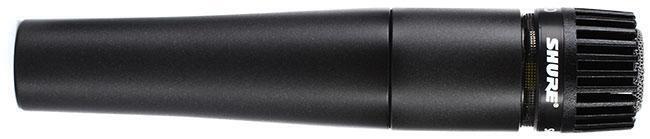
We could talk for days about choosing microphones for different applications — if you have a choice, practically any dynamic microphone is a good place to start when miking a guitar amp. The Shure SM57 is one of the most widely used mics for guitar amps, but some other favorites include Sennheiser’s e609 Silver, e906, and MD 421 II; Audix’s i5; Royer’s R-121; Telefunken’s M81; and (though not a dynamic mic) the Neumann U 47 fet.
Moving the Mic
Moving a microphone even an inch will have a big impact on your guitar sound — so how do you dial in a good sound fast, without spending half an hour moving the mic in circles? Keep these fundamentals in mind, and you’ll be able to find your mic’s sweet spot with any amp.
Pro Tip from Don Carr:
A good starting place for miking with a typical dynamic mic is halfway between the center and edge of the cone, with the mic capsule pointed directly at the speaker, leaving just enough room to slide your pinky between the mic and grille cloth.
Moving the microphone closer to the amp’s speaker will increase bass frequencies, and moving farther away will reduce the overall bass response of your recorded tone. (This rule does not apply to omnidirectional microphones, but in most cases you won’t want to use an omni mic for close-miking a guitar amp anyway).
Moving the microphone sideways, closer to the surround edge of the speaker, will reduce midrange and upper-mid frequencies. Moving the microphone toward the center of the speaker will emphasize midrange frequencies.

Angling the microphone at a 45-degree angle can sometimes tame harsh high frequencies, but its effectiveness is determined by which specific mic you’re using. For a good start, point the mic directly at the speaker, at least until you’ve found the right distance and mic position on the cone.
In summary:
- If you need more bass, move the microphone closer to the speaker. If it’s too boomy, move it back.
- For more mids, position the mic closer to the center of the speaker. For a darker sound, move toward the edge of the speaker cone.
- Start with the mic pointed directly at the amp’s speaker, but experiment with angling the mic at a 45-degree angle if you want to fine-tune what you’re hearing.

Pro Tip from Don Carr:
If you can’t clearly see where the speaker is placed in the cabinet or guitar amplifier, you can feel for the edge of the cone by lightly pressing on the grille cloth. Start somewhere in the middle of the cabinet, and when it no longer gives easily, you’ve found the edge of the speaker. Then, trace that edge in a circle to find its placement in the cabinet. If your grille cloth isn’t super-thick, shining a flashlight directly into the speaker and moving it around can reveal the edge as well.
Use your ears to find the right spot to mic
Assuming the guitar amplifier is putting out the tone you want to hear, your goal is to find the mic position that best represents what the amp sounds like when you’re standing in front of it. Where you first place the mic is much less important than the act of listening — hear what the mic is capturing, decide what needs to change, and move the microphone according to the tips above. Too boomy? Back the mic off an inch or two. Lows and highs sound good, but not enough midrange growl? Start moving the mic closer to the center of the speaker, farther away from the edge.
And remember that when we say “move the microphone,” we’re talking inches, not multiple feet. Small changes in mic position result in big sonic differences. Start close — from a couple of inches away to right on top of the grille cloth — to reduce capturing unwanted ambient sound. Keep the fundamentals above in mind, listen to what your mic is capturing, and you’ll find the best spot for the sound you’re after.

Pro Tip from Don Carr:
Remember that the mic is ‘listening’ to your guitar amp dead-on and up close. This sounds completely different from the way most guitarists listen to their amp, which is 3-5 feet away, on the floor, speaker pointed at their knees. When you’re critically listening to decide mic type, placement, etc., start by putting your face directly in front of the speaker so you’re hearing it the same way the mic will. You don’t have to be an inch away, but being on direct axis with the speaker will give you a much more accurate sonic picture. If your amp is really loud, decide quickly!
Pro Tip from Lynn Fuston:
Put on a set of isolating headphones when adjusting the mic position on the guitar cabinet. That way you can hear the adjustments as you make them, instead of repositioning and then going back to the control room to hear the effect of the adjustment. Or you can use the Dynamount mic positioner to adjust the mic position via Wifi right from your smartphone.
Avoid these common miking mistakes!
Don’t record too hot — assuming you’re recording digitally, there’s no reason to have the microphone signal peaking close to 0dBFS (0 decibels Full Scale, the point where the incoming signal goes into the red, indicating you’re out of headroom). Back off the recording level to prevent unwanted digital clipping — you’ll still have plenty of dynamic range when it comes to mixing.
Don’t assume you’ll “fix it in the mix.” When you get the best sound possible from the source, everything down the line becomes easier. Trying to “fix” a guitar tone in the mix leads to over-EQing, over-compression, and other unfortunate events.
Picking the right mic for your guitar amp depends on lots of variables. Your Sweetwater Sales Engineer can review the sound you’re after and help you select the right mic for you. Call us at (800) 222-4700.