

Where is the Pitch knob in Melodyne 4?
In Melodyne 4, the pitch of the plugin can be adjusted globally if you use the automation in your DAW or a MIDI controller routed to them.
Here’s how to setup Pitch automation in Pro Tools:
Step 1: Define a real-time controller in the Melodyne plugin interface as shown below.
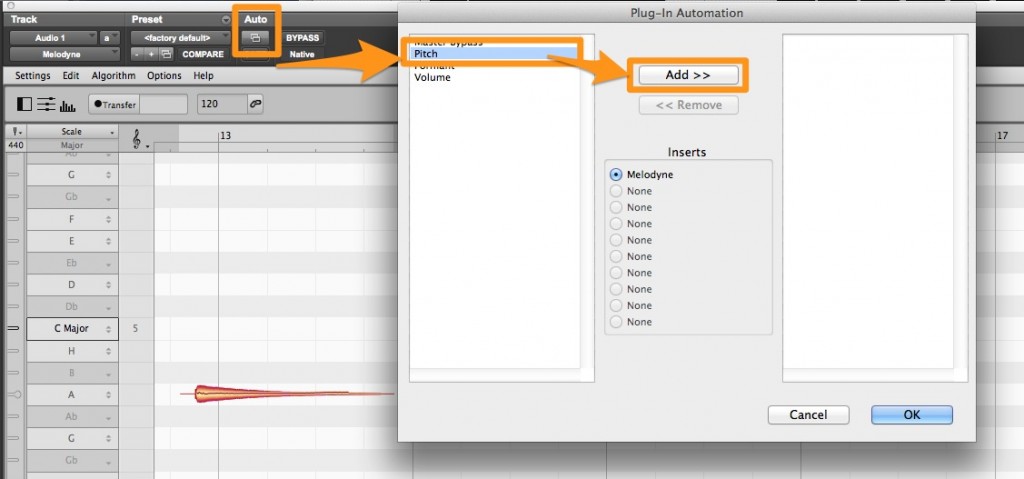
Step 2: Select “Pitch” in the automation lane on your Melodyne track.
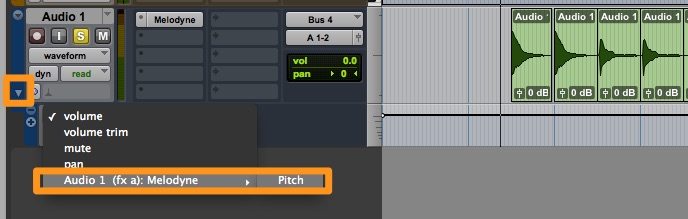
Step 3: You can now drag the little white dot up and down to adjust the pitch of Melodyne. This will adjust the pitch of all the notes in Melodyne simultaneous.
When you need help, Sweetwater has the answers!
Our knowledge base contains over 28,000 expertly written tech articles that will give you answers and help you get the most out of your gear. Our pro musicians and gear experts update content daily to keep you informed and on your way. Best of all, it’s totally FREE, and it’s just another reason that you get more at Sweetwater.com.

