

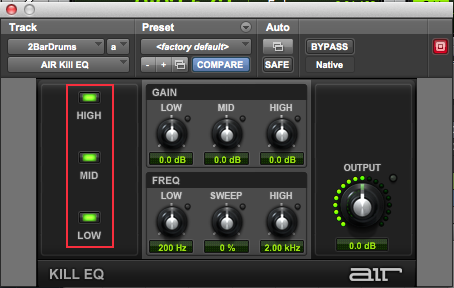
When using the AIR Kill EQ on a track in Pro Tools, the audio doesn’t play back.
If you enable the kill switches on all three EQ bands in the Kill EQ, then you are effectively muting the track. Try turning off one or all of the kill switches to bring your audio back into the mix.
Helpful Links
Behringer X AIR: How To Setup Channel Names & Fader Layout (iPad)
How do I set up my Behringer X Air series mixer with an external wireless router?
How do I setup my Behringer X-Air mixer to be controlled from the X AIR app on my mobile device?
How do I set up an X AIR mixer with an external router and the X AIR app on an iPad?
Behringer X Air: How to connect to your iPad
When you need help, Sweetwater has the answers!
Our knowledge base contains over 28,000 expertly written tech articles that will give you answers and help you get the most out of your gear. Our pro musicians and gear experts update content daily to keep you informed and on your way. Best of all, it’s totally FREE, and it’s just another reason that you get more at Sweetwater.com.

