
Understanding the DP-004 filesystem
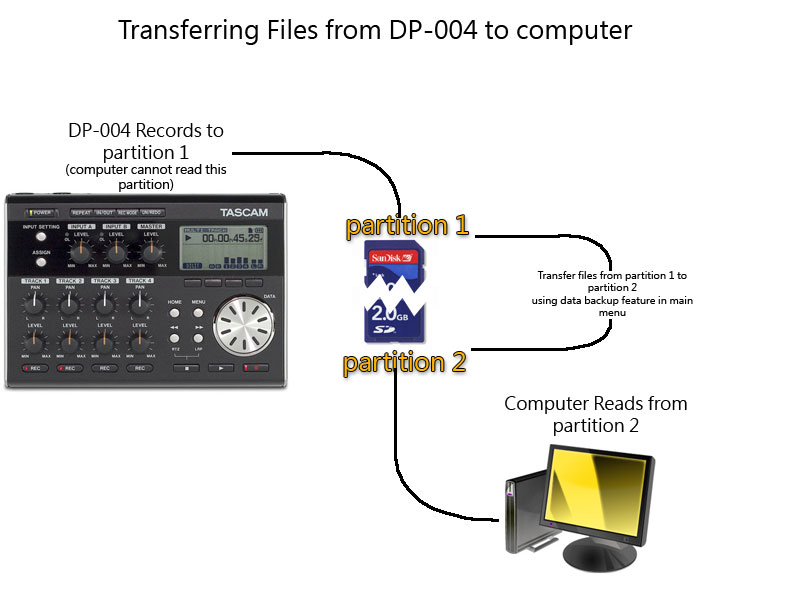
The DP-004 filesystem can be difficult to understand at first. Once you get the hang of it though it should be very easy. The DP-004 partitions (splits) your SD memory card into two sections. If you have are using 2GB SD memory card you will have 1GB of recording space and 1GB of backup space. The recording space is the area where the DP-004 records your projects to and the backup space is the area that your computer can access. The computer cannot access the recording space. This is where we’ve seen the most confusion.
In order to transfer backup files from your DP-004 to the computer, you must first move your songs from the recording space to the backup space using the Data Backup feature in the main menu. If you are looking to back up every song on the recorder, you must perform the data backup function on each one of the selected songs. The data backup feature copies the project files from the recording space, to the backup space making them accessible by the computer. Once you have completed the data backup procedure, you can commence with plugging in your USB cable from the recorder to the computer.
When you plug in the USB cable, you will see 3 folders labeled Backup, Utility, and Wave. The Backup folder contains the project files you backed up. These files are in a proprietary format, so you won’t be able to directly access the audio files, but they are built in to these backup files even though you can’t see them. All that is needed is to drag and drop the Backup folder from the memory card onto a safe place on your computer. Once this has been accomplished, you can reformat the card if need be, or delete the files from the card to free up more space for new recordings. Here is a diagram that may explain easier how the file system works. Just click on the picture below to view it full size.
If you are looking to restore your backups from your computer to the recorder, you will follow a reverse procedure. Plug in the USB cable from the DP-004 to the computer. You will see the backup folder once again when you plug in the recorder. You will now move the files you want to restore from the Backup folder on the computer, into the Backup folder on the memory card. Once the transfer has completed, you can move the songs from the backup area to the recording area by using the data restore feature in the main menu.
On a different topic, if you are looking to move the raw audio files from the recorder to the computer you will use the Wave Export feature. This is located in the Menu> Wave> Wave Export. This is similar to the backup process but it doesn’t save your project file, only the raw audio. This is useful if you are looking to use a computer application to further edit your files. Once you perform the Wave Export function, the audio will get saved to the Wave folder instead of the Backup folder.
This process will also be the same if you are looking to export your already mixed down master tracks from the recorder to the computer. Except in this case you will use the Wave> Export Master function in the main menu.
When you need help, Sweetwater has the answers!
Our knowledge base contains over 28,000 expertly written tech articles that will give you answers and help you get the most out of your gear. Our pro musicians and gear experts update content daily to keep you informed and on your way. Best of all, it’s totally FREE, and it’s just another reason that you get more at Sweetwater.com.

