

Scarlett Mix Control crashes when opened on Mac OS X 10.9 Mavericks.
Focusrite has discovered an issue with Scarlett Mix Control that causes it to crash when running on Mac OS X Mavericks. They are currently working to fix the issue.
For now, you can follow the steps below for a workaround to get Mix Control back up and running for your Scarlett interface:
- Quit Mix Control and all audio and MIDI applications including your web browser.
- Open the Activity Monitor. This can be found in Applications > Utilities.
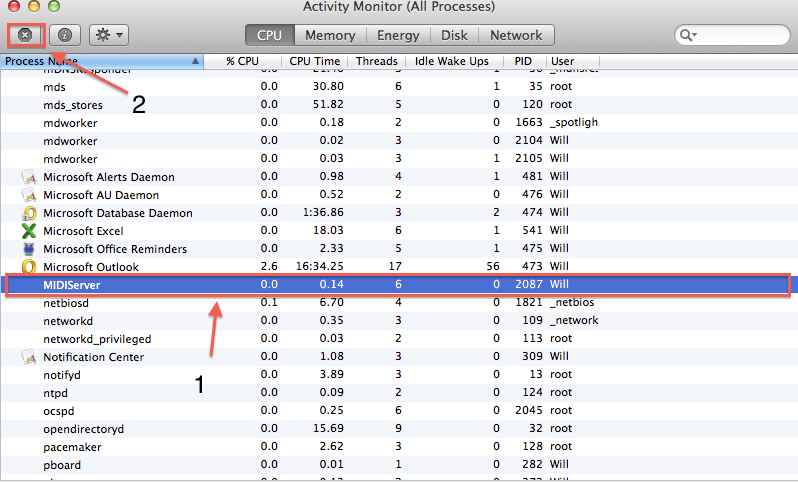
- Look for MIDIServer (see picture below). If you don’t see it, try opening Scarlett Mix Control. It should appear.
- Click on MIDIServer so that it is highlighted.
-
Click on the X symbol located at the top left of the Activity Monitor.
- Once the process is stopped, Mix Control should open without issue.
When you need help, Sweetwater has the answers!
Our knowledge base contains over 28,000 expertly written tech articles that will give you answers and help you get the most out of your gear. Our pro musicians and gear experts update content daily to keep you informed and on your way. Best of all, it’s totally FREE, and it’s just another reason that you get more at Sweetwater.com.

