

Line 6 Metallurgy Software Activation Instructions

In this guide, we will show you how to activate, download, and install your new Line 6 Metallurgy software. Follow the sections below to get started.
Register the Software
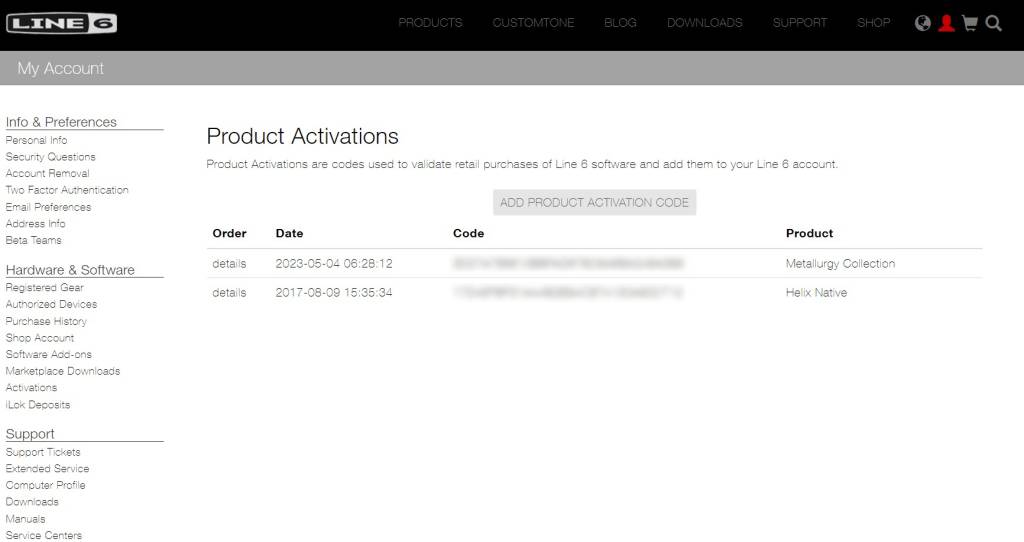
The first step in activating your Line 6 Metallurgy software is registering it to your Line 6 account.
- Log into your Line 6 account. You can create an account here if you don’t have one yet.
- Once logged in, click Activations, then select ADD PRODUCT ACTIVATION CODE.
- Copy and paste the activation code you received from your Sweetwater Sales Engineer. Click SUBMIT.
Download and Install
NOTE: Your computer must be connected to the Internet to activate your software.
Once the software is registered to your account, you’ll need to download, install, and activate it.
- Navigate to the Line 6 software download page.
- Use the -Choose Software- dropdown menu to select the Metallurgy product and the -Choose OS- dropdown menu to select the installer for your OS. Then click Go.
- Select the latest version of your Metallurgy plug-in. Accept the user terms to begin the download process.
- Navigate to your Downloads folder. Locate and launch the Metallurgy installer file.
- After the installation is complete, launch your DAW, add the plug-in to an audio track, and enter your Line 6 account credentials when prompted.
- Your Metallurgy plug-in is now activated. Enjoy your software!
When you need help, Sweetwater has the answers!
Our knowledge base contains over 28,000 expertly written tech articles that will give you answers and help you get the most out of your gear. Our pro musicians and gear experts update content daily to keep you informed and on your way. Best of all, it’s totally FREE, and it’s just another reason that you get more at Sweetwater.com.

