
Image-Line Software Activation Instructions

In this guide, we will show you how to authorize and install your new Image-Line software. Follow the instructions below to get started.
Authorize your Image-Line software
IMPORTANT! Please document your account credentials as you will need these for future purchases and Image-Line support. If you forgot your Image-Line account credentials, you must fill out their support request form.
You first need to create an account to authorize any Image Line product. If you already have an account, just sign in. Once the account is created, you must authorize the software. Follow these steps to authorize your product.
- Log in to your Image-Line account. If you don’t have one, you can create it here.
- On your account home page, click Unlock Products, expand the Register Boxes and Plugins Serials section, then copy and paste the Serial Number you received from your Sweetwater Sales Engineer.
- Alternatively, you can go to the Enter Serial page, then copy and paste the Serial Number.
- Complete the authorization process and follow the on-screen instructions.
- Once authorized, continue to Install and unlock FL Studio or Install and unlock Image-Line plug-ins.
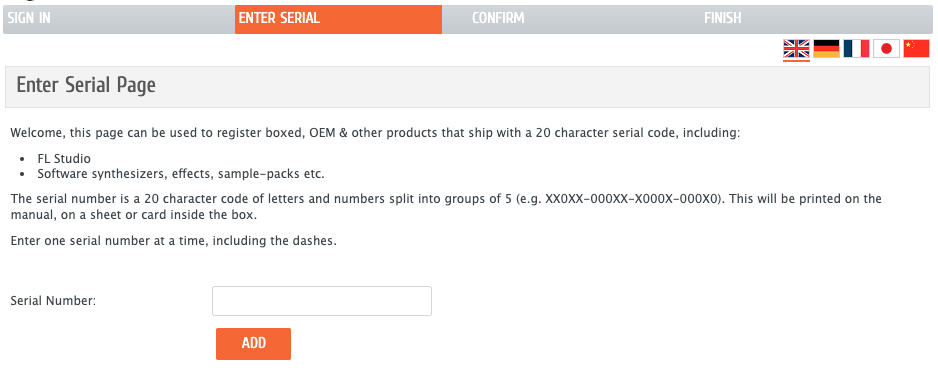
Click the image to register your Image-Line software
Install and unlock FL Studio and Image Line Plug-ins
NOTE: The FL Studio installer includes all Image Line plug-ins, so no additional downloads are necessary when activating an Image Line plug-in.
Once authorized, you can now download and install FL Studio. There are two methods to unlock the software; online or offline. Just go to the download page, install the software for your OS, and then unlock FL Studio and Image Line plug-in.
Unlock FL Studio and Image Line plug-ins online
- Go to the FL Studio download page and locate the latest installer file for your OS. If you already have the demo version installed, you can skip to Step 3.
- Open your Downloads folder, double-click the .exe file (PC) or .dmg file (Mac), and follow the on-screen instructions.
- Launch FL Studio, click Help, then select About. Enter your account login credentials, then click Unlock with account.
- Restart the program.
Unlock FL Studio and Image Line plug-ins offline
IMPORTANT: If you update your version of FL Studio, you will need to download and install a new registry (.reg) key.
If your computer is offline and you need to authorize FL Studio or an Image-Line plug-in, you’ll need to unlock it using a reg key file. You’ll need to download the .Reg file, and if you’re on an offline computer, use a thumb drive to transfer the file to the offline computer. Follow these steps to unlock your software utilizing the reg key.
- Sign in to your Image-Line account on a computer connected to the internet, then click Unlock Products.
- Navigate to Unlock VST Plugins/Alternative Unlock for FL Studio, then click the picture of the keyboard to download the .Reg file.
- Alternatively, you can click the link below the picture to download the file.
- Transfer the FLRegkey.Reg file to a thumb drive, then connect the thumb drive to the offline computer.
- Launch FL Studio, click Help, select About, then click Unlock with key.
- Navigate to the .Reg file location, select that, then click Open. Restart the software to complete the unlock process.
Unlock FL Studio With Your Account
Unlock FL Studio With a Regkey File
Related Articles
When you need help, Sweetwater has the answers!
Our knowledge base contains over 28,000 expertly written tech articles that will give you answers and help you get the most out of your gear. Our pro musicians and gear experts update content daily to keep you informed and on your way. Best of all, it’s totally FREE, and it’s just another reason that you get more at Sweetwater.com.

