

How do I update my Celemony product?
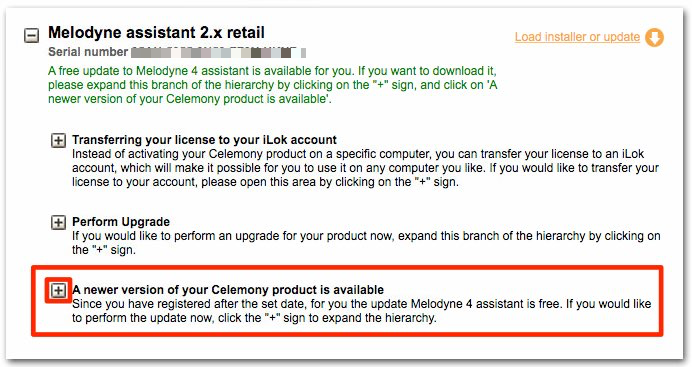
Step 1: Log into your MyCelemony account and click the + next to “A newer version of your Celemony Product is available”.
Step 2: Click “Upgrade Now” at the bottom of the page like it shows in the picture below.
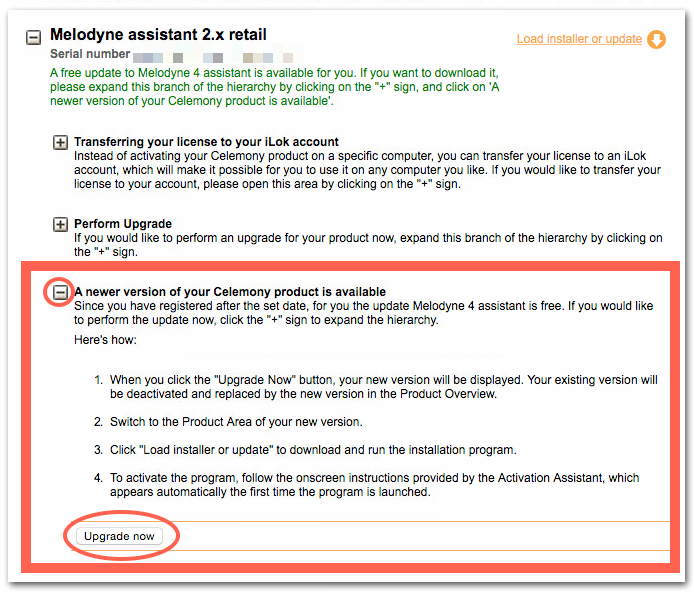
Note: If you don’t see the update in your account right away, you may need to log out and back in for the update to show up in your MyCelemony account. Your account should look similar to the this:
When you need help, Sweetwater has the answers!
Our knowledge base contains over 28,000 expertly written tech articles that will give you answers and help you get the most out of your gear. Our pro musicians and gear experts update content daily to keep you informed and on your way. Best of all, it’s totally FREE, and it’s just another reason that you get more at Sweetwater.com.

