

How do I make an aggregate device on Mac OS X?
From Apple:
- From the Finder, choose Utilities from the Go menu. Open the AudioMIDI Setup application.
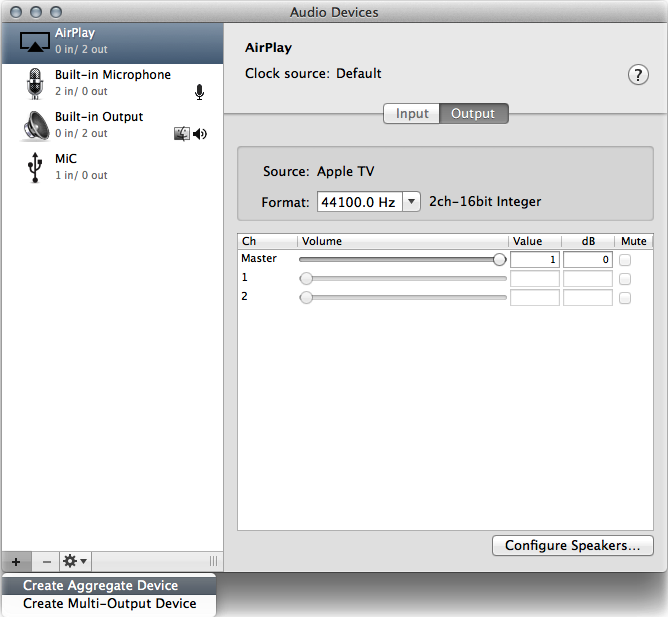
- Click the Add (+) button on the bottom-left corner in the Audio Devices window and chose Create Aggregate Device:
- A new aggregate device appears in the list on the left side of the window. To rename the device, double-click it:

- With the new aggregate device selected, enable the checkbox labeled “Use” on the left side of the Audio Devices window. Do this for each device you want to include in the aggregate device. The order in which you check the boxes determines the order of the inputs and outputs in applications like Logic and MainStage. For example, the first box you checked will be inputs one and two, the second box checked will be three and four, and so on.
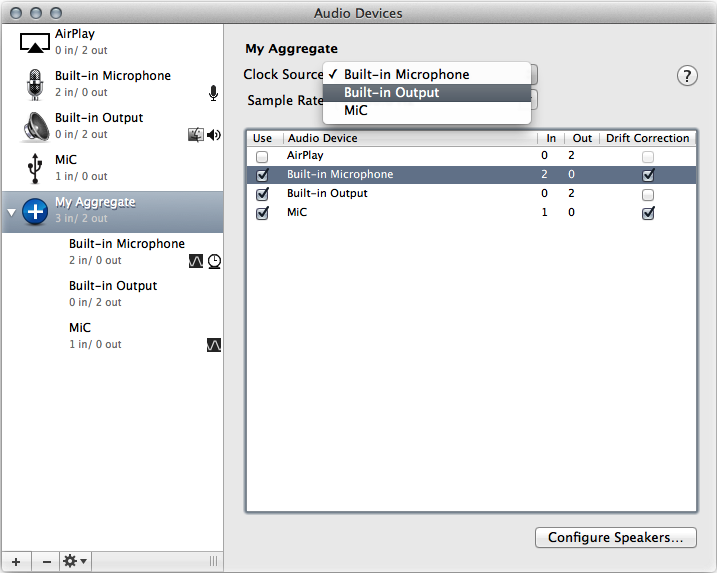
Note: The list on the right shows the currently connected audio devices and the number of input and output channels for each one. - To use the clock of a device as the master clock for all the combined devices, choose the device from the aggregate device’s Clock Source pop-up menu. Choose the device with the most reliable clock:
- If your audio devices all work with word clock, connect them together using a word clock cable. Connect the cable from the device you designated as Clock Source in step 5 to the input of each other device. Refer to your audio device product documentation for specific details.
- If any of your devices do not work with word clock, enable the Drift Correction checkbox for the devices that are not designated clock master.
When you need help, Sweetwater has the answers!
Our knowledge base contains over 28,000 expertly written tech articles that will give you answers and help you get the most out of your gear. Our pro musicians and gear experts update content daily to keep you informed and on your way. Best of all, it’s totally FREE, and it’s just another reason that you get more at Sweetwater.com.

