

AKAI MPK Mini Play Quick Start Guide
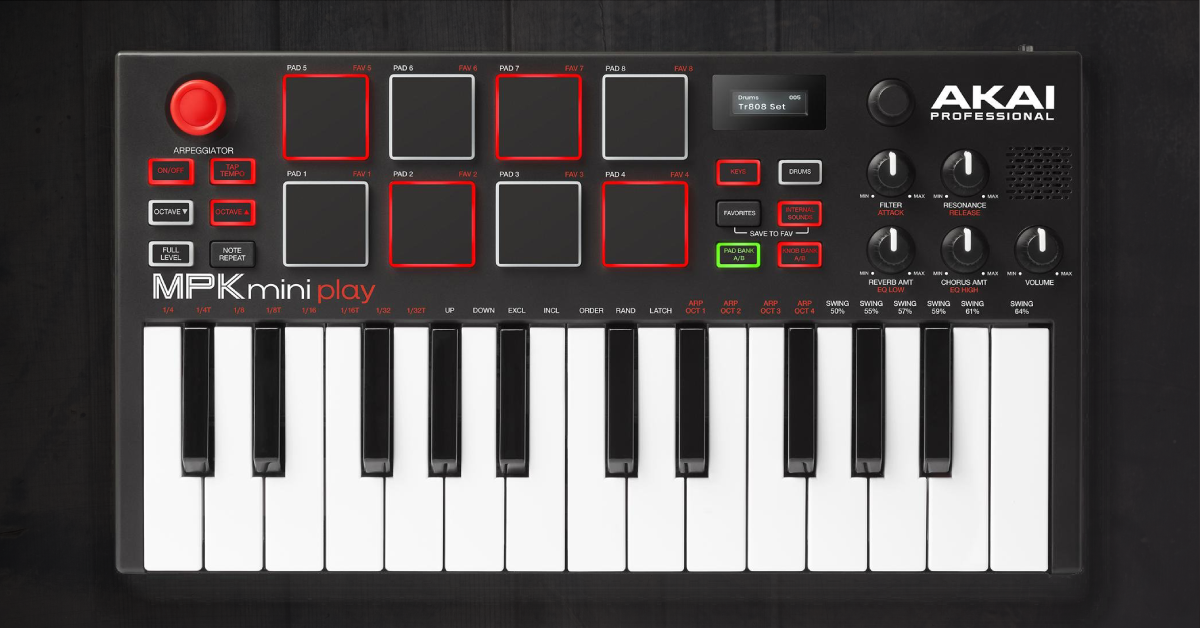
Overview
In this article, we will show you how to set up and get started with the AKAI MPK Mini Play. Follow the steps below to get started!
3. Make Sounds
Getting Started
If you’re like us, the first thing you probably want to is to play your MPK Mini Play. Who could blame us? But first, you’ll want to get started by registering it with AKAI so that you can the included software. Follow the software download instructions below.
Software Download Instructions
The first thing you need to do is register your MPK Mini Play with AKAI. By doing so, you’ll be able to access all the bundled software including Pro Tools First, MPC Essentials, and the Hybrid and Wobble virtual instruments. If you already have an AKAI account, you do not need to create another one, just log in. Follow the instructions below to register and obtain your bundled software.
1. Log in to your AKAI account or create one for the first time.
2. Register your MPK Mini Play on your account’s product registration page.
3. View included software on your account’s products page.
Install Bundled Software
Once registered, your bundled software can be found on your account’s products page. Follow the instructions to register and install each app/instrument. Learn more on AKAI’s support page.
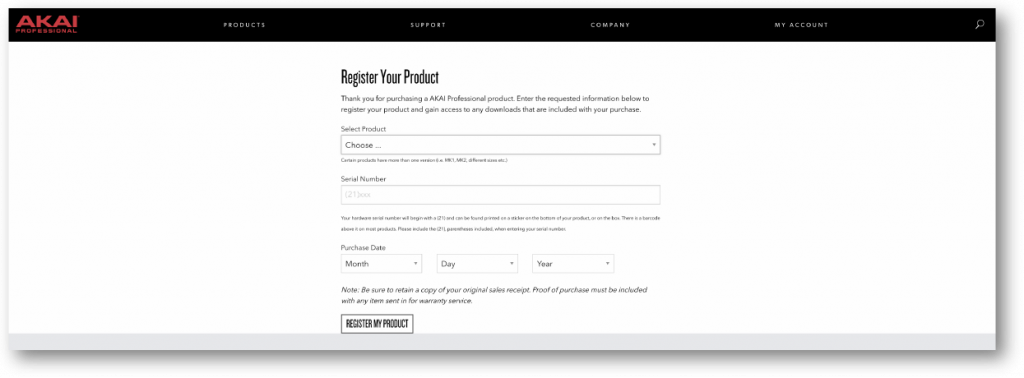
Click the above image to register your MPK Mini Play with AKAI.
Setup and Connections
Setting up your MPK Mini Play couldn’t be easier.The keyboard can be powered two ways: with a wired USB connection or by using three AA batteries to go wireless.
The battery option is ideal for mobile use, especially if you want to jam or create with headphones. Regardless of how the keyboard is powered, it must be connected via USB in order to transmit MIDI signal to a computer.
While the MPK Mini Play appears to play audio, it does not actually transmit audio over USB. To get sound, the MIDI data must trigger a virtual instrument like the bundled Hybrid 3 or Wobble. Here are a few tips for connecting your MPK Mini Play to a computer.
Bus & Battery Power
The Power switch determines whether the device is battery or USB powered. When connecting to a computer over USB, the MPK Mini Play is bus powered from the computer and does not drain the batteries.
USB Hubs
Connecting to a USB hub may not provide enough power for your device, especially with passive hubs that don’t use a power adapter. Try using a USB hub with its own power supply or reconfiguring your USB connections so that the MPK Mini Play is connected directly to your computer.
Not showing up?
If the MIDI controller does not show up, first try unplugging and plugging it back in or try another USB port and/or USB cable.
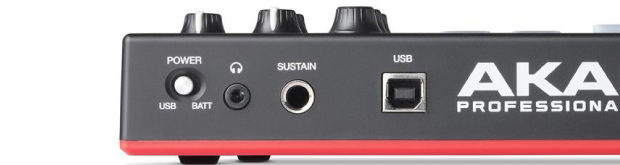
Use the USB connection with a computer/tablet.
Playing MPK Mini Play Internal Sounds
To play the internal key and drum sounds, you must have the INTERNAL SOUNDS button engaged. Once on, the keys and pads will create their respective sounds. If you don’t want to use the internal speaker, either turn the volume down, disable INTERNAL SOUNDS, or connect a set of headphones.
Make Sounds
The MPK Mini Play comes with built-in sounds: 128 keys and 10 drums. So long as the INTERNAL SOUNDS button is engaged, both pads and keys can be used simultaneously. Consider the following tips when playing the MPK Mini Play’s internal sounds.
Drums
- Press the DRUMS button and press the pads to trigger each drum kit’s sounds.
- While DRUMS is enabled, rotate the encoder (to the right of the screen) to change between the 10 drum kit sounds.
- Engage the FULL LEVEL button to make all pads sound at full velocity.
Keys
- Press the KEYS button and play any of the keys to create sound.
- While KEYS is enabled, rotate the encoder to change between the 128 sounds.
- Use the Arpeggiator (below) to arpeggiate chords in all sorts of ways.
Saving and Loading Favorites
To save a sound to a pad (FAV 1, 2, etc.), hold the FAVORITES and INTERNAL SOUNDS buttons and then press one of the eight pads. To load a saved sound, hold the FAVORITES button and press the corresponding pad.
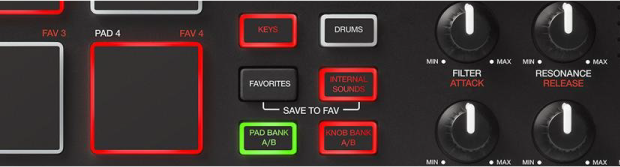
Engage the INTERNAL SOUNDS button to hear drum and key sounds.
Arpeggiator
Enable/disable the arpeggiator by pressing the ON/OFF button underneath “ARPEGGIATOR”. While turned on, the arpeggiator will alternate the notes you play at a given tempo. Follow the instructions below to change the arpeggiator’s behavior.
Change the arpeggiator’s rate, range, and rhythm with the following settings:

TEMPO: Repeatedly press the TAP TEMPO button to set the note’s tempo.
TIME DIVISION: Hold the ON/OFF button and press a key labeled with a rhythmic value (¼, 1/4T, etc…)
OCTAVE: Increase the arpeggio octave range. Hold the ON/OFF button and press a key labeled with ARP OCT ( 1, 2, etc.)
SWING: Swing the rhythm by holding the ON/OFF button and pressing keys labeled with swing percentages. SWING 50% equals no swing.
Arpeggiator Modes
Changing the arpeggiator mode means changing how the arpeggiation plays back. Hold the ON/OFF button and choose one of the following modes by pressing its corresponding key.
UP: Notes arpeggiate lowest to highest.
DOWN: Notes arpeggiate highest to lowest.
INCL (Inclusive): Notes will sound from lowest to highest, always repeating the lowest and highest notes.
EXCL (Exclusive): Notes will sound from lowest to highest, and the lowest and highest notes are not repeated.
ORDER: Notes sound in the order they were pressed.
RAND (Random): Notes sound in a random order.
LATCH: Notes will continue to arpeggiate after you stop pressing the keys. You can add additional notes by continuing to press. If you release and press new notes, the new notes will begin to arpeggiate.

Use the ON/OFF button and use the keys to change arpeggiator settings.
Helpful Links
PC & Mac Optimization Guides
Resolving Audio Interface Issues on Windows 10
Resolving Audio Interface Issues on Mac
How to Install and Use ASIO4ALL
macOS 10.14 Mojave Compatibility List
When you need help, Sweetwater has the answers!
Our knowledge base contains over 28,000 expertly written tech articles that will give you answers and help you get the most out of your gear. Our pro musicians and gear experts update content daily to keep you informed and on your way. Best of all, it’s totally FREE, and it’s just another reason that you get more at Sweetwater.com.


Offer applies only to single-receipt qualifying purchases. Select manufacturers may require that only the manufacturer’s products qualify towards the minimum purchase amount needed to be eligible for promotional financing. Otherwise, an invoice that meets the minimum purchase amount and contains at least one qualifying manufacturer product is eligible for promotional financing. No interest will be charged on promo purchase balance, and equal monthly payments are required on promo purchase until it is paid in full. The payments equal the amount financed divided by the number of months in the promo period, rounded up to the next whole dollar. These payments may be higher than the payments that would be required if this purchase was a non-promo purchase. During the last month(s) of the promo period the required monthly payment may be reduced due to the prior months’ rounding. Regular account terms apply to non-promo purchases. New Accounts as of 07/31/2025: Purchase APR is 34.99%. Penalty APR is 39.99%. Min Interest Charge is $2. Existing cardholders: See your credit card agreement terms. Subject to credit approval.
Offer applies only to single-receipt qualifying purchases. No interest will be charged on the promo balance if you pay it off, in full, within the promo period. If you do not, interest will be charged on the promo balance from the purchase date. The required minimum monthly payments may or may not pay off the promo balance before the end of the promo period, depending on purchase amount, promo length and payment allocation. Regular account terms apply to non-promo purchases and, after promo period ends, to the promo balance. New Accounts as of 07/31/2025: Purchase APR is 34.99%. Penalty APR is 39.99%. Min Interest Charge is $2. Existing cardholders: See your credit card agreement terms. Subject to credit approval.
The estimated required monthly payment shown which excludes taxes and delivery equals the amount financed divided by the number of months in the promo period, rounded up to the next cent. During the last month(s) of the promo period the required monthly payment may be reduced due to this rounding. These payments apply only with the financing offer shown. If you make these payments by the due date each month, you should pay off this amount financed within the promo period, if it is the only balance you are paying off. If you have other balances on your account, this payment will be added to any other minimum monthly payments.
Applies only to select items from this manufacturer. Ask your Sweetwater Sales Engineer for more details.