
Ableton Live Software Activation Instructions
In this article, we will walk you through every step between purchasing your Ableton software and launching it for the first time. You may want to leave this article open in a separate tab or window so you can reference it throughout the activation, download, and installation processes.
IMPORTANT: Academic versions
If you purchased an academic version of Ableton Live, you will need to verify your education status before installing your software. To do this, please visit Ableton’s eligibility page and make sure you meet the necessary criteria. After doing this, upload your proof of eligibility in your user account after registering your copy of Live.
Enter Your Registration Code
IMPORTANT: PUSH 3 bundles and upgrades
If you purchased a Push 3 or Live upgrade, you won’t be able to register the upgraded version of Live until the prerequisite version is registered first (Intro > Standard > Suite).
This means you MUST register the hardware before registering the upgrade.
First, make sure your computer meets or exceeds the system requirements and is compatible with your version of Windows or macOS. Also, don’t forget to create an Ableton account. You can reset your password here if you need to.
- Log into your Ableton account. If you don’t have an account, you can create it now.
- Open the Software Activation Instructions email from your Sweetwater Sales Engineer and locate the Registration Code (e.g. B234-5E78-98R6-543N-E234).
- Copy and paste the Registration Code into the box on Ableton’s product registration page, then click Submit
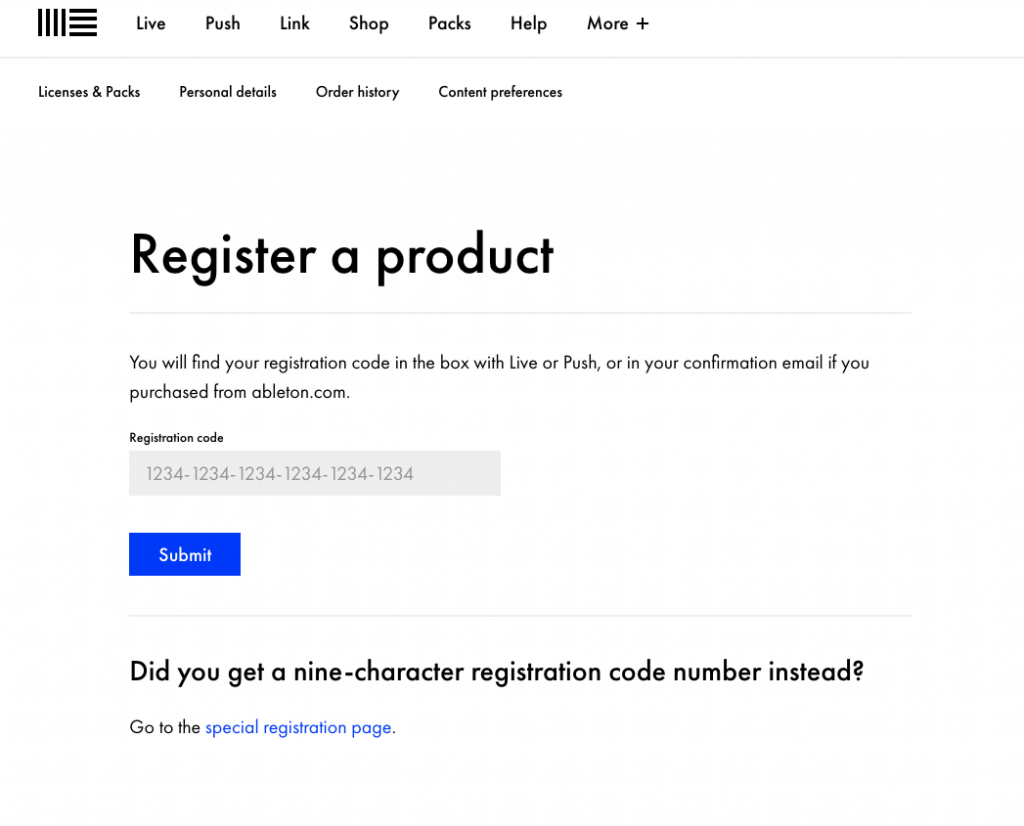
Click the image above to enter your Registration Code with Ableton!
Download and Install Ableton Live
Now that you’ve registered, download links for your Live software will appear in your Ableton account. Follow these steps to download and install your software.
- On your account home page, click the dropdown box to select your OS, then click Download.
- Navigate to your Downloads folder and launch the installer.
- Windows PC: Select the ableton_live .ZIP folder and click Extract All. Then, click Extract. Open the newly extracted folder, then double-click the Setup file to start the installation.
- macOS: Double click the ableton_live .DMG file. An Installer window will appear. Click and drag the Live icon onto the adjacent Applications folder. Then, release to install the app.
How to Downloads and Install Ableton Live for Windows
How to Downloads and Install Ableton Live for macOS
Launch and Authorize Ableton Live
Now that Ableton Live has been registered and installed, you can launch the software to complete the authorization process. When prompted to select a license to authorize, choose the version of Live you just registered. Choosing another version will not apply the correct license. Visit Ableton’s support article for more information about authorizing Live. Once done, you’re all set.
IMPORTANT! Multi-seat license activation requires additional steps. Go to Ableton’s page for additional instructions on managing Hands-Off Authorization for Deployment Systems.
TIP: Ableton Live includes additional content called Live Packs. Click here to learn more about Live Packs.
TIP: If you cannot complete the authorization process because of an error or anything else, visit this Ableton support article for a solution.
How to Use Ableton Live – Getting Started with Ableton Live
Related Articles
When you need help, Sweetwater has the answers!
Our knowledge base contains over 28,000 expertly written tech articles that will give you answers and help you get the most out of your gear. Our pro musicians and gear experts update content daily to keep you informed and on your way. Best of all, it’s totally FREE, and it’s just another reason that you get more at Sweetwater.com.

