Helix’s amps not only are authentic-sounding models of iconic amps, but they also have enough parameters that you can customize them into variations that never existed in the physical world. Most of the amp parameters, like Drive, Bass, Treble, etc., are well understood by most guitarists. However, some of the parameters leave users scratching their heads. So, let’s do a deep dive and not only explain what Ripple, Hum, Bias and Bias X, and Sag do but also show you how to hear for yourself the ways that they affect the sound.
Ripple
Ripple in physical amps is due to power supply–related issues. In theory, power supplies filter the incoming AC (alternating current) power into DC (direct current) power, but it’s almost impossible to avoid some residual AC ripple. Because the power supply affects every part of an amp, even subtle imperfections compared to pure DC power may affect the sound. Ripple can become more pronounced when an amplifier is under heavy load or when the filter capacitors in older amps start aging.
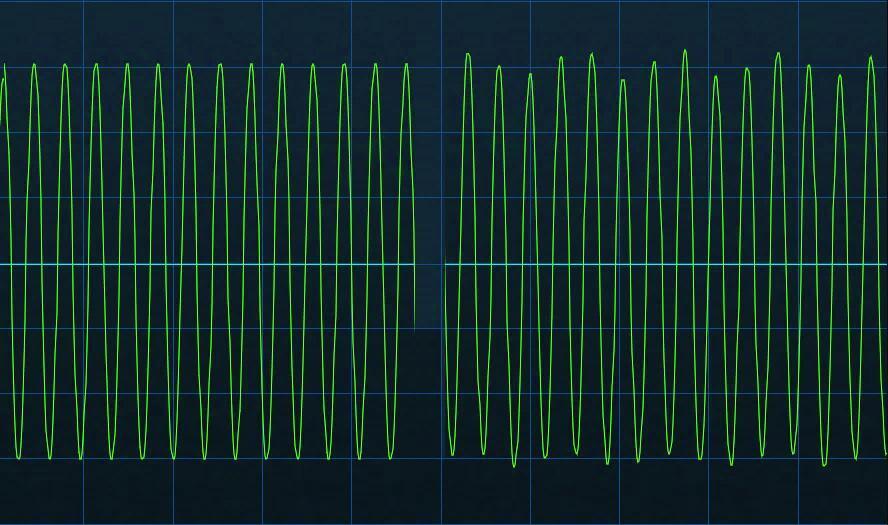
In figure 1, the input signal is a 400Hz sine wave. Unlike hum, which is mixed in parallel with the audio, ripple modulates the audio level. This effect is audible, and measurable, even with fairly heavy amounts of distortion.
Here’s how to hear the way ripple affects the sound:
- Load the WhoWatt 100 block with no cab. Set Drive to 0.0.
- Turn Hum and Ripple all the way down.
- Turn up Ripple to 10.0. At a sufficiently loud monitoring level, you’ll hear something that sounds like hum but with a more complex waveform.
- Play a note above the 12th fret on your high E string. With Ripple up all the way, you’ll hear a slightly grittier sound “underneath” the note. Increasing Drive will make this more apparent. Turn Ripple down, and the sound will be cleaner.
Ripple is more of a subliminal effect than something you “hear.” Without ripple, notes sound cleaner. However, some guitar players feel that adding ripple makes amps sound more alive and interesting because of the complex overtones that ripple creates. Try boosting Ripple on some of your favorite presets and play through them for a while. Then turn Ripple all the way down and play through the same presets some more. Choose whichever option puts a smile on your face.
Hum
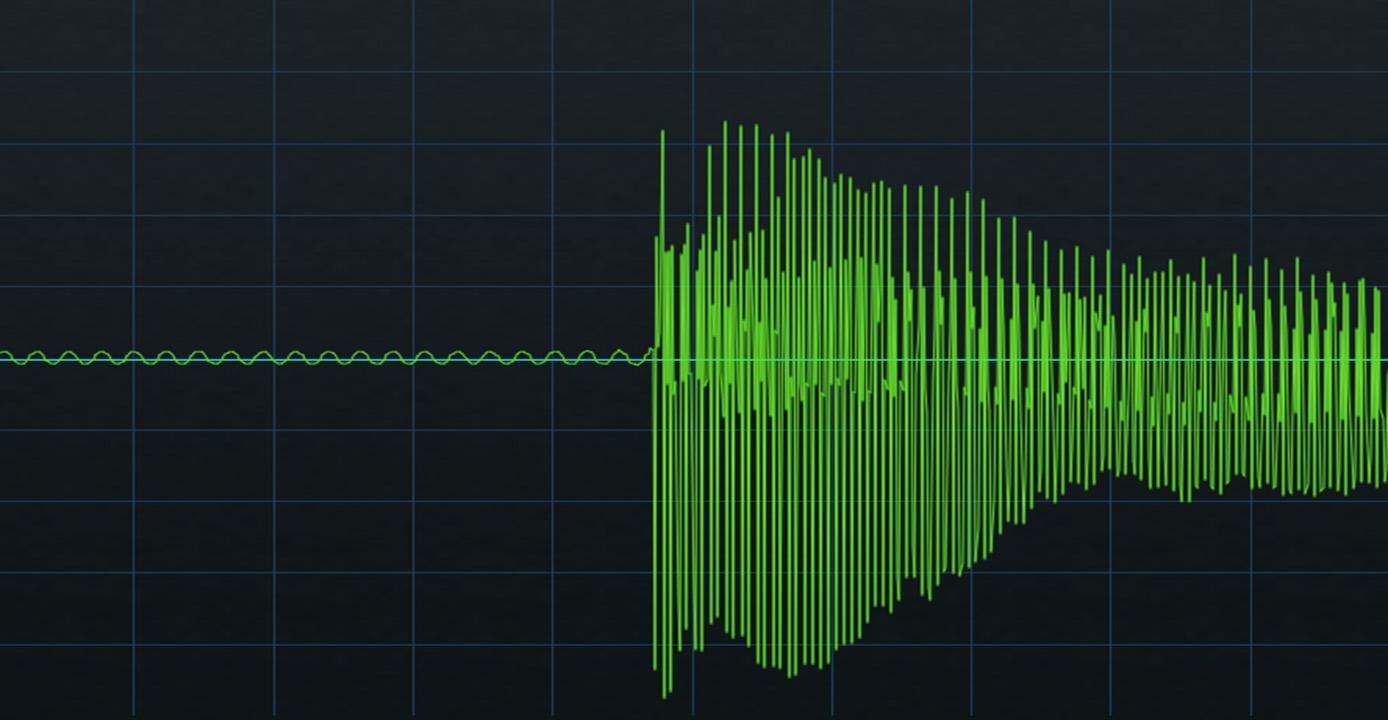
This parameter mixes in a controllable amount of hum to give a “you’re listening to a real amp” sound. Figure 2 shows the hum at maximum level on the left side of the image in comparison to a single note hit with moderate force on the right side of the image.
Here’s how to hear the way hum affects the sound:
- Load the WhoWatt 100 block with no cab. Set Drive to 0.0.
- Turn Ripple all the way down.
- Turn up Hum to 10.0
- Hum produces a low-level, low-frequency signal, so you’ll probably need to turn up the level on whatever system you’re using to monitor the hum. With enough level, you’ll hear it.
Bias and Bias X
Some users are frustrated because they expect a universal “rule” on how to adjust these parameters. However, Bias and Bias X interact with multiple settings — the input signal level, drive amount, sag, and master volume — as well as with each other. So, a Bias setting that increases 2nd-harmonic distortion may increase 3rd-harmonic distortion with other control settings. For those who want suggested settings, there really is no option other than “change the parameter values and use your ears.”
However, let me show you how varying these controls affects the way distortion emphasizes different harmonics. Figure 3 shows the WhoWatt 100 with both Bias X and Drive at 5.0. The top image shows Bias at 0.0. The bottom image shows Bias at 10.0. The even harmonics have yellow circles. The odd harmonics have red rectangles.
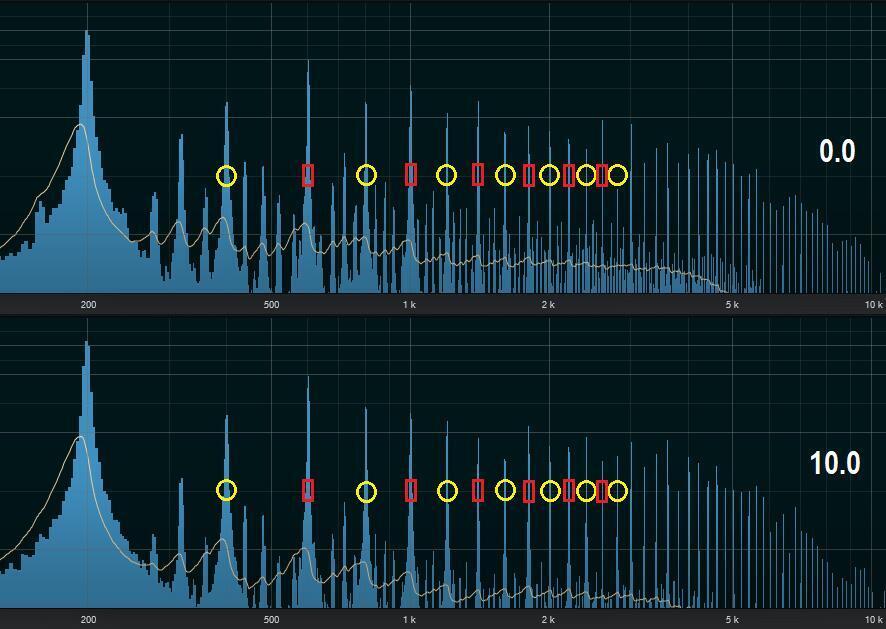
While it’s not an exact science, the 10.0 setting is more prone to emphasize even harmonics, especially at higher frequencies. It also generates slightly less overall distortion. 0.0 is more about odd harmonics. But, again, it’s worth emphasizing that changing any of several parameters could give different results.
Ultimately, what matters is how your guitar sounds with different settings. However, sending a sine wave through an amp and listening to how Bias and Bias X affect the sound reveals a lot. Fortunately, Line 6 has the ideal tone generator. Here’s how to hear the way Bias and Bias X affect the sound:
- Insert the 4 OSC Generator in front of the Amp+Cab you want to test or at the beginning of a preset that you want to edit.
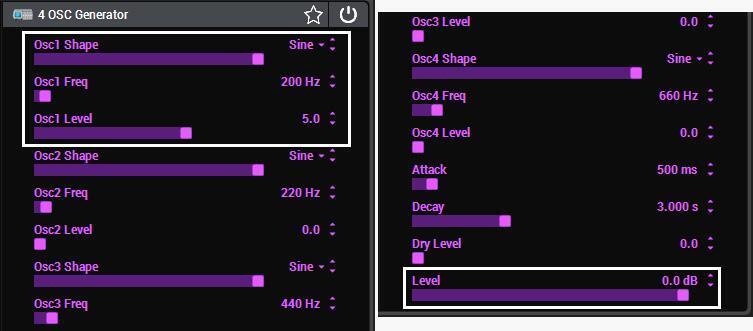
- Turn down all 4 OSC Generator level controls except for Osc1 Level and the main Level (fig. 4). A 200Hz sine-wave tone is a good choice for testing purposes.
Experiment with different Bias, Bias X, Drive, Sag, Master Volume, and other parameters. As you change the Bias and Bias X sliders, you’ll hear different distortion characters. Also, listen to low Drive settings as you change the Bias. You’ll find almost all the amps can offer many useful variations just by altering the Drive, Bias, and Bias X parameters.
Sag
An amplifier doesn’t necessarily react predictably when you hit it with a note or a chord. The sudden demand for current from the power supply can cause the voltage to start off higher, sag, and then stabilize as the amp delivers more current. Or it may sag a lot and then recover. How the output transformer reacts also matters.
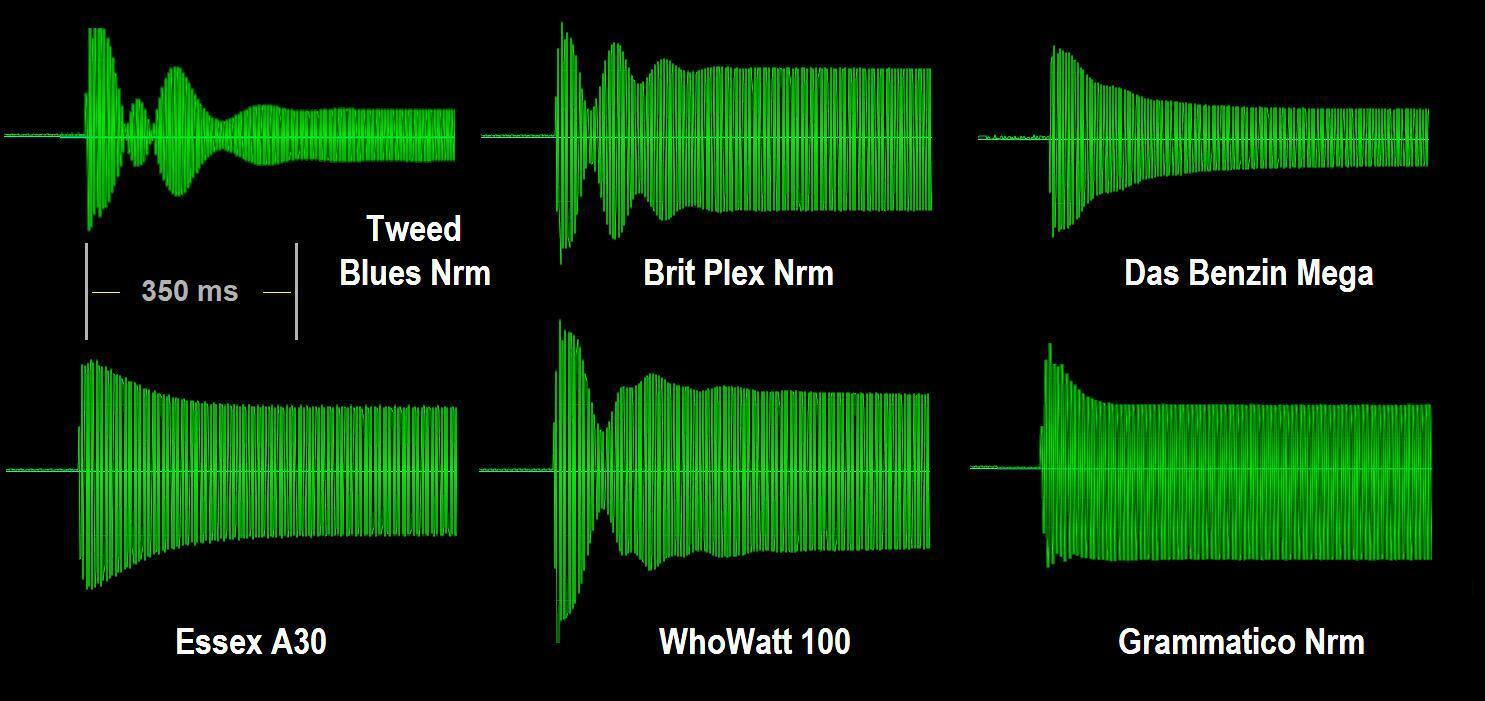
Figure 5 shows several amps’ sag characteristics with maximum Sag. The Tweed Blues Nrm has the most anomalous sag, followed by the Brit Plex Nrm and the WhoWatt 100. The Essex A30 has a more controlled sag, as do the Grammatico Norm and Das Benzin Mega. The time scale for all amps is the same. Sag takes place over a short amount of time.
With Sag at minimum, the output level doesn’t change when a strong input signal hits the amp. This diagram also shows the futility of trying to make an overall conclusion about sag like “more sag gives more sustain” or “more sag gives more touch sensitivity.” These comments are true for some amps but not necessarily for others. Also remember that sag interacts with other parameters. The one comment that does apply is that zero Sag gives a “tighter” sound because the attack is instantaneous.
Let’s hear how sag affects the sound. As with testing Bias and Bias X, we’ll take advantage of the 4 OSC Generator. Here’s how to run the test:
- Insert the 4 OSC Generator in front of the Amp+Cab you want to test or at the beginning of a preset that you want to optimize.
- Use the same settings as in figure 4 but set Attack and Decay to minimum.
- Turn on the 4 OSC Generator while listening to the attack at the amp output.
- To evaluate different Sag settings, bypass the 4 OSC Generator block, change the Sag control, and then enable the 4 OSC Generator block again.
You can’t lower the 4 OSC Generator’s attack time below 10ms; ideally, you’d use a test tone generator with an instant attack time. Your DAW may include a test tone generator, and there are also third-party options like the Waves eMo Generator. The main point is you want to hear what happens when the amp goes from no input signal to a strong input signal.
And there you have it — we’ve hopefully demystified several of the more enigmatic Helix amp parameters. Have fun!
This article is excerpted with permission from Sweetwater Publishing’s eBook+preset pack The Big Book of Helix Tips and Tricks.