Line 6 Helix devices are loaded with effects, but they don’t have a manual that lists what all the effects parameters do. Although many of these are straightforward — most everyone knows how a parameter like level or treble affects the sound — the function of some parameters isn’t at all obvious. So, let’s explore three Helix effects, and find out what their parameters really do.
Horizon Gate
This is not a traditional noise gate — it’s a noise filter. As the input signal gets lower, there’s a greater amount of high-frequency rolloff (fig. 1). This is ideal for reducing hiss.
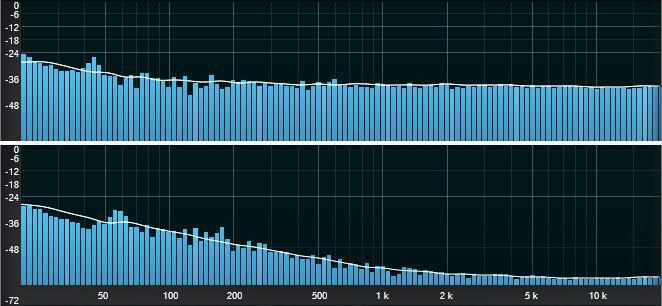
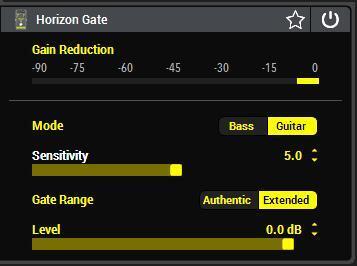
Although the controls (fig. 2) are simple, they can be a little touchy to adjust. The settings in the screenshot provide moderate hiss reduction.
- Mode is self-explanatory — choose a response that’s optimized for bass or guitar.
- For a given input level, Sensitivity reduces the high frequencies more with higher settings.
- Gate Range sets a lower limit for how much the filter will attenuate the noise. With Authentic, the filter pushes the noise down around -30 dB. Extended increases this to -90 dB.
The Horizon Gate typically inserts toward the beginning of a signal chain. However, it can follow a hissy Amp so that when you’re not playing, the hiss goes away. It can also follow a traditional noise gate so that when the gate’s release time begins, the Horizon Gate reduces any residual hiss.
Cosmos Echo
This echo effect emulates a vintage tape-based device with three playback heads that played back sounds from a tape loop. The tape loop played continuously (it was an actual circular loop of tape) and was driven by a capstan motor. The original unit on which this is based was known for unpredictable behavior that many found (and still find) endearing. That remains the case for Cosmos Echo, which is by far the quirkiest of the Helix delays.
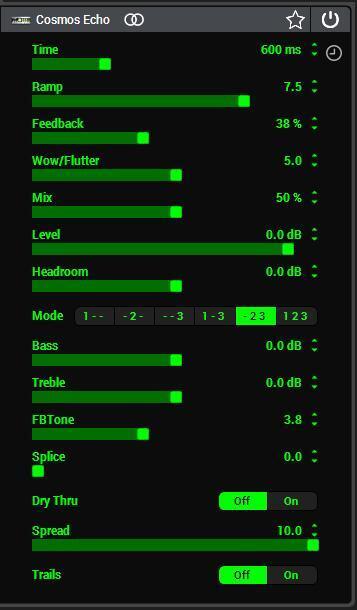
Although many of the parameters (fig. 3) may seem familiar, they have some interesting twists:
- Time is the master time parameter. It sets the delay when playing back through Head 3. Head 2’s delay is 2/3 the Time parameter, and Head 1’s delay is 1/3 the Time parameter. See Mode for more information.
- Ramp. With the original unit, changing Time wasn’t instantaneous because the change in tape speed was subject to a mechanical lag. Ramp sets the rate of change when you alter the Time parameter. 0.0 gives the fastest rate of change, 10.0 the slowest.
- Feedback is a highly variable parameter that’s not like the echoes of analog or digital delays. The tone, bandwidth, and sound quality vary considerably as the feedback keeps going. It’s also possible to drive the Cosmos Echo into self-oscillation where repeats go on forever, even at lower values (e.g., 50%). You needn’t always go up to 100% to enter the world of feedback insanity.
- Wow/Flutter adds pitch variations to the virtual tape, but if there’s feedback and some of the echoes “land” on previous echoes, the wow and flutter add a chorusing-type effect. This doesn’t happen with the value at 0.0.
- Mix sets the ratio of dry and processed sound, but see the Dry Thru parameter (below) for more details.
- Level acts like a standard output level control. It may be the only parameter in this effect that’s relatively normal.
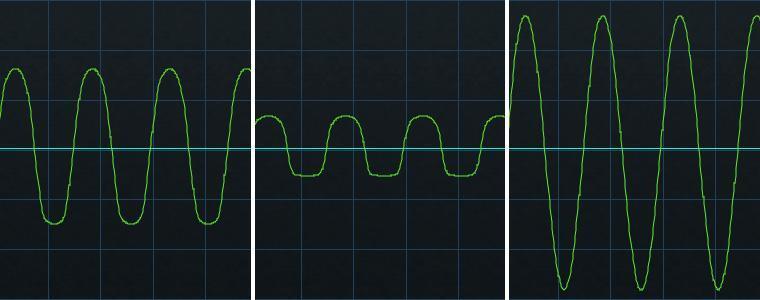
- Headroom is a unique Helix parameter that comes into play with hotter-than-normal input signals (fig. 4). At 0, the output reflects any overload occurring with the effect, as caused by too high an input level. Negative headroom values bring peaks more under control, like adding saturation. The advantage of having a headroom parameter is being able to control any peaks inside the effect, instead of elsewhere in the effects chain. Positive headroom values open up more headroom (dynamic range), which reduces distortion by being more tolerant of overload conditions.
- Mode chooses which head(s) will play back echoes. For example, suppose the Time is set to 600 ms. With Mode 1 ‑ 3, you’ll hear a 200 ms echo from Head 1 and a 600 ms echo from Head 3. With Mode ‑ 2 ‑ 3, you’ll hear a 400 ms echo from Head 2 and a 600 ms echo from Head 3. Each Mode creates a different type of repeating pattern. Adding feedback to the more complex modes creates some novel effects.
- Bass lifts or attenuates the low frequencies (fig.5).
- Treble does the same for the high frequencies (fig.5).
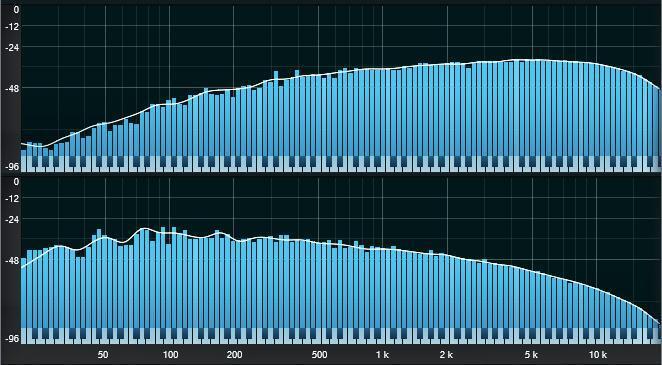
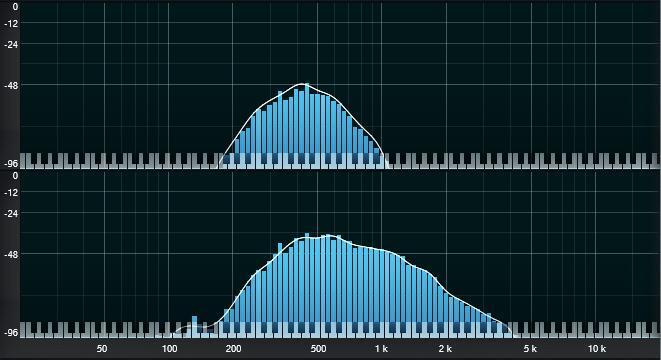
- FB Tone alters the bandwidth as feedback continues. When feedback first starts, the bandwidth is at its widest. As the feedback continues, the bandwidth narrows. At lower FB Tone settings, the bandwidth narrows, with a center frequency around 400 Hz. At higher FB Tone settings, the bandwidth extends into a higher frequency range, with a somewhat higher level. However, bear in mind this effect changes over time and depends on the amount of feedback.
Fig. 6 shows what happens on the 20th repeat of a single head with feedback set to 70%. Bass and Treble are at 0.0 dB (FB Tone is influenced by these controls). Note the difference with FB Tone set to minimum and maximum. Although this effect can vary, the general rule is that high FB Tone values give more bandwidth as the feedback continues.
- Splice. To create a tape loop, it was necessary to splice together the piece of tape’s beginning and end. The Splice parameter emulates the glitch that occurred when the splice passed over a tape playback head. 0.0 selects no splice. Higher values increase the glitch’s severity.
- Dry Thru. When Off, all incoming audio goes through the effect’s electronics. With Dry Thru On, the Mix parameter varies the ratio of effect to an independent paralleled dry sound. The effect is subtle and relates mostly to slightly less high-frequency response with Dry Thru off.
- Spread does stereo imaging, but it’s understated — don’t expect echoes ping-ponging back and forth across your head.
Teemah!
Compared to most distortion, this effect is more subtle. Even the Clipping parameter (fig. 7) is more about tweaking the character than transforming the sound.
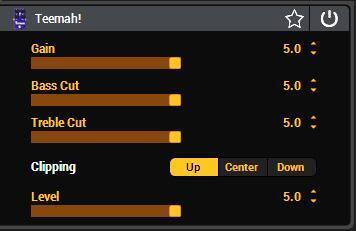
Bass Cut doesn’t make a big difference; it’s noticeable mostly at higher gain levels. Treble Cut makes a more dramatic difference at any gain level. The star of the show here is the Clipping parameter, which has three very different distortion characters.
- Clipping – Up has the densest sound due to lots of harmonics (fig. 8).
- Clipping – Center has a focused, spikier distortion sound and less dense harmonic content.
- Clipping – Down has the least amount of clipping and harmonic content.

In my experience, Teemah! seems most at home when placed before an amp — it brings out different colors from your amp and guitar rather than create heavy distortion.
This article is excerpted with permission from Sweetwater Publishing’s eBook+preset pack, The Big Book of Helix Tips and Tricks.