It wasn’t too long ago that the thought of relying on a computer for live performance was cause for skepticism, but today computers are a mainstay in live performance. Whether it’s for the biggest rock or pop bands or even just a local church, computers are sometimes the heartbeat of the show. Taking your laptop on the road can still prove to be very stressful if you don’t take steps to keep it running smoothly. If your computer goes down in the middle of a show, you’d better be really good at immediately playing your songs acoustically or going into a stand-up comedy routine while the tech (which very well could be you!) is trying to fix the problem. But what if you are a solo artist or a DJ, and you don’t have a band to cover the down time? Below are some things you can do to protect your gear and to make sure the show never stops because your computer suddenly decides to act up.
1. Redundant systems with a switcher
 The only way to ensure that your show will go on even if your computer crashes in the middle of a song is to have a redundant system. That means having a second computer that is running an exact copy of your show, with the same DAW, sounds, plug-ins, and anything else you may be using for your gig. That can be expensive, I know, but it really is a must if you rely on backing tracks or if you have MIDI running video and lights, or both. A redundant system that automatically changes over when something goes wrong during your show will be well worth the investment. Whether you need it once or never at all, it brings peace of mind, so you can just perform and not worry about your gear. Think of it like insurance. If you have it, you’ll likely never need it.
Pro-Tip: The Radial SW8 Auto-switcher is a great switcher to do this job. It can switch between two 8-channel sources by detecting a machine malfunction and switching to a backup machine seamlessly.
2. Hard drive backups
In this day and age of affordable hard drives, it may seem like common sense to have backups of your hard drive; in fact, it is a must to have multiple backups of everything once you hit the road. You never know when that hard drive will fail. Computer techs know that there are only two kinds of people when it comes to losing data to a hard drive crash: 1) Those who have already lost their data and 2) those who are about to. Let me tell you from first-hand experience that not only will that time come, it will likely come more than once. It is a good thing to be overly cautious and back up everything – twice. There are many great external hard drive solutions.
Pro-Tip: The Glyph Studio USB 3.0 and the G-Drive USB both run at 7200RPM, which is great for music applications and range from 1TB to 4TB in size. If you don’t want to carry around a desktop external hard drive, then there are plenty of great portable options. The Glyph BlackBox Mobile, LaCie Rugged, and G-Technology’s G-Drive ev ATC are a few portable options that will do a great job backing up your files and save some space while traveling.
3. Protect your computer – hardshell laptop cases
Taking your computer on the road definitely requires more care than normal. Putting your laptop in your backpack at the end of the night is definitely NOT recommended. Dropping the computer is of course very bad, but even accidentally knocking it against a wall while making your way out of a crowded venue could jar the hard drive enough to really mess things up. For road situations, a hardshell case is a must.
Pro-Tip: The SKB 3i-1813 Waterproof Laptop Case can take a fall and a dunk in water while keeping your computer safe. The Gator GTSA-Laptop Case is very rugged and even the right size to bring onto a plane as carry-on luggage. Those are just a couple examples of hardshell laptop cases. Make sure you get one before you take off on tour.
4. Laptop stands
 While I was on the road with Tears For Fears, I ran our backing tracks from my drum set position, and we had our laptops sitting on top of the road cases. They were not sitting directly on the road cases, but on little stands so there could be some airflow underneath the computer. If you’ve ever had a laptop computer on your lap for any length of time, you certainly know how hot it can get. Preventing that by raising the computer up a little really helps to keep it cool. There are some really nice computer stands that can do that and more.
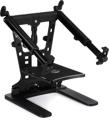
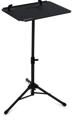
Pro-Tip: Check out the Ultimate Support HyperStation QR and the Numark Laptop Stand Pro. Both are easy solutions for getting your computer up off a flat surface. There are also stands like the Roland SS-PC1. Its sturdy tripod base and table with clamps to hold the computer make it easy to get the computer as high as needed.
5. Laptop locks
Nothing is more frustrating than when your stuff is stolen. If you’ve ever played at a big festival, then you know how crazy the backstage area can be. There are all kinds of people running around doing their jobs to keep the festival running on time. You might think that your gear would be safe, but not all people are honest. It is an unfortunate fact of life. A simple solution to keep your laptop safe is to get a laptop lock that secures your laptop in place with a locking cable. They can easily be found online and work with both PC’s and MAC’s.
There is nothing like playing your music in front of people. It is what playing music is all about. I encourage you to use these options and others in order to ensure a worry-free and seamless show while on the road.