

Mid-side processing is a powerful mixing technique, yet it remains a mystery to many. Fortunately, it’s easier than ever to apply mid-side processing to your mixes.
A stereo signal’s two channels usually carry the left and right audio. However, mid-side processing separates (encodes) the left and right channels into two different types of channels:
- Mid, or center channel. This is the sum of the left and right channels. In other words, it’s the same as panning stereo audio’s left and right channels to the center. (Note that “mid” refers to the “middle” or center audio, not midrange frequencies.)
- Sides channel. This contains only audio the left and right channels don’t have in common. It basically removes the audio in the center.
Separating the mid and sides allows them to be processed separately. However, the separation is not perfect. Because the mid includes the left and right channels, it overlaps with the sides. For example, if a sound is panned far left, then it will be in the sides channel but will also be present (often at a lower perceived level) in the mid channel.
It can be difficult to predict what processing the mid and sides will sound like when decoded back to stereo. So, most processors decode the signal back to stereo before sending it to the output. Then you can make changes to the mid and sides yet hear the results of those edits in conventional stereo.
How to Implement Mid-side Processing
Mid-side processing works by adding and subtracting signals, and altering phase, to encode the left and right channels. This used to require a hardware encoder and decoder or using a bunch of mixer buses and a mixer channel’s ability to change phase. However, this kind of complex approach is becoming unnecessary because mid-side processing is often built into EQs, compressors, and other signal processors.
Some processors can switch among several processing options (fig. 1): the left and right (or mid and side) channels or one channel (right, left, mid, or side). Although some processors may have separate outputs for the mid and sides in mid-side mode, in most cases the processor decodes what you’re doing back into stereo.
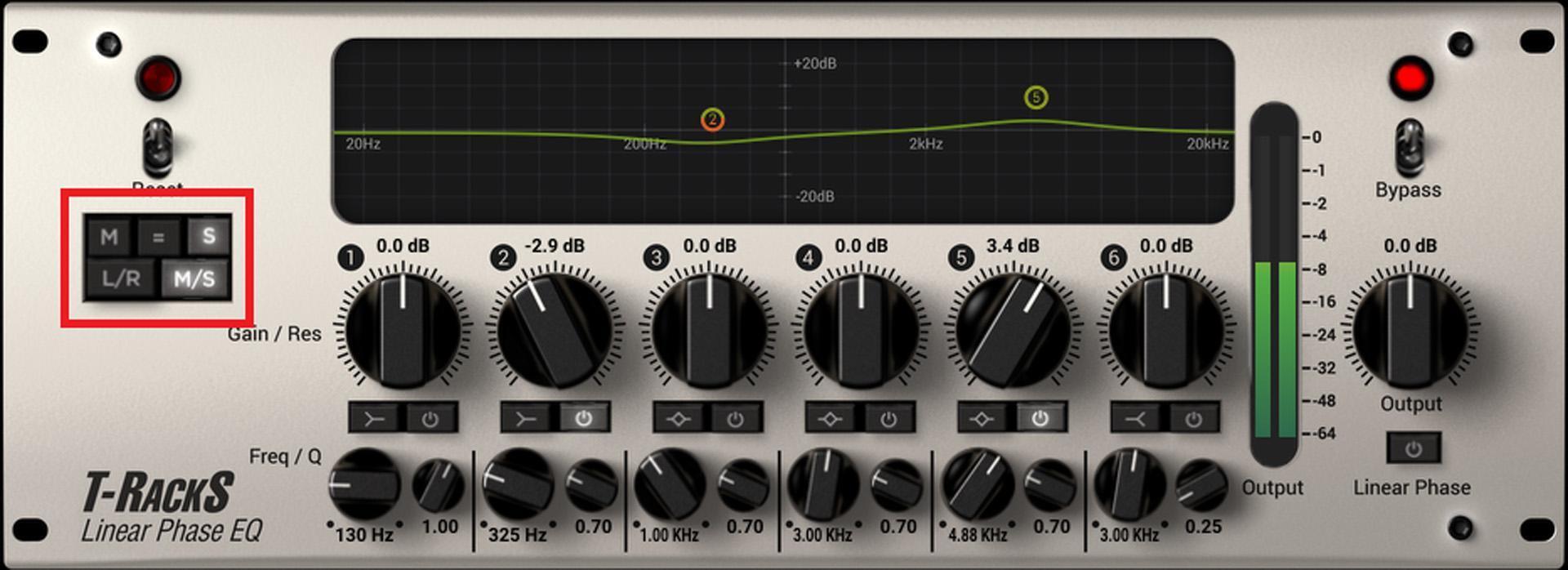
Here’s how to do mid-side processing with an effect that doesn’t incorporate it as an option:
- Your DAW may include an encoder and decoder. Use them to precede and follow, respectively, the effect you want to process. Ableton Live and Studio One can encode and decode.
- Encoder and decoder plug-ins are available as free downloads. Two favorites are Voxengo MSED and Blue Cat’s Gain Suite (which also provides VCA channel–like functions in some DAWs).
- Create your own encoder and decoder matrix by using multiple buses and phase-flipping. We won’t cover this because it’s rarely needed and a hassle, but you can find out how to do it on the web.
Mid-side Processing with Pro Tools
With Pro Tools, it’s easy to turn any multimono plug-in into a mid-side processor:
- Download the free Mid-Side Encoder (MSED) AAX plug-in from Voxengo.com.
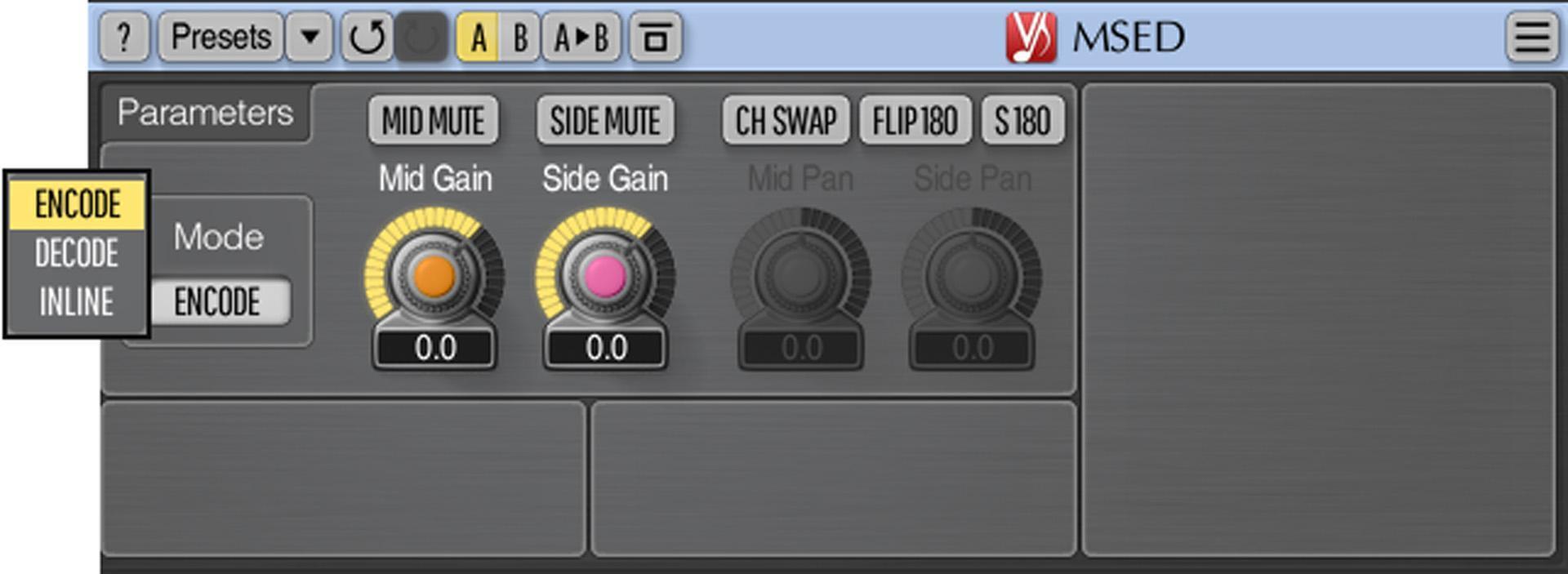
- Insert MSED before the effect that you want to convert to mid-side operation and choose the MSED’s Encode mode (fig. 2). This encodes the left channel into the mid and the right channel into the sides.
- Insert the multimono effect (or chain of effects) after the MSED.
- Insert another MSED after the multimono effect and choose the MSED’s Decode mode.
- Unlink the multimono plug-in’s Master Link button (in the upper right; the transport needs to be stopped).
- Choose Left from the drop-down menu underneath the Master Link button (fig. 3) to process the mid signal or Right to process the sides.
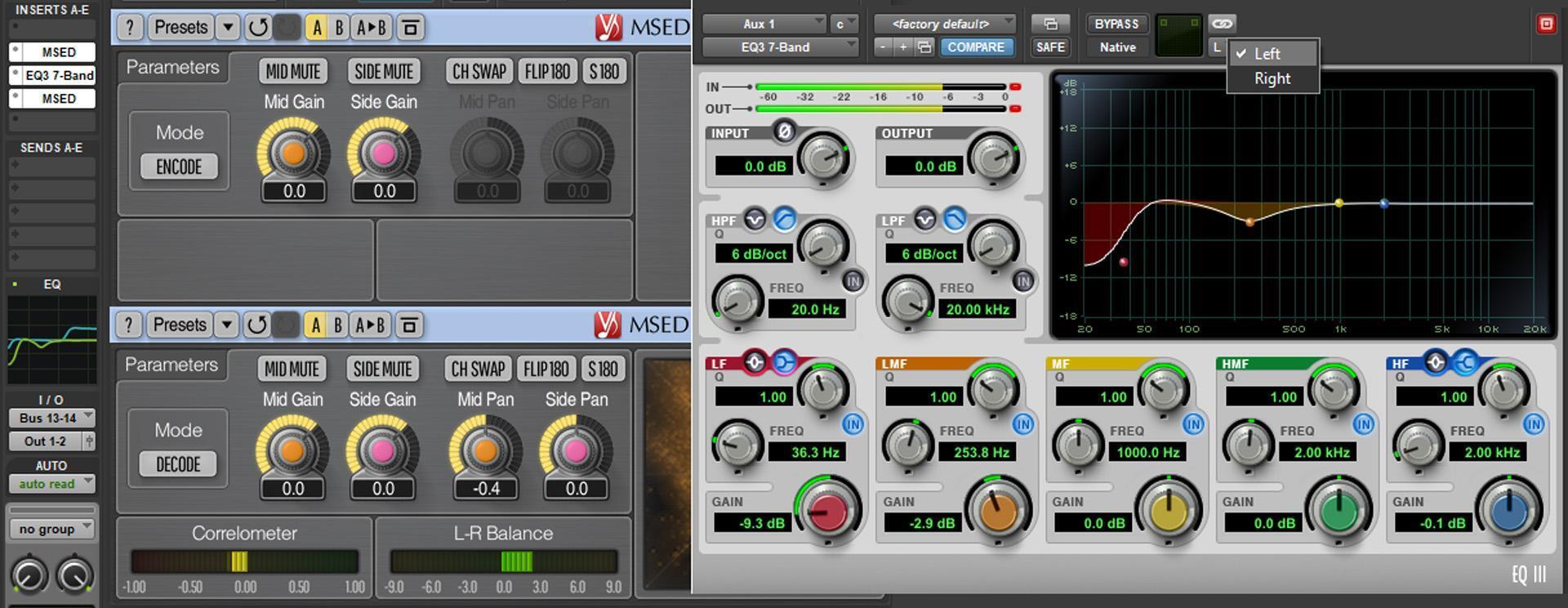
Tweak the mid and side levels, if needed, with their respective Gain controls in the decoder MSED.
How to Use Mid-side Processing
Because of the overlap between the mid and sides, the effects of some processing on a full mix are unpredictable. Although mid-side processing can solve problems, it can also provide creative effects. Here are a few examples of mid-side processing applications:
- To widen a track’s stereo image, to increase the level of the sides somewhat, or to lower the mid level. This makes the extreme left and right signals louder, so the stereo image will appear wider.
- Mid-side processing can be useful to “remix” stereo mixes when the original tracks are not available. It’s sometimes possible to EQ the audio with more finesse than with conventional left/right stereo EQ.
- You can use a high-frequency shelving EQ boost on the mid to increase the articulation of elements that are mixed to center (like vocals, kick, snare, etc.).
- If you compress the center enough that it affects the overlap from the sides, then the compressed side audio in the mid will change levels, but the audio in the sides themselves won’t be compressed. Using a limiter for the mid may work better because it leaves audio under the threshold intact. This allows for limiting the mid without affecting the sides as long as the audio in the sides is below the threshold’s level.
- With synthesizers, inserting different reverbs in the mid and sides can sound richer and more diffused than a single overall reverb.
- Electronic instruments with an inherently stereo output may not play well with a pan pot because, with a stereo track, it acts like a balance control. So, panning to one side or another to avoid conflict with the center means you’ll lose part of what a channel contributes to the sound. Mid-side processing can reduce the level for the mid, thus causing less potential conflict with the center.
- Mid-side EQ processing can help shape reverb. For the mid processing, select a highpass curve and set the frequency so high it takes out essentially everything. This removes most of the reverb from the center, where it could muddy the bass and kick. Then, shape the remaining reverb with the side EQ.
- Drums with lots of room ambience may benefit from boosting the upper mids in the sides and the lower mids in the center to accent the kick.
- If a synth bass’s wide image interferes with other instruments, then lower the bass in the sides.
- Add some short delays to the sides to augment the sound of room reflections.
- Mid-side processing can enhance a stereo mix, particularly with EQ.
These are just some of the ways you can use mid-side processing creatively in your productions, so go for it! And then, come up with some cool techniques of your own.
Excerpted from the book Max Your Mix! Chapter 05, “Combining Effects.” To purchase the entire e-book, please visit Sweetwater Publishing.