Building a pedalboard is fairly easy. You take an armful of your favorite stompboxes and put them on a board, wire them up, and usually, it’s enough to get by. Building a clean pedalboard, however, is not so easy.
Do a quick image search for “cable management,” and you’ll find beautifully routed and organized network servers, workstations, and entertainment systems. It’s a commonly used term to describe precision, workmanship, or planning when routing an electronic system of some kind.
While it does take some effort, utilizing cable management on a pedalboard has many benefits. It preserves your tone, reduces unwanted noise, and results in an ergonomic and natural experience that can inspire you and elevate your performance. Furthermore, a clean pedalboard is more consistent and reliable, which means that you’ll spend less time troubleshooting and more time playing.
The experts at Sweetwater put together this guide to help you build a clean and reliable pedalboard. Here’s how to get started.
Plan the layout

The first step to cable management for a pedalboard is putting together a list of the pedals you want to have on the board and planning how you want to set them up. This will give you a general idea of the pedalboard size that you need and help you figure out where to put your pedals.
There might be certain pedals you’ll want up front, such as pedals with a tap tempo. Also the order of placement can be important. Some pedals don’t operate as well when placed after others. For example, fuzz pedals typically perform best when they’re first in the signal chain, as they interact with the guitar’s volume knob. They do not usually work well after a buffer.
These are things you’ll want to consider early on so that you don’t run into problems after the board is built.
Once you have an idea of which effects you want on the pedalboard, the next step is to visualize how it will be laid out. This could be done in a variety of ways, but the simplest is to sketch a layout with pencil and paper. You can pull the dimensions of any effect pedal at Sweetwater by reading the product specs at the bottom of each product page. After you’ve drawn up your desired layout, you can estimate the size of the board you’ll need to make your vision a reality!
Pro Tip: If you have a Pedaltrain pedalboard, there’s an online tool, called Pedalboard Planner, that helps you visualize your new pedalboard. The tool is loaded with to-scale representations of all Pedaltrain products and thousands of common effects pedals from a variety of manufacturers. This is also a great solution if you are still shopping for pedals and want to buy something that will fit in a certain place on your board.
Choose a pedalboard

With so many high-quality, affordable options for building pedalboards, making your own board from scratch is often more of a hassle than it’s worth. Instead, a premade aluminum board is ideal due to its strength and light weight.
A few great options are Pedaltrain, Friedman, and Voodoo Lab. Each of these manufacturers has models in a variety of sizes, allowing you to choose the board that fits your needs. Using the layout sketch you put together in the previous step, choose a board that is only slightly larger than what you need. You want to leave yourself a little extra room — but not too much.
Custom-cut cables

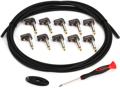
A big part of cable management for pedalboards is to not have extra cable where you don’t need it. By custom-cutting your cables, you can route your audio cables beautifully and efficiently.
Also look for opportunities to run multiple audio cables along similar paths, which allows you to keep your routing clean and organized. A few great options are George L’s, D’Addario, and Emerson. Each of these brands makes pedalboard cable kits, as well as individual components.
The process for setting up cables is generally the same. For each cable needed, follow the steps below:
- Route the cable in exactly the way you want it when the board is complete (visualize the cleanest path between two points on your pedalboard).
- Cut your cable to length, leaving around ¼” to ½” extra length on each side.
- Affix the cable connectors on each side, tightened lightly.
- Test with a multimeter in continuity mode (tip–tip and sleeve–sleeve should sound a tone, tip–sleeve should not sound a tone).
- Tighten the connectors fully.
- Test with a multimeter again.
Pro Tip: Never route your audio cables parallel to any cable with power flowing through, as this will generate unwanted noise in your signal. If you must cross paths with a power cable, do so in an “X” pattern so that there’s only an intersection at one single point.
Utilities

A few useful devices exist to further help you with cable management for your pedalboard, and you’ll find these are key to many rigs of professional guitarists and bassists around the world. These include the following tools.
- Buffer: A buffer is a type of circuit that helps to preserve your guitar’s sound across all frequencies. This becomes a necessity when you’re running long lengths of instrument cable, which is what we do with pedalboards.
- There are dedicated buffers available, such as the JHS Little Black Buffer or the Mesa/Boogie Stowaway, for example.
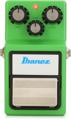
- Many pedals also have buffers built into them, such as the Ibanez TS9 Tube Screamer and the BOSS DS-1 Distortion.
- Noise gate: Noise gates help to eliminate noise when you’re not playing. Unwanted noise is very common in pedalboards. While there are a variety of ways to alleviate this problem, the only sure-fire way is to employ a noise gate of some kind.
- Sweetwater offers many different styles of noise gates, and two popular options include the BOSS NS-2 Noise Suppressor and the ISP Decimator II G String.
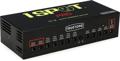
- Pedalboard power supply: Sweetwater recommends power supplies with isolated outputs because that helps reduce noise by preventing multiple pedals from sharing the same ground (in other words, preventing a ground loop hum).
- Popular examples include the Voodoo Lab Pedal Power 2 Plus and the Truetone 1 Spot Pro CS12.
- In addition to having an isolated power supply, a power conditioner from Furman will help to deliver clean, consistent power to your board.
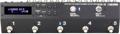
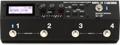
- Effects switcher: When it comes to keeping your audio signal clean, adding an effects switcher is a great option. Rather than running each pedal to the next, in series, you can put one or multiple pedals into a loop. When you have the loop engaged, all pedals in that loop are added to the signal. When you have the loop bypassed, your signal is completely unaffected by those pedals. In addition to a cleaner signal, you’ll also benefit from less “tap dancing,” allowing you to focus on your performance!
- Patchbay: This is a cable management essential you’ll see on many pedalboards. When you’re performing at a gig or in the studio, a patchbay makes setting up your rig a breeze. Not only that, but it makes it so that you don’t have to run cable to several different places on your board. All the ins and outs are in one place! A great option for a patchbay is the Friedman Buffer Bay Buffer and Junction Box.
Other cable management necessities

In addition to the utilities above, here are a few common tools of the trade to help you set up a clean pedalboard:
- Multimeter: Mentioned above, this is a great tool for testing your custom-cut cables.
- Label maker: Use this to label your connections and audio loops.
- Zip ties: These are a more permanent solution for grouping multiple cables of a similar type.
- Tie downs: Great for 90-degree angles, these allow you to route cables with zip ties along a flat surface.
- Windex: When applying hook-and-loop fasteners to the backs of pedals, apply Windex first to make a secure bond.
Think of cable management for pedalboards as a way to spend less time troubleshooting power issues, hums, and weird noises and more time playing, performing, and being inspired! Not to mention, you’ll sound better in the process.
By planning your board, custom-cutting cables, and adding the right pedalboard necessities, you’ll be well on your way to creating a clean pedalboard in no time.