
¡Obtenga asesoría en español!  Llámenos hoy a (800) 222-4701
(800) 222-4700 Talk to an expert!
Loading Cart
Your Cart Is Empty

See what's new at Sweetwater.

My Cart this.cartQty
Recording Guitar Bass Keyboard Drums Live Sound DJ Band & Orchestra Content Creators Worship

How to Use AirTurn with Four Pedals

How to Use AirTurn with Four Pedals

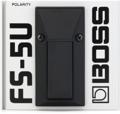
The AirTurn BT-105 comes configured with two footswitches/pedals, which most of us assign to page up/page down functions in our apps and software. But did you know that you can actually use four pedals with the BT-105? One solution for doing this is the BOSS FS-5U footswitch. The FS-5U has the advantage that multiple units can interlock together creating a solid “pedalboard” that doesn’t slide around on uneven surfaces or under heavy use.

NOTE: In order for the FS-5U to work properly with the AirTurn BT-105, the polarity switch must be moved away from the pedal’s jack (to the right, when looking at the back panel of the footswitch).

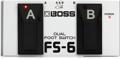
You can also use the BOSS FS-6 dual footswitch with the BT-105. When doing so, set the polarity switches to the right (when viewing the back panel), and set the two mode switches to “FS-5U (momentary)” mode.

Whether you have two or four switches connected to your AirTurn, the device can be used to control a wide variety of functions, depending on what your software or app supports. For example, with the Positive Grid JamUp Pro XT iPad app, guitar players can control virtual stomp boxes, effects, amps and presets wirelessly with the 4-pedal and 2-pedal versions of the AirTurn BT-105.
In this article

Shop Sweetwater

Offer applies only to single-receipt qualifying purchases. Select manufacturers may require that only the manufacturer’s products qualify towards the minimum purchase amount needed to be eligible for promotional financing. Otherwise, an invoice that meets the minimum purchase amount and contains at least one qualifying manufacturer product is eligible for promotional financing. No interest will be charged on promo purchase balance, and equal monthly payments are required on promo purchase until it is paid in full. The payments equal the amount financed divided by the number of months in the promo period, rounded up to the next whole dollar. These payments may be higher than the payments that would be required if this purchase was a non-promo purchase. During the last month(s) of the promo period the required monthly payment may be reduced due to the prior months’ rounding. Regular account terms apply to non-promo purchases. New Accounts as of 07/31/2025: Purchase APR is 34.99%. Penalty APR is 39.99%. Min Interest Charge is $2. Existing cardholders: See your credit card agreement terms. Subject to credit approval.

Offer applies only to single-receipt qualifying purchases. No interest will be charged on the promo balance if you pay it off, in full, within the promo period. If you do not, interest will be charged on the promo balance from the purchase date. The required minimum monthly payments may or may not pay off the promo balance before the end of the promo period, depending on purchase amount, promo length and payment allocation. Regular account terms apply to non-promo purchases and, after promo period ends, to the promo balance. New Accounts as of 07/31/2025: Purchase APR is 34.99%. Penalty APR is 39.99%. Min Interest Charge is $2. Existing cardholders: See your credit card agreement terms. Subject to credit approval.

The estimated required monthly payment shown which excludes taxes and delivery equals the amount financed divided by the number of months in the promo period, rounded up to the next cent. During the last month(s) of the promo period the required monthly payment may be reduced due to this rounding. These payments apply only with the financing offer shown. If you make these payments by the due date each month, you should pay off this amount financed within the promo period, if it is the only balance you are paying off. If you have other balances on your account, this payment will be added to any other minimum monthly payments.

Applies only to select items from this manufacturer. Ask your Sweetwater Sales Engineer for more details.