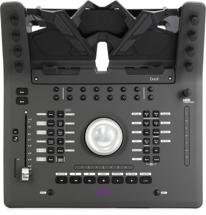
Avid’s upcoming Pro Tools Dock has generated a ton of interest since it was announced at the recent AES show. And for good reason — it looks super cool! Combining an iPad running the Pro Tools Control iOS app and a hardware controller, the Pro Tools Dock allows you to get hands on with Pro Tools, making operating the software even more efficient and ergonomic.
Pro Tools Dock won’t be shipping for a couple of months, but I was given an opportunity to get hands on with one of only two prototypes in the world, when Avid brought the unit by to demonstrate it for Sweetwater’s Sales Engineers. The Pro Tools Dock I checked out was part of a system that also included an Apple Macbook Pro, an Avid S3 control surface, and an Avid Pro Tools Quartet audio interface. The entire rig functioned flawlessly and made working in Pro Tools a total breeze!
The Dock itself is a sleek unit that combines a color touchscreen with eight assignable tactile rotary controls, two touchstrips, transport controls, an assignable jog wheel, a channel fader, and an array of assignable buttons. The Dock connects to your computer via Cat5 cable, while the iPad interfaces with the rig via wi-fi. There’s also a monitor control on the Pro Tools Dock that can set the output level for workstations that support remote audio level control. The Dock does have a USB port, which can be used to charge your iPad to keep its battery topped off during long sessions. Everything communicates using the EUCON protocol, which allows for flexible configuration of every control on the Pro Tools Dock as well as interfacing with the Pro Tools Control app running on the iPad.
The Pro Tools Control app offers comprehensive control over Pro Tools, with virtual faders, soft buttons, metering, plug-in control, and much more. (For a full overview of Pro Tools Control and EUCON, check out my Sweetwater Minute video on the EUCON Ecosystem.) Pro Tools Control is even more powerful when you use it in conjunction with a Pro Tools Dock; you gain a channel view that gives you instant access to channel parameters, settings, and controls. The experience is quite similar to how the touchscreen works on Avid’s high-end S6 control surface, especially when you combine the Pro Tools Dock with an S3. (Check out my S6 video and my S3 video.)
In my brief time with the Pro Tools Dock, I found myself immediately focusing on it for tactile control. It simply feels right to turn a knob to change a plug-in parameter, to hit a real transport control, or to use the channel fader to write automation. None of this is new for users of control surfaces, of course. But where the Pro Tools Dock takes it to another level is with the tight integration it offers with Pro Tools software and the way that it disappears when you are working. Your hands quickly develop the habit of reaching for the Dock instead of typing on the computer keyboard or scrolling/clicking with the mouse. It feels very natural.
In use, the iPad and the Pro Tools Dock merge into one unit. You have so many more options arrayed in front of you for instant access, yet because they’re well organized, you don’t have to think to access them. The freedom to configure everything the way you want it is exciting, as well. For example, most of us think of a jog/shuttle wheel for locating within or scrolling through a session. But why not assign the jog wheel to control horizontal zoom when you’re editing tracks? Or use it to adjust clip start or endpoints…to use a tired cliche, the possibilities are endless.
Similarly, using plug-ins becomes much more like using hardware when you have real knobs to adjust parameters. In conjunction with the Pro Tools Control app, it’s easy to instantiate and set up plug-ins and take control over all the parameters. Switching among multiple plug-ins on a track is a breeze.
I think you’re really going to enjoy the Pro Tools Dock — and keep in mind that it will work with any software that supports EUCON, not just Pro Tools! EUCON even supports switching among multiple workstations.
The rig I used for my Sneak Preview is really the dream configuration. The S3 and the Pro Tools Dock complement each other perfectly for total control whether you’re mixing, editing, or tracking. But the Pro Tools Dock on its own provides tremendous power; having the channel fader onboard still lets you perform your mixes in a way that you just can’t with a mouse. Or, add an Artist Mix or two for even more faders. There are many possible EUCON control surface configurations; you can customize to match your needs exactly!
I’m anxious to add a Pro Tools Dock to my rig. I’m already hooked on the Pro Tools Control app running on my iPad; adding the hardware control aspect to it, along with the channel view, is tremendously exciting. I can’t wait!