
Which Plug-in Format Do I Need For My DAW?
Digital Audio Workstations (DAW) are what we use to record and edit audio and MIDI. The most common way to apply effects or processing to the audio is with plug-ins. In this guide, we will explain what DAW plug-in formats (like VST or AAX) are and which ones are compatible with your DAW of choice. Follow the sections below to learn more. Plug-ins are essentially virtual versions of real gear like an EQ, compressor, or reverb. Not every plug-in format works in every DAW, so it’s important to know what versions are compatible.
DAW plug-in compatibility list
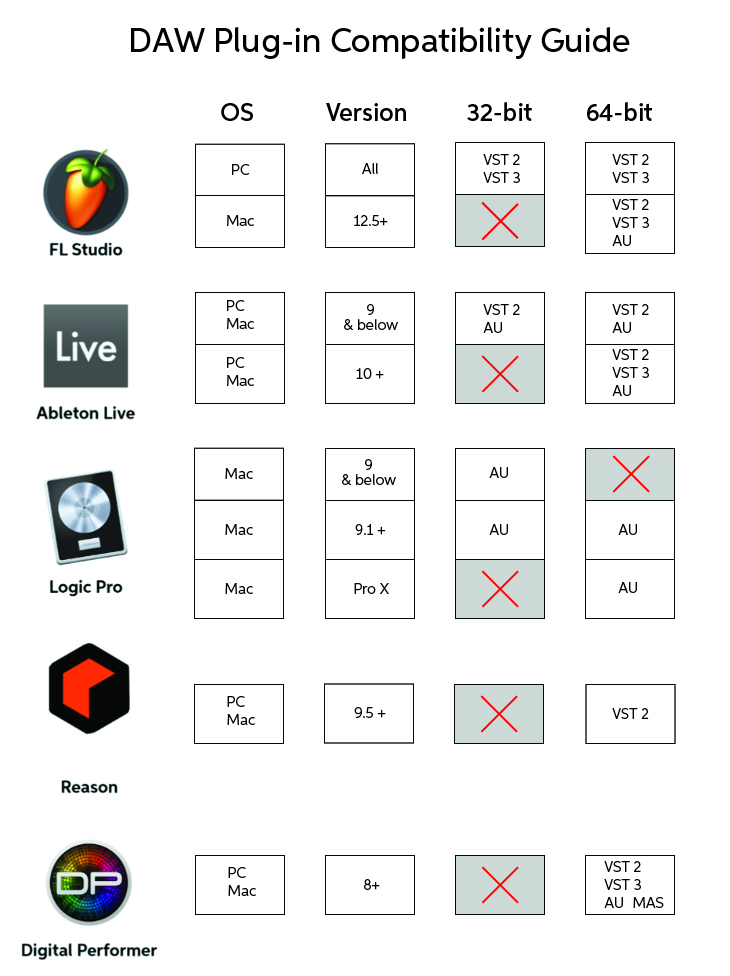
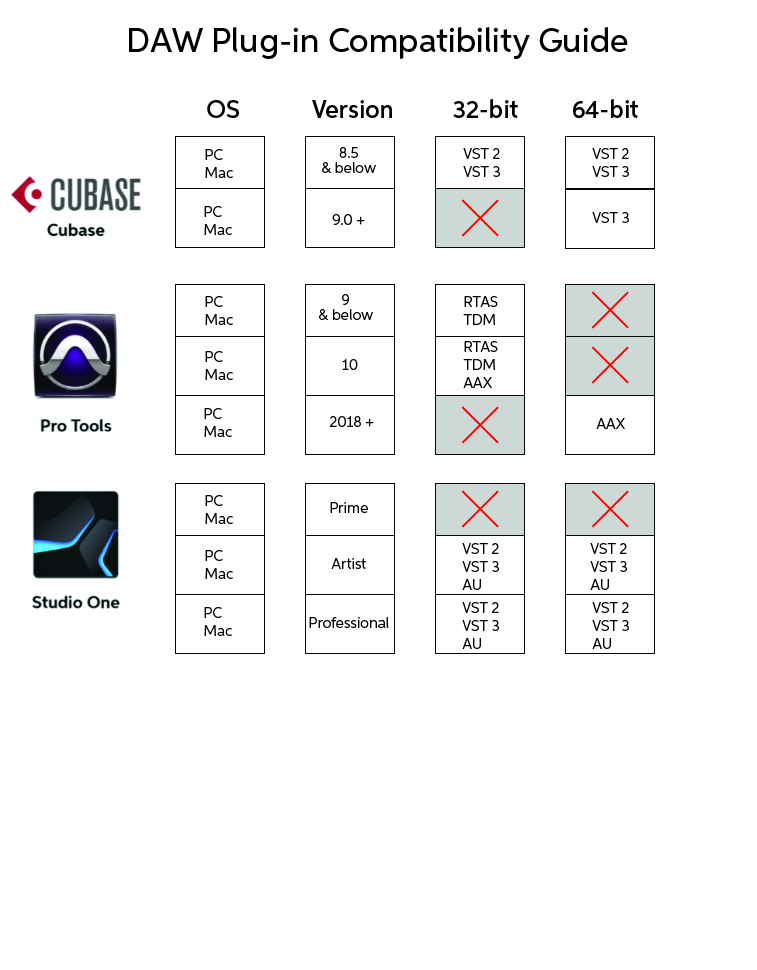
Plug-in formats explained
Each format is a little different depending on which DAW and OS you’re using. They all have unique features, as well as file types so we’ll tell you what the differences are. The most common plug-in formats are listed below.
VST (Virtual Studio Technology)

The VST plug-in format was created in 1996 with the release of Cubase 3. Since then, it has become an industry standard and is compatible with most DAW’s. VST’s were initially only compatible with the Windows OS, but they are now compatible with Mac as well. The latest version is VST 3.0. However, some VST 2.0 and VST 2.4 are still compatible with most DAW’s.
- While VST 2.0 and 2.4 can still be used, 32-bit versions are becoming obsolete, particularly with newer versions of DAW’s. 64-bit versions are recommended for compatibility.
Common VST file paths
PC
- VST 2 (.dll file extension):
- C:\Program Files\VSTPlugins
- C:\Program Files\Steinberg\VSTPlugins
- C:\Program Files\Common Files\VST 2
- C:\Program Files\Common Files\Steinberg\VST2
- C:\Program Files (x86)\Steinberg\VstPlugins (For32-bit plugins on 64-bit version of Windows)
- VST 3 (.vst3 file extension):
- C:\ Program Files\Common Files\VST3
- C:\Program Files (x86)\Common Files\VST3
Mac
- VST 2 (.vst file extension):
- Library/Audio/Plug-ins/VST
- Users/username/Library/Audio/Plug-ins/VST
- VST 3 (.vst3 file extension):
- Library/Audio/Plug-ins/VST3
- Users/username/Library/Audio/Plug-ins/VST3
AU (Audio Units)

Audio Units (.AU file extension) are a proprietary plug-in format made specifically for the MacOS. Unlike VST’s, AU plug-ins are built into the operating system itself which means faster processing. However, the plug-in file path cannot be changed like with other plug-in formats.
Mac
- /Library/Audio/Plug-Ins/Components (individual user)
- ~/Library/Audio/Plug-Ins/Components (all users)
AAX (Avid Audio Extension)
The AAX plug-in format (.aax file extension) is compatible with Pro Tools 10 and higher. This format replaced RTAS and TDM. There are two different AAX versions; AAX Native and AAX DSP. The difference is that Native is compatible with any version of Pro Tools, while DSP requires Avid HDX hardware. The 32-bit AAX plug-ins were compatible up until Pro Tools 10. Pro Tools version 11 and above require the 64-bit version to be used. The plug-in file path cannot be changed.
AAX file paths
PC
- C:\Program Files\Common Files\Avid\Audio\Plug-ins
Mac
- /Library/Application Support/Avid/Audio/Plug-ins
RTAS (Real-Time AudioSuite)

RTAS (.rtas file extension) is the native plug-in format which was supported from Pro Tools LE up to Pro Tools 10. Like the Pro Tools 10 DAW, RTAS plug-ins could only run in a 32-bit environment. The plug-in file path cannot be changed.
RTAS file paths
PC
- C:\Program Files\Common Files\Digidesign\DAE\Plug-Ins (32-bit OS)
- C:\Program Files (x86)\Common Files\Digidesign\DAE\Plug-Ins (64-bit OS)
Mac
- Macintosh HD/Library/Application Support/Digidesign/Plug-Ins
TDM-Time-Division-Multiplexing
TDM was the first plug-in format Pro Tools had used. It could only work with an Avid HD card which had built-in DSP, or Avid VENUE consoles. It was supported from Pro Tools version 5.1 up until Pro Tools 10. Like AAX and RTAS, the plug-in file path cannot be changed.
TDM file paths
PC
- C:\Program Files\Common Files\Digidesign\DAE\Plug-Ins
Mac
- Macintosh HD/Library/Application Support/Digidesign/Plug-Ins
When you need help, Sweetwater has the answers!
Our knowledge base contains over 28,000 expertly written tech articles that will give you answers and help you get the most out of your gear. Our pro musicians and gear experts update content daily to keep you informed and on your way. Best of all, it’s totally FREE, and it’s just another reason that you get more at Sweetwater.com.

