

When I try to start a project in Steinberg Cubase or Nuendo on Windows, it crashes.
The problem described in this article affects all versions of Cubase and Nuendo making use of the Steinberg Hub (Cubase LA/AI/Elements 7, Cubase and Cubase Artist 7/7.5 and Nuendo 6.5).
When the application using the Steinberg Hub crashes right after launching a project, the issue is most probably related to the recent Windows update KB2977629 (9th of September 2014).
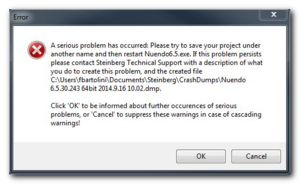
The error message displayed will be similar to this one:
There is currently one known permanent workaround:
- Disable the Steinberg Hub
Open Cubase without launching any project
Go to File -> Preferences -> General -> Untick “Use Steinberg Hub”
Steinberg are currently investigating and trying to find a solution together with Microsoft as soon as possible.
When you need help, Sweetwater has the answers!
Our knowledge base contains over 28,000 expertly written tech articles that will give you answers and help you get the most out of your gear. Our pro musicians and gear experts update content daily to keep you informed and on your way. Best of all, it’s totally FREE, and it’s just another reason that you get more at Sweetwater.com.

