
Synthogy Software Activation Instructions
How to use this guide
In this guide, we will show you how to register, download, and activate your new Synthogy software. Follow the steps below to get started.
Create an iLok account
Synthogy software is licensed with iLok. That means in order to use it, you will need to register its iLok license either to your computer, or to an iLok USB stick. If you don’t already have an iLok account, you’ll need to create one and install the iLok License Manager app. Follow the steps below to get started. If you already have an account, pass these steps and continue to register the software. Learn more about iLok licensing in our iLok Quickstart Guide.
- Visit iLok’s registration page and complete the registration form. Take note of your User ID and password.
- Open the iLok Account Activation email and click on the verification link.
- Download and install the iLok License Manager.
- Launch the iLok License manager app and sign in to your iLok account.
- (optional) Connect an iLok and when prompted, click Yes to register it to your account.
Register & download the software
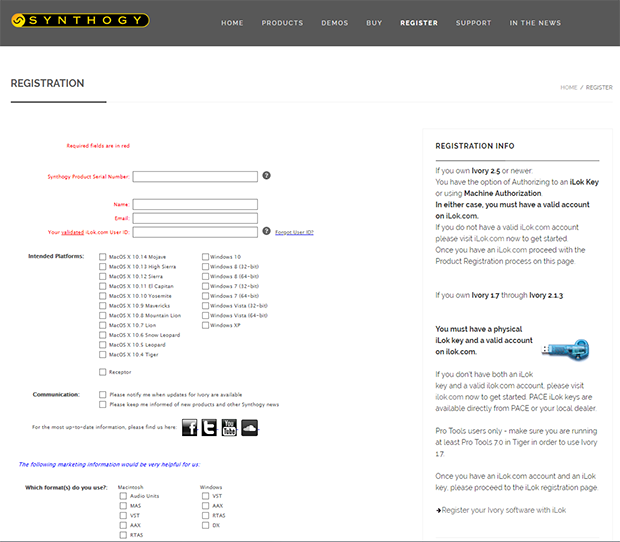
The next step in the authorization process is to register your product with Synthogy. You’ll need to go to the Synthogy registration page and use the serial number provided by your Sweetwater Sales Engineer, as well as a valid e-mail address and your iLok ID. Follow these steps to register and download the software.
- Once registered, open the Software Activation Instructions email sent from your Sweetwater Sales Engineer to get your Download Link and Serial Number.
- Go to the Synthogy registration page, fill out the required information and then click Submit.
- Go to your Downloads folder, launch the installer, and follow the on-screen instructions.
Activate the license
The last step in the authorization process is to activate it via iLok to an iLok USB dongle or to your computer. Follow these steps to activate the license.
- Sign in to iLok License Manager and click the Available tab.
- Locate your license and drag it to a connected iLok USB dongle or to drag it to the computer.
When you need help, Sweetwater has the answers!
Our knowledge base contains over 28,000 expertly written tech articles that will give you answers and help you get the most out of your gear. Our pro musicians and gear experts update content daily to keep you informed and on your way. Best of all, it’s totally FREE, and it’s just another reason that you get more at Sweetwater.com.


Offer applies only to single-receipt qualifying purchases. Select manufacturers may require that only the manufacturer’s products qualify towards the minimum purchase amount needed to be eligible for promotional financing. Otherwise, an invoice that meets the minimum purchase amount and contains at least one qualifying manufacturer product is eligible for promotional financing. No interest will be charged on promo purchase balance, and equal monthly payments are required on promo purchase until it is paid in full. The payments equal the amount financed divided by the number of months in the promo period, rounded up to the next whole dollar. These payments may be higher than the payments that would be required if this purchase was a non-promo purchase. During the last month(s) of the promo period the required monthly payment may be reduced due to the prior months’ rounding. Regular account terms apply to non-promo purchases. New Accounts as of 07/31/2025: Purchase APR is 34.99%. Penalty APR is 39.99%. Min Interest Charge is $2. Existing cardholders: See your credit card agreement terms. Subject to credit approval.
Offer applies only to single-receipt qualifying purchases. No interest will be charged on the promo balance if you pay it off, in full, within the promo period. If you do not, interest will be charged on the promo balance from the purchase date. The required minimum monthly payments may or may not pay off the promo balance before the end of the promo period, depending on purchase amount, promo length and payment allocation. Regular account terms apply to non-promo purchases and, after promo period ends, to the promo balance. New Accounts as of 07/31/2025: Purchase APR is 34.99%. Penalty APR is 39.99%. Min Interest Charge is $2. Existing cardholders: See your credit card agreement terms. Subject to credit approval.
The estimated required monthly payment shown which excludes taxes and delivery equals the amount financed divided by the number of months in the promo period, rounded up to the next cent. During the last month(s) of the promo period the required monthly payment may be reduced due to this rounding. These payments apply only with the financing offer shown. If you make these payments by the due date each month, you should pay off this amount financed within the promo period, if it is the only balance you are paying off. If you have other balances on your account, this payment will be added to any other minimum monthly payments.
Applies only to select items from this manufacturer. Ask your Sweetwater Sales Engineer for more details.