
Rising Software Activation Instructions

How to use this guide
In this guide, we will show you how to register, download, and activate your new Rising Software product. Follow the steps below to get started.
Register the software
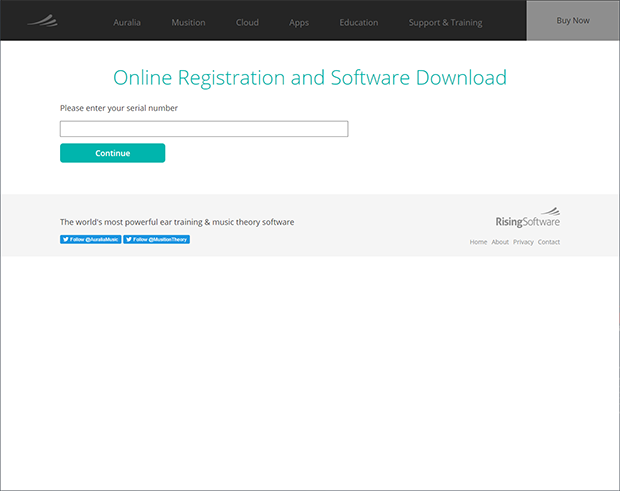
The first step in the authorization process is to register your product(s) with Rising Software. You’ll need to go to the Rising Software registration page and use the serial number(s) provided by your Sweetwater Sales Engineer, as well as a valid e-mail address. Follow these steps to complete the registration.
- Go to the Rising Software registration page, then enter the first serial number you received from your Sweetwater Sales Engineer. If you received a bundle product, you’ll need to separate the codes and activate them each individually.
- EXAMPLE:ABCDE 999 A99 B99 C99 D99 / FGHIJ 111 LMN 111 111 1
- On the following page, enter in your information including a valid e-mail address.
Do you have multiple serial numbers?
If you have purchased bundled software, you will need to go through the registration procedure for each application.
Install & activate the application
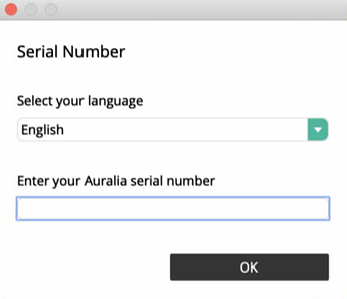
Once you have registered your product, the last step is to install and activate it. You will be taken to a page where you will need to download the correct installer file for your OS. Follow these steps to install and activate the application.
- Download the installer file for your OS from the download page of your account.
- Go to your Downloads folder, run the installer file.
- Enter the serial number, and information you used during the registration process when prompted. If you received a bundle product, re-enter the corresponding code to complete the activation.

When you need help, Sweetwater has the answers!
Our knowledge base contains over 28,000 expertly written tech articles that will give you answers and help you get the most out of your gear. Our pro musicians and gear experts update content daily to keep you informed and on your way. Best of all, it’s totally FREE, and it’s just another reason that you get more at Sweetwater.com.

