
How to Install and Register EarMaster

Overview
In this article, we will walk you through the steps needed to get your software up and running. In order to use EarMaster 7 Pro, you will need to download and run the installer file. After doing this, all that is left is for to register your EarMaster license, entitling you to free product support and serial number recovery.
System Requirements
To ensure that EarMaster 7 Pro works with your current operating system, verify your computer meets the System Requirements.
How to Download and Install EarMaster
Downloading and installing EarMaster Pro 7 is simple and easy using the instructions below:
Download and Install EarMaster for Mac or Windows
1. Go to the EarMaster Installation page and select the appropriate download based on your operating system (Mac or Windows)
2. Go to your Downloads folder and select the EarMaster7.pkg file.
3. Run the installer and follow the onscreen instructions.
How to Register your EarMaster License
After running the installer, you will need to register your EarMaster serial number using the License Manager. Your serial number can be found in the Software Activation Instructions email you received from your Sweetwater Sales Engineer. Follow the instructions below:
Register your EarMaster License
1. Launch EarMaster 7 Pro
2. From the navigation bar, select Help and choose License Manager.
3. Enter your serial number, name, and email address into the fields provided.
4. Click Activate Now.
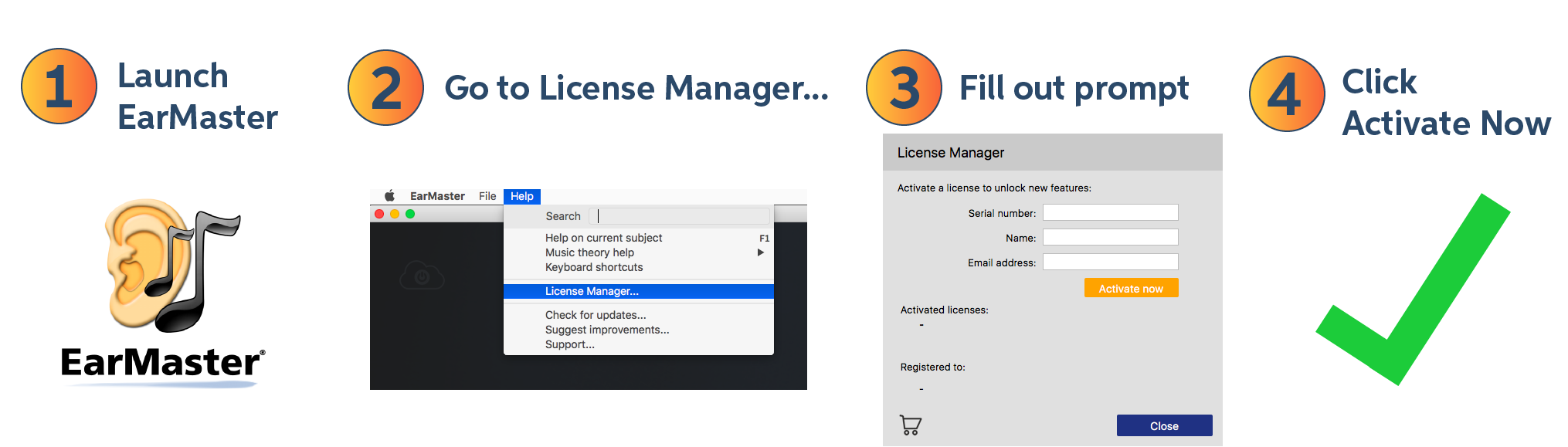
Register your EarMaster license in the License Manager window. Click to enlarge.
That’s all there is to it! You can now use EarMaster 7 Pro. For more info, check out EarMaster’s FAQ page and user guides. And don’t miss their Tutorial page that will show you the ins and outs of using EarMaster 7 Pro.
Helpful Links
eMedia Software Activation Instructions
What’s the difference between Mic, Instrument, Line, and Speaker level signals?
When you need help, Sweetwater has the answers!
Our knowledge base contains over 28,000 expertly written tech articles that will give you answers and help you get the most out of your gear. Our pro musicians and gear experts update content daily to keep you informed and on your way. Best of all, it’s totally FREE, and it’s just another reason that you get more at Sweetwater.com.

