
eMedia Software Activation Instructions

DOWNLOADABLE PRODUCT INSTALL GUIDE
Note: If your software was fulfilled via the Xchange Market Platform or a 3rd Party, you may have received a direct download link and can bypass steps 1 & 2.
As an example, we are using eMedia Guitar Method, but the process is similar for all eMedia software titles.
Follow the instructions below to download, install, and use your eMedia software:
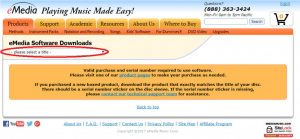
Step 1: Select Your Software
If you have not received a direct download link, please go to the link below and select the software you wish to download from the drop down menu.
https://www.emediamusic.com/download/software.html
Step 2: Choose Your Operating System
After you select the your product, choose which operating system you are using (Windows or Mac) and wait for the download to finish.
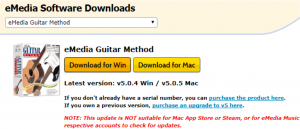
Step 3: Install
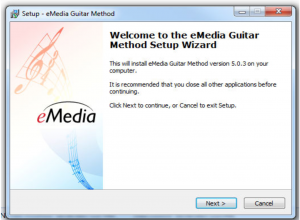
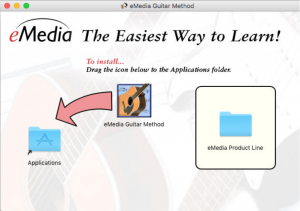
When the download finishes, find it in your downloads folder or wherever your downloads normally appear. Then, double click the .exe/.dmg file to begin the install process.
Windows: Click Next through each prompt to install.
Mac: Drag the application into the Applications folder.
Step 4: Launch & Authorize
When your install finishes, open the application. By default, an Icon for the application will be located on your desktop for Windows and in your Applications folder for Mac
Enter the serial number you received in the “Software Activation Instructions” email from your Sweetwater Sales Engineer or on a sticker on the front CD sleeve your disc came in. The serial number is a 16-digit alphanumeric code in the following format: xxxx-xxxx-xxxx-xxxx
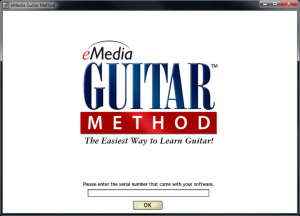
Sweetwater and eMedia strongly recommend you register your software with eMedia, in case you lose your serial number or have concerns about the product and want them to research your case specifically.
If you have any further questions, you can reach eMedia at (888)-363-3424 or at www.emediamusic.com. To submit a Tech Support Request with eMedia, please visit: http://support.emediamusic.com
When you need help, Sweetwater has the answers!
Our knowledge base contains over 28,000 expertly written tech articles that will give you answers and help you get the most out of your gear. Our pro musicians and gear experts update content daily to keep you informed and on your way. Best of all, it’s totally FREE, and it’s just another reason that you get more at Sweetwater.com.

