

I can’t find the Audio Units/Plugin manager in Logic Pro X.
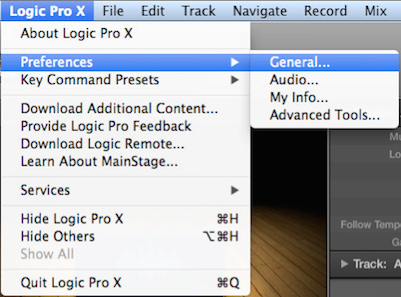
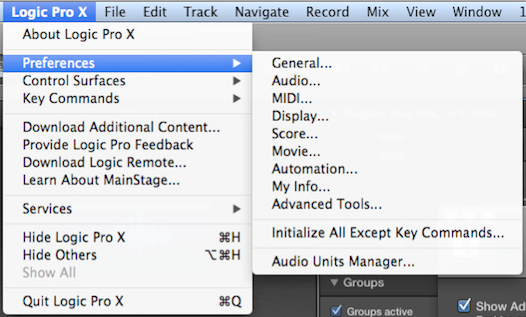
In order to see the Audio Units Manager choice in your Preferences menu, you need to enable Advanced Tools. Please note that in newer versions of Logic Pro X, the AU Manager is now called “Plugin Manager.
To do this:
- Click on the Logic Pro X menu and choose Preferences > General

- On the Advanced tab, check Show Advanced Tools

- Audio Units Manager will now appear under Logic Pro X > Preferences


Helpful Links
How do I set up my Behringer X-Touch (and X-Touch Compact) in Logic Pro X?
How do I set up my AKAI MPK controller in Logic Pro X?
Focusrite Forte tutorials for Pro Tools, Logic Pro, and Cubase
How do I set the Tascam DM4800/IFFWDMmkII up for use with Logic Pro?
How do I setup a Raven MTi2 in Logic Pro?
When you need help, Sweetwater has the answers!
Our knowledge base contains over 28,000 expertly written tech articles that will give you answers and help you get the most out of your gear. Our pro musicians and gear experts update content daily to keep you informed and on your way. Best of all, it’s totally FREE, and it’s just another reason that you get more at Sweetwater.com.

