
DDMF Software Activation Instructions
In this article, we will show you how to activate, download, and install your new DDMF plug-in. The process is very easy, so follow the instructions below to get started.
Register the plug-in
You will first need to register the plug-in to your DDMF account via the Xchange page. Please note this also applies to users who already have a DDMF account!
- Go to the DDMF XChange page
- Copy and paste the code you received from your Sweetwater Sales Engineer, then click OK.
- If your license code is valid, Fill out the necessary information to create an account.

Click the image to register your DDMF plug-in
Download and install
The download and installation process is straightforward. Just click the download link for your OS, navigate to your Downloads folder, then extract and run the installer.
- PC: Right-click the plug-in’s .zip folder, select Extract all…, and click Extract. Double-click the new Setup .exe file and follow the on-screen instructions.
- Mac: Double-click the .zip folder, locate the new Setup file, then follow the on-screen instructions

Activate the plug-in
Now that everything is registered and installed, the last thing you need to do is activate the plug-in within your DAW.
- Go to your DDMF account page, scroll to the bottom of the page (License file download), use the dropdown box to select your plug-in, then click Submit.
- DDMF will then send you a license code file that you will need to activate the plug-in.
- If you don’t see an email, be sure to check your spam folder!
- Launch your DAW, and load the plug-in onto an audio track.
- When you see the “Missing or old license” box appear, navigate to the download location and upload the downloaded license file, then reload the plug-in!
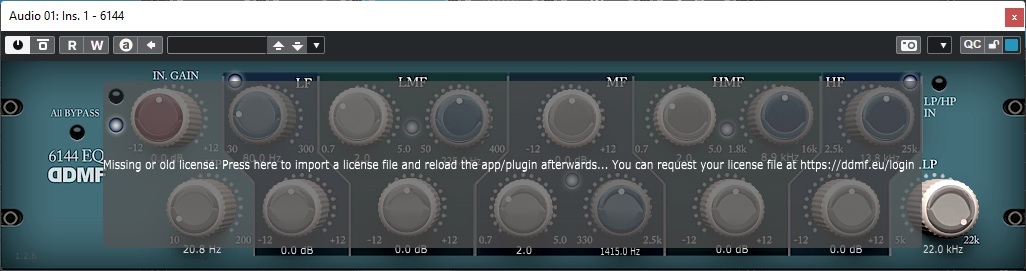
Click the Missing or old license message box to upload the license file.
When you need help, Sweetwater has the answers!
Our knowledge base contains over 28,000 expertly written tech articles that will give you answers and help you get the most out of your gear. Our pro musicians and gear experts update content daily to keep you informed and on your way. Best of all, it’s totally FREE, and it’s just another reason that you get more at Sweetwater.com.

